Get Fedex Expanded Service International Air Waybill Blank Form Pdf
How it works
-

Open form follow the instructions
-

Easily sign the form with your finger
-

Send filled & signed form or save
How to fill out the FedEx Expanded Service International Air Waybill Blank Form Pdf online
Filling out the FedEx Expanded Service International Air Waybill is essential for efficient shipping of documents and goods internationally. This guide will walk you through each section of the form, providing clear and helpful instructions to ensure accurate completion.
Follow the steps to complete the form effectively.
- Click the ‘Get Form’ button to obtain the form and open it in the editor.
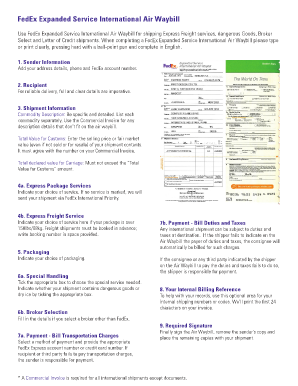
- In the sender information section, add your address details, phone number, and FedEx account number. Ensure all information is accurate for smooth processing.
- For the recipient section, include full and clear details to ensure reliable delivery. Incomplete information can delay your shipment.
- In the shipment information section, provide a detailed commodity description. List each commodity separately and reference the Commercial Invoice for descriptions that don’t fit on the air waybill.
- Enter the total value for customs, reflecting the selling price or fair market value of the contents. Ensure this agrees with your Commercial Invoice.
- For total declared value for carriage, ensure that this amount does not exceed the 'Total value for customs.' This value is critical for insurance and liability purposes.
- In the express package services section, select your choice of service. If no service is marked, your shipment will default to FedEx International Priority.
- For express freight service, indicate your choice here if your package weighs over 150 lbs/68 kg. Remember that freight shipments must be booked in advance, and include your booking number if applicable.
- Indicate your choice of packaging to ensure the items are properly secured for transit.
- In the special handling section, tick the appropriate box based on any special services required, including marking if the shipment contains dangerous goods or dry ice.
- For broker selection, fill in details if you choose a broker other than FedEx. Ensure that all relevant broker information is accurate.
- Select a payment method in the payment section. Provide the appropriate FedEx account number or credit card number for billing of transportation charges.
- In the section for billing duties and taxes, specify who will pay these charges to avoid issues upon arrival, as failure to do so may lead to additional responsibilities for the shipper.
- Use the optional internal billing reference to track your shipments, if needed. This section allows for up to 24 characters that will print on your invoice.
- Finally, sign the air waybill, remove your copy, and place the remaining copies with your shipment to ensure proper documentation.
Complete your FedEx Expanded Service International Air Waybill online for efficient international shipping today!
Filling an air waybill is a straightforward process. Start by entering the sender's and recipient's information, including names, addresses, and contact numbers. Next, specify the shipment details such as the description of goods, weight, and value. To ensure accuracy and compliance, you can download the Fedex Expanded Service International Air Waybill Blank Form Pdf from our platform, which provides a clear template to guide you.
Industry-leading security and compliance
-
In businnes since 199725+ years providing professional legal documents.
-
Accredited businessGuarantees that a business meets BBB accreditation standards in the US and Canada.
-
Secured by BraintreeValidated Level 1 PCI DSS compliant payment gateway that accepts most major credit and debit card brands from across the globe.