We use cookies to improve security, personalize the user experience, enhance our marketing activities (including cooperating with our marketing partners) and for other business use.
Click "here" to read our Cookie Policy. By clicking "Accept" you agree to the use of cookies. Read less
Read more
Accept
Loading
Form preview
  • US Legal Forms
  • Form Library
  • More Forms
  • More Multi-State Forms
  • Certificate Of Correction

Get Certificate Of Correction

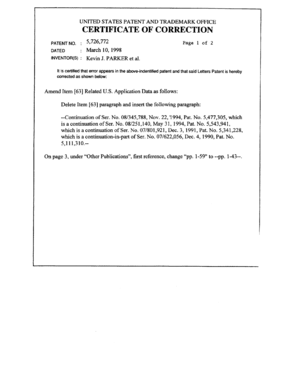
UNITED STATES PATENT AND TRADEMARK OFFICE. CERTIFICATE OF ... Amend Item 63 Related U.S. Application Data as follows: Delete Item 63 .

How it works

  1. Open form

    Open form follow the instructions

  2. Easily sign form

    Easily sign the form with your finger

  3. Share form

    Send filled & signed form or save

How to fill out the Certificate Of Correction online

Filling out the Certificate Of Correction online is a straightforward process designed to rectify errors in official documents. This guide provides clear, step-by-step instructions to ensure that you successfully complete the form.

Follow the steps to fill out the Certificate Of Correction effectively.

  1. Click the ‘Get Form’ button to access the Certificate Of Correction and open it in your editing interface.
  2. Begin by reviewing the instructions provided on the form to understand the required details and the corrections needed.
  3. Locate the section for your personal information. Fill in your full name, address, and contact details accurately to ensure proper identification.
  4. Identify the specific document or record that requires correction. Provide the exact title or description, along with any reference numbers, if applicable.
  5. Specify the nature of the error. Detail how the information should be corrected, ensuring clarity and precision in your explanations.
  6. Sign and date the document in the designated areas. Your signature indicates your agreement and acknowledgement of the corrections being made.
  7. Review all entered information to confirm its accuracy before finalizing the form.
  8. Once satisfied with your entries, save your changes, and download or print the completed Certificate Of Correction for your records.
  9. Consider sharing the completed form with relevant parties or submitting it as required by your legal procedure.

Complete your documents online today and ensure your records are accurate.

Get form

Experience a faster way to fill out and sign forms on the web. Access the most extensive library of templates available.
Get form

Related content

Certificate of Correction - NYC - NYC.gov
Respondent named on the violation. (if the named respondent is an individual). â–¡...
Learn more
35 U.S. Code § 255 - Certificate of correction of...
Such patent, together with the certificate, shall have the same effect and operation in...
Learn more
Patents 2016 - Kirkland & Ellis LLP
The patent owner, with the burden of proof on infringement, normally goes first. ... be...
Learn more

Related links form

VA 21P-8416b (Formerly 21-8416b) 2011 VA 22-0848 2009 VA 26-1817 2004 VA 26-1820 2004

Questions & Answers

Get answers to your most pressing questions about US Legal Forms API.

Contact support

Filling out a birth certificate correction form involves providing specific details, such as the child's full name, date of birth, and the nature of the correction. Be sure to include the incorrect information alongside the correct data. It's important to sign and date the form before submission. For a streamlined experience, uslegalforms offers templates and instructions that help you complete your Certificate Of Correction efficiently.

To fill a declaration for the correction of birth, start by obtaining the correct form, which is often available online. Clearly state the error you wish to correct, and provide the accurate information needed. Include any supporting documents, such as identification or proof of the correct details. Utilizing uslegalforms can simplify this process, providing step-by-step guidance to ensure your Certificate Of Correction is filed correctly.

The requirements for a birth certificate correction typically include a completed application form, identification, and any documents that support the correction request. Each state may have unique criteria, so reviewing your local vital records office's guidelines is essential. US Legal Forms can provide the necessary forms and information to help you meet these requirements effectively.

To get a correction in your birth certificate online, start by visiting your state’s vital records website. Look for the section that discusses certificate of correction and follow the provided instructions. For added convenience, you can use the US Legal Forms platform, which offers templates and guidance to make the process smoother.

Yes, you can correct a mistake on a birth certificate through a certificate of correction. The process usually requires you to provide evidence of the error and fill out the necessary forms. Be sure to check the specific requirements of your state, as they vary.

In many cases, you can initiate a birth certificate correction online, depending on the state where you were born. Each state has different rules and processes, so it's advisable to visit the official website of your state's vital records office for detailed instructions. Additionally, US Legal Forms can assist you in navigating this online process efficiently.

To correct an error on your birth certificate, you need to submit a request for a certificate of correction to the appropriate vital records office. This usually involves filling out a form and providing supporting documents that validate the correction. You can find guidance on how to proceed by visiting the US Legal Forms platform, which offers resources to simplify this process.

Yes, someone else can request a certificate of correction on your behalf, but they typically need to provide specific documentation. This often includes proof of their relationship to you, as well as any necessary identification. It's important to check with your local authority for their specific requirements.

The primary difference between a reissue and a certificate of correction lies in the extent of changes made. A certificate of correction addresses minor errors, while a reissue is used to replace a patent or trademark with broader claims or corrections. Understanding these differences is crucial when determining how to proceed with your filings. US Legal Forms can help clarify these distinctions and assist you in choosing the right option for your needs.

To request a corrected filing receipt from the USPTO, you should contact the office directly through their designated channels. Provide your application details and explain the nature of the correction needed. It’s important to be clear and concise in your communication to facilitate the process. Using services from US Legal Forms can help you draft your request properly.

Get This Form Now!

Use professional pre-built templates to fill in and sign documents online faster. Get access to thousands of forms.
Get form
If you believe that this page should be taken down, please follow our DMCA take down processhere.

Industry-leading security and compliance

US Legal Forms protects your data by complying with industry-specific security standards.
  • In businnes since 1997
    25+ years providing professional legal documents.
  • Accredited business
    Guarantees that a business meets BBB accreditation standards in the US and Canada.
  • Secured by Braintree
    Validated Level 1 PCI DSS compliant payment gateway that accepts most major credit and debit card brands from across the globe.
Get Certificate Of Correction
Get form
Form Packages
Adoption
Bankruptcy
Contractors
Divorce
Home Sales
Employment
Identity Theft
Incorporation
Landlord Tenant
Living Trust
Name Change
Personal Planning
Small Business
Wills & Estates
Packages A-Z
Form Categories
Affidavits
Bankruptcy
Bill of Sale
Corporate - LLC
Divorce
Employment
Identity Theft
Internet Technology
Landlord Tenant
Living Wills
Name Change
Power of Attorney
Real Estate
Small Estates
Wills
All Forms
Forms A-Z
Form Library
Customer Service
Terms of Service
Privacy Notice
Legal Hub
Content Takedown Policy
Bug Bounty Program
About Us
Blog
Affiliates
Contact Us
Delete My Account
Site Map
Industries
Forms in Spanish
Localized Forms
State-specific Forms
Forms Kit
Legal Guides
Real Estate Handbook
All Guides
Prepared for You
Notarize
Incorporation services
Our Customers
For Consumers
For Small Business
For Attorneys
Our Sites
US Legal Forms
USLegal
FormsPass
pdfFiller
signNow
airSlate WorkFlow
DocHub
Instapage
Social Media
Call us now toll free:
+1 833 426 79 33
As seen in:
  • USA Today logo picture
  • CBC News logo picture
  • LA Times logo picture
  • The Washington Post logo picture
  • AP logo picture
  • Forbes logo picture
© Copyright 1997-2025
airSlate Legal Forms, Inc.
3720 Flowood Dr, Flowood, Mississippi 39232
Form Packages
Adoption
Bankruptcy
Contractors
Divorce
Home Sales
Employment
Identity Theft
Incorporation
Landlord Tenant
Living Trust
Name Change
Personal Planning
Small Business
Wills & Estates
Packages A-Z
Form Categories
Affidavits
Bankruptcy
Bill of Sale
Corporate - LLC
Divorce
Employment
Identity Theft
Internet Technology
Landlord Tenant
Living Wills
Name Change
Power of Attorney
Real Estate
Small Estates
Wills
All Forms
Forms A-Z
Form Library
Customer Service
Terms of Service
Privacy Notice
Legal Hub
Content Takedown Policy
Bug Bounty Program
About Us
Blog
Affiliates
Contact Us
Delete My Account
Site Map
Industries
Forms in Spanish
Localized Forms
State-specific Forms
Forms Kit
Legal Guides
Real Estate Handbook
All Guides
Prepared for You
Notarize
Incorporation services
Our Customers
For Consumers
For Small Business
For Attorneys
Our Sites
US Legal Forms
USLegal
FormsPass
pdfFiller
signNow
airSlate WorkFlow
DocHub
Instapage
Social Media
Call us now toll free:
+1 833 426 79 33
As seen in:
  • USA Today logo picture
  • CBC News logo picture
  • LA Times logo picture
  • The Washington Post logo picture
  • AP logo picture
  • Forbes logo picture
© Copyright 1997-2025
airSlate Legal Forms, Inc.
3720 Flowood Dr, Flowood, Mississippi 39232