Loading
Get Sancharika Welfare Society
How it works
-

Open form follow the instructions
-

Easily sign the form with your finger
-

Send filled & signed form or save
How to fill out the Sancharika Welfare Society online
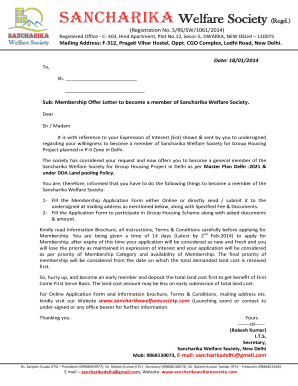
This guide provides clear and supportive instructions on how to complete the Sancharika Welfare Society membership application online. By following the outlined steps, users can ensure a smooth and successful application process.
Follow the steps to complete your application online.
- Click ‘Get Form’ button to obtain the membership application form and open it in your preferred document editor.
- Begin filling out the personal information section. This typically includes your name, address, contact information, and any other requested details. Ensure all information is accurate and up-to-date.
- Provide any additional information required to participate in the Group Housing Scheme. This may include financial details or identification verification, depending on the society's requirements.
- Review the Terms & Conditions and Information Brochure carefully. Ensure that you understand all stipulations that come with membership and any obligations you may have.
- Prepare any necessary documents that need to be submitted along with your application. These may include proof of identity, previous membership requests, or financial documentation.
- Submit the completed application form and the required documents, ensuring you include the specified fee. Make sure to verify that everything is included before finalizing your submission.
- You will have the option to save changes, download, print, or share the completed form based on your needs. Be sure to keep a copy of the submitted application for your records.
Complete your membership application online today to secure your place in the Sancharika Welfare Society!
Combine data from 2 columns into 1 column Select the cell where you want to put the combined data. Type = and select the first cell you want to combine. Type & and use quotation marks with a space enclosed. Select the next cell you want to combine and press enter. An example formula might be =A2&" "&B2.
Industry-leading security and compliance
US Legal Forms protects your data by complying with industry-specific security standards.
-
In businnes since 199725+ years providing professional legal documents.
-
Accredited businessGuarantees that a business meets BBB accreditation standards in the US and Canada.
-
Secured by BraintreeValidated Level 1 PCI DSS compliant payment gateway that accepts most major credit and debit card brands from across the globe.