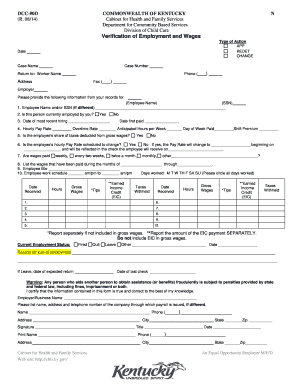
Get Dcc-90d Verification Of Employment And Wages 8-15-2014.doc
How it works
-

Open form follow the instructions
-

Easily sign the form with your finger
-

Send filled & signed form or save
How to fill out the DCC-90D Verification Of Employment And Wages 8-15-2014.doc online
Filling out the DCC-90D Verification Of Employment And Wages form online can streamline the verification process for employees and employers alike. This guide provides clear and concise instructions to help you navigate and complete the form accurately and efficiently.
Follow the steps to fill out the DCC-90D form with ease.
- Click ‘Get Form’ button to obtain the form and open it in the editor.
- Begin by entering the date at the top of the form. This should reflect the current date or the date when you are completing the verification.
- Enter the case number and case name accurately, as this information is essential for identification within the system.
- In the 'Return to' section, specify the worker's name and their contact information, including the phone number and any necessary fax details.
- Provide the employer's name along with the employee’s name and Social Security Number (SSN) in the designated fields to ensure proper record-keeping.
- Indicate whether the employee is currently employed by selecting 'Yes' or 'No' in the relevant section.
- Record the date of the employee's most recent hiring and their date of first pay, as accurate employment history is crucial.
- Fill in the hourly pay rate, overtime rate, anticipated hours per week, and the day of the week the employee is paid, including any shift premiums applicable.
- If the employee's taxes are deducted from their gross wages, select 'Yes' or 'No.' If applicable, record any changes to the pay rate and when these changes will take effect.
- List the frequency of wage payments (weekly, bi-weekly, etc.) in the given section.
- Detail the wages paid during the specified months in the table provided, ensuring that you include gross wages, tips, earned income credit, and taxes withheld.
- Complete the current employment status section by indicating if the employee was fired, quit, on leave, or other, along with the reason for their employment status change.
- In the certification area, the employer should sign, print their name, and include their title along with the date of completion. Provide the company’s contact information if different from that listed.
- Once all relevant sections are completed, review the form for accuracy. Save your changes, download, print, or share the form as needed.
Start filling out your DCC-90D form online today for quick and efficient processing.
The employment verification form is usually filled out by an employer or a designated HR representative. This form requires accurate details about your job status and wages. It's important that the information is complete and truthful to avoid any issues. If you need assistance, consider using the DCC-90D Verification Of Employment And Wages 8-15-2014.doc template available on the US Legal Forms platform.
Industry-leading security and compliance
-
In businnes since 199725+ years providing professional legal documents.
-
Accredited businessGuarantees that a business meets BBB accreditation standards in the US and Canada.
-
Secured by BraintreeValidated Level 1 PCI DSS compliant payment gateway that accepts most major credit and debit card brands from across the globe.