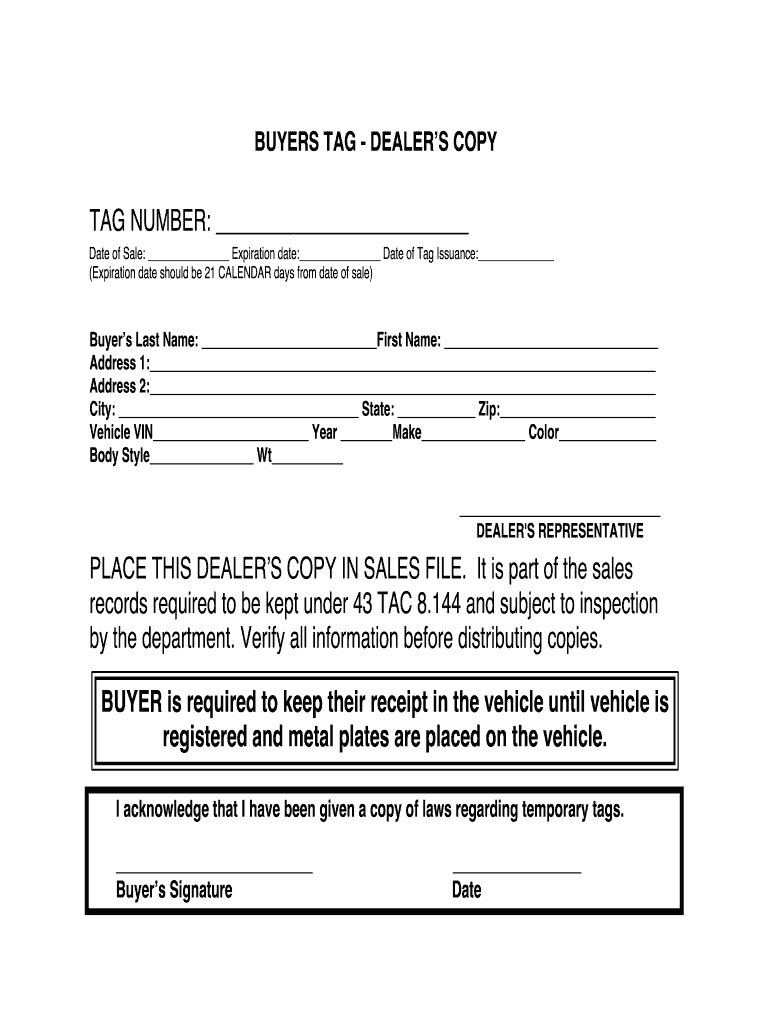
1 CALENDAR days from date of sale) Buyer s Last Name: First Name: Address 1: Address 2: City: State: Zip: Vehicle VIN Year Make Color Body Sty.

Open form follow the instructions

Easily sign the form with your finger

Send filled & signed form or save
How to fill out the Texas Buyers Tag online
The Texas Buyers Tag is a vital document used for the temporary registration of vehicles sold in Texas. This guide provides a detailed, step-by-step process for completing the Texas Buyers Tag online, ensuring that users can navigate the form with ease and accuracy.
Follow the steps to fill out the Texas Buyers Tag accurately.
- Click the ‘Get Form’ button to obtain the Texas Buyers Tag form and open it in your preferred editor.
- Begin by filling in the 'TAG NUMBER' field with the assigned tag number for the vehicle.
- Enter the 'Date of Sale,' which is the date the vehicle transaction occurred.
- Fill out the 'Expiration Date.' This date should be set 21 calendar days from the 'Date of Sale.'
- Record the 'Date of Tag Issuance,' which is the day the temporary tag was issued to the buyer.
- Provide the buyer's personal information by filling in the 'Last Name,' 'First Name,' 'Address 1,' and 'Address 2' fields, followed by the 'City,' 'State,' and 'Zip Code.'
- Input the details of the vehicle including the 'Vehicle VIN,' 'Year,' 'Make,' 'Color,' and 'Body Style.'
- Fill in the 'Weight' of the vehicle as applicable and ensure all entries are correct.
- The dealer's representative should also ensure that the form is verified before distribution.
- Once all information is accurately filled out, save changes, download the completed form for your records, and print a copy for distribution.
Complete your Texas Buyers Tag online today for a smoother vehicle registration process.
Experience a faster way to fill out and sign forms on the web. Access the most extensive library of templates available.
Related content
Buyer Tags · Issued to a retail purchaser · MUST have current inspection · MUST be...
temporary cardboard buyer's tag on a vehicle when the dealer has been unable ... Each...
Sinclair Broadcast Group, Inc. (SBG) is a publicly traded American telecommunications...
Get answers to your most pressing questions about US Legal Forms API.
What is a Texas buyer tag?
A Texas buyer tag is a temporary registration tag issued to vehicle buyers in Texas. It allows you to legally operate your newly purchased vehicle for a limited time while you wait for your permanent registration. This tag is an essential part of the buying process, ensuring that you can drive your car without delay. Always remember to follow the registration process promptly to avoid any complications.
Can I drive a car I just bought home without plates in Texas?
Driving a car you just bought home without plates is not allowed in Texas. Instead, you should obtain a Texas Buyers Tag from the dealership, which allows you to drive your new vehicle legally. This temporary tag is essential for ensuring you comply with state laws while you finalize your registration. Stay informed and avoid potential issues by using this tag.
How long is a buyer's temporary tag valid in Texas?
A buyer's temporary tag in Texas is valid for 30 days. This period gives you enough time to complete the registration process and receive your permanent plates. It's important to keep track of this timeframe, as driving without a valid tag can lead to fines. If you need assistance with registration, consider using platforms like uslegalforms to simplify the process.
What is a Texas buyer's tag?
A Texas Buyers Tag is a temporary tag issued to new vehicle owners in Texas. This tag allows you to drive your vehicle legally while you wait for your permanent registration and plates. The Texas Buyers Tag is essential for ensuring you stay compliant with state laws during the transition period. Use it responsibly to enjoy your new vehicle right away.
Can you drive a car without a tag if you just bought it in Texas?
In Texas, you cannot drive a car without a tag, even if you just bought it. However, you can use a Texas Buyers Tag, which allows you to drive your newly purchased vehicle legally for a short period. This temporary tag is crucial for getting your vehicle home while you wait for your official plates. Always ensure you have the necessary documentation while using the buyer's tag.
What is a buyer's tag in Texas?
A buyer's tag in Texas is a temporary registration that allows you to drive your newly bought vehicle legally. This tag is especially useful while you complete the registration process for your car. It usually remains valid for a short period, ensuring you can use your vehicle without delay.
How to get a buyer tag in Texas?
To obtain a buyer tag in Texas, visit your local county tax office and present the required documents, which include your vehicle title and proof of identity. You may also need to fill out certain forms for the Texas Buyers Tag. After processing, you will receive a temporary tag that allows you to drive your vehicle while you finalize registration.
How to get a tag for a car you just bought?
To obtain a tag for your newly purchased car, you first need to fill out the necessary paperwork at your local tax office. Bring along your vehicle title, proof of identity, and the bill of sale. Once you complete these steps, you will receive your Texas Buyers Tag, allowing you to legally drive your vehicle.
Does Texas dealership provide temporary plates for buyers?
Yes, most Texas dealerships provide temporary plates for buyers at the point of sale. This temporary plate often comes in the form of a Texas Buyers Tag, allowing you to drive your new vehicle immediately. The dealership will typically assist you with all necessary paperwork, ensuring you have everything you need to stay compliant on the road. If you prefer a more streamlined process, consider using platforms like US Legal Forms for additional resources and guidance.
How to properly fill out a Texas title?
To fill out a Texas title correctly, start by entering the vehicle identification number (VIN) at the top of the title. Next, provide the name and address of the seller and buyer in the appropriate sections. Make sure to sign the title where indicated, as this validates the transfer. If you need assistance, consider using USLegalForms, which offers resources to guide you through the Texas Buyers Tag process.
Use professional pre-built templates to fill in and sign documents online faster. Get access to thousands of forms.
If you believe that this page should be taken down, please follow our DMCA take down process here.