We use cookies to improve security, personalize the user experience, enhance our marketing activities (including cooperating with our marketing partners) and for other business use.
Click "here" to read our Cookie Policy. By clicking "Accept" you agree to the use of cookies. Read less
Read more
Accept
Loading
Form preview
  • US Legal Forms
  • Form Library
  • Other Forms
  • New York Other Forms
  • Ny Dos-1206-f-a 2020

Get Ny Dos-1206-f-a 2020-2025

Read ALL instructions carefully before completing the application. Incomplete forms will be returned. Any omission, inaccuracy or failure to make full disclosure may be deemed sufficient reason to deny a registration or may result in the suspension or revocation of an issued registration. FINGERPRINT REQUIREMENTS: Applicants have access to electronic fingerprinting through IdentoGo by IDEMIA. Electronic Fingerprinting Procedure: Schedule Appointment: Applicants must schedule appointments with I.

How it works

  1. Open form

    Open form follow the instructions

  2. Easily sign form

    Easily sign the form with your finger

  3. Share form

    Send filled & signed form or save

How to fill out the NY DOS-1206-f-a online

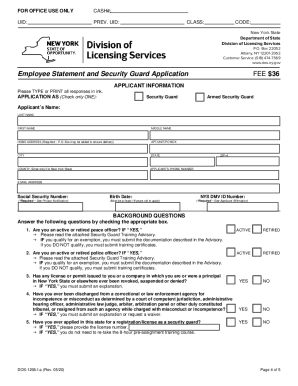
The NY DOS-1206-f-a form, also known as the Employee Statement and Security Guard Application, is essential for individuals seeking registration as security guards in New York State. This guide offers clear, step-by-step instructions for completing the form online, ensuring you understand each section and its requirements.

Follow the steps to fill out the form correctly:

  1. Click the ‘Get Form’ button to access the NY DOS-1206-f-a document and open it in your preferred online editor.
  2. In the ‘Applicant Information’ section, accurately provide your name, home address, phone number, email address, social security number, birth date, and NYS DMV ID number if applicable.
  3. Select your application type by checking either 'Security Guard' or 'Armed Security Guard'.
  4. Carefully read and respond to the background questions. Ensure you indicate if you are an active or retired peace officer and provide necessary documentation if applicable.
  5. Complete the Child Support Statement by indicating your obligations and whether you are in arrears.
  6. In the Criminal History section, disclose any pending or prior arrests or convictions, and provide explanations as required.
  7. Review the checklist to ensure that you have included all required documents, such as fingerprints, training certificates, application fee, and any additional paperwork.
  8. In the Applicant Affirmation section, read the statements carefully, sign the form, and enter the date signed.
  9. If applicable, ensure the Notice of Employment section is completed by your employer before submitting the form.
  10. Once all sections are completed and reviewed, save your changes, download the form, and prepare it for submission.

Complete your application online to secure your position as a licensed security guard.

Get form

Experience a faster way to fill out and sign forms on the web. Access the most extensive library of templates available.
Get form

Related content

Employee Statement and Security Guard Application
www.dos.ny.gov/licensing/fingerprinting.html), along with an acceptable ... A Child...
Learn more
Emergency Response Procedures - Warner Pacific...
503-517-1238. Secondary: Nathan Dunbar. 503-517-1206. Facilities Supervisor. Primary: Dean...
Learn more
(415) 638-1206 Copyright 1980, 1981, 1982...
Sep 26, 2014 - We lcome to the ASSOCIATE microcompute r from Da ta Te chnology Industrie...
Learn more

Related links form

AFCU Form 323 2021 ME Old Town Orono YMCA Member And Participant Registration & Waiver 2016 NE Application For License 2009 USCIS I-800A Supplement 3 2024

Questions & Answers

Get answers to your most pressing questions about US Legal Forms API.

Contact support

To obtain a NYS security guard license, you need to complete a series of steps. First, enroll in an approved training course, ensuring it covers the 8-hour pre-assignment training required by the state. After completing the training, you will need to fill out the NY DOS-1206-f-a application form, which you can easily find on the New York State Division of Licensing Services website. Lastly, submit your application along with the required fees and documents to the appropriate authority, and await your approval to start your career in security.

To apply for a security guard job, first, ensure you have completed the necessary training and obtained your license. Prepare a professional resume highlighting your skills and experience. Search for job openings on various job boards or company websites, and submit your application. Uslegalforms can provide resources to help you create a standout resume and cover letter to improve your chances of landing that job.

To obtain a security guard license in Connecticut, start by completing the necessary training and background checks. Afterward, you will need to submit an application along with the required fees to the Connecticut Department of Emergency Services and Public Protection. The NY DOS-1206-f-a form may not apply, but you can find similar forms that meet Connecticut's requirements. Uslegalforms can assist you with the application process to ensure you have everything you need.

Your security guard application should be mailed to the New York Department of State at the address specified on their website. Make sure to include the NY DOS-1206-f-a form and any supporting documents. Double-check for the most current address before sending your application. If you need help with the paperwork, consider using uslegalforms to access accurate forms and advice.

You should mail your security guard application to the New York Department of State, Division of Licensing Services. Include the completed NY DOS-1206-f-a form with your application. It is crucial to check the latest mailing address on the official website, as it may change. For assistance, uslegalforms can help you find the right resources to ensure your application reaches the right place.

To start a security company in New York, you need to obtain a private security license from the New York Department of State. This process includes submitting the NY DOS-1206-f-a form, along with other required documentation. Ensure you meet the necessary qualifications, such as background checks and training requirements. Using a service like uslegalforms can simplify this process by providing the correct templates and guidance.

In New York, security guards can carry guns, but they must meet specific requirements outlined by state law. A valid security guard license and additional firearm training are necessary for carrying a weapon. The NY DOS-1206-f-a provides important documentation and regulations that help clarify these requirements. For comprehensive guidance, consider utilizing the resources available through US Legal Forms.

Yes, the 4th Amendment applies to security guards, as they are subject to the same legal standards regarding search and seizure as private citizens. This means security guards cannot conduct unreasonable searches without probable cause. Understanding these rights is vital for both security personnel and the public. The NY DOS-1206-f-a can provide guidance on these legal standards.

With a New York State security license, you may carry a weapon, but certain conditions apply. The license must specifically authorize the carrying of a firearm. Additionally, you must comply with state laws governing weapon carrying, including the NY DOS-1206-f-a regulations. Always check your local laws to ensure compliance.

No, licensed security guards cannot carry firearms in every state. Each state has its own laws and regulations regarding firearm possession and use by security personnel. It is crucial for guards to understand the specific requirements of the state they operate in. The NY DOS-1206-f-a form helps clarify these regulations for New York.

Get This Form Now!

Use professional pre-built templates to fill in and sign documents online faster. Get access to thousands of forms.
Get form
If you believe that this page should be taken down, please follow our DMCA take down processhere.

Industry-leading security and compliance

US Legal Forms protects your data by complying with industry-specific security standards.
  • In businnes since 1997
    25+ years providing professional legal documents.
  • Accredited business
    Guarantees that a business meets BBB accreditation standards in the US and Canada.
  • Secured by Braintree
    Validated Level 1 PCI DSS compliant payment gateway that accepts most major credit and debit card brands from across the globe.
Get NY DOS-1206-f-a
Get form
Form Packages
Adoption
Bankruptcy
Contractors
Divorce
Home Sales
Employment
Identity Theft
Incorporation
Landlord Tenant
Living Trust
Name Change
Personal Planning
Small Business
Wills & Estates
Packages A-Z
Form Categories
Affidavits
Bankruptcy
Bill of Sale
Corporate - LLC
Divorce
Employment
Identity Theft
Internet Technology
Landlord Tenant
Living Wills
Name Change
Power of Attorney
Real Estate
Small Estates
Wills
All Forms
Forms A-Z
Form Library
Customer Service
Terms of Service
Privacy Notice
Legal Hub
Content Takedown Policy
Bug Bounty Program
About Us
Help Portal
Legal Resources
Blog
Affiliates
Contact Us
Delete My Account
Site Map
Industries
Forms in Spanish
Localized Forms
State-specific Forms
Forms Kit
Legal Guides
Real Estate Handbook
All Guides
Prepared for You
Notarize
Incorporation services
Our Customers
For Consumers
For Small Business
For Attorneys
Our Sites
US Legal Forms
USLegal
FormsPass
pdfFiller
signNow
airSlate WorkFlow
DocHub
Instapage
Social Media
Call us now toll free:
+1 833 426 79 33
As seen in:
  • USA Today logo picture
  • CBC News logo picture
  • LA Times logo picture
  • The Washington Post logo picture
  • AP logo picture
  • Forbes logo picture
© Copyright 1997-2025
airSlate Legal Forms, Inc.
3720 Flowood Dr, Flowood, Mississippi 39232
Form Packages
Adoption
Bankruptcy
Contractors
Divorce
Home Sales
Employment
Identity Theft
Incorporation
Landlord Tenant
Living Trust
Name Change
Personal Planning
Small Business
Wills & Estates
Packages A-Z
Form Categories
Affidavits
Bankruptcy
Bill of Sale
Corporate - LLC
Divorce
Employment
Identity Theft
Internet Technology
Landlord Tenant
Living Wills
Name Change
Power of Attorney
Real Estate
Small Estates
Wills
All Forms
Forms A-Z
Form Library
Customer Service
Terms of Service
Privacy Notice
Legal Hub
Content Takedown Policy
Bug Bounty Program
About Us
Help Portal
Legal Resources
Blog
Affiliates
Contact Us
Delete My Account
Site Map
Industries
Forms in Spanish
Localized Forms
State-specific Forms
Forms Kit
Legal Guides
Real Estate Handbook
All Guides
Prepared for You
Notarize
Incorporation services
Our Customers
For Consumers
For Small Business
For Attorneys
Our Sites
US Legal Forms
USLegal
FormsPass
pdfFiller
signNow
airSlate WorkFlow
DocHub
Instapage
Social Media
Call us now toll free:
+1 833 426 79 33
As seen in:
  • USA Today logo picture
  • CBC News logo picture
  • LA Times logo picture
  • The Washington Post logo picture
  • AP logo picture
  • Forbes logo picture
© Copyright 1997-2025
airSlate Legal Forms, Inc.
3720 Flowood Dr, Flowood, Mississippi 39232