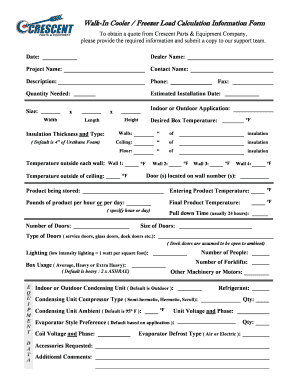
Get Walk-in Cooler / Freezer Load Calculation Information Form
How it works
-

Open form follow the instructions
-

Easily sign the form with your finger
-

Send filled & signed form or save
How to fill out the Walk-In Cooler / Freezer Load Calculation Information Form online
Completing the Walk-In Cooler / Freezer Load Calculation Information Form is essential for obtaining an accurate quote from Crescent Parts & Equipment Company. This guide will provide you with a step-by-step approach to ensure you fill out the form accurately and efficiently online.
Follow the steps to accurately complete the form online.
- Click ‘Get Form’ button to obtain the form and open it in the editor.
- Begin by entering the date at the top of the form. This ensures your submission is time-stamped.
- Fill in the Dealer Name field with the name of the dealership you are working with.
- Enter the Project Name to specify the particular project you are requesting information for.
- Provide your Contact Name, ensuring the person coordinating the project is listed.
- Add a brief Description of the project or requirements. This helps clarify your needs.
- Enter your Phone number for follow-up communication regarding your submission.
- Indicate the Quantity Needed for the project.
- Provide the Estimated Installation Date, specifying when you expect the installation to occur.
- Fill in the dimensions of the cooler or freezer, entering Size, Width, Height, and Length accordingly.
- Select whether the application is Indoor or Outdoor.
- Specify the Insulation Thickness and Type. The default is 4 inches of Urethane Foam.
- Enter the Desired Box Temperature in Fahrenheit.
- Document the insulation thickness for the Walls, Ceiling, and Floor, making sure to note each measurement.
- Provide the outside temperature for each wall and the ceiling, ensuring accuracy in your readings.
- List the Door(s) location by indicating the wall number(s) where the doors are situated.
- Specify the Product being Stored and its Entering Product Temperature.
- Indicate the Pounds of Product per hour or per day, and state the Final Product Temperature.
- Fill in the Number of Doors and the Pull Down Time, typically 24 hours.
- Provide the Size and Type of Doors, indicating service doors, glass doors, dock doors, etc.
- Enter the Number of People expected to use the cooler or freezer.
- Detail the Lighting conditions, noting low intensity lighting as 1 watt per square foot.
- Specify the Number of Forklifts that will operate in relation to the unit.
- Indicate the Box Usage, selecting from Average, Heavy, or Extra Heavy, with a default set to Heavy.
- List any Other Machinery or Motors that will be used along with the cooler or freezer.
- Specify whether the Condensing Unit is Indoor or Outdoor, with a default set to Outdoor.
- Provide the type of Refrigerant being used.
- Indicate the Condensing Unit Compressor Type, choosing from Semi-hermetic, Hermetic, or Scroll.
- Enter the Condensing Unit Ambient temperature, defaulting to 95°F.
- Fill in the Unit Voltage and Phase information.
- Specify the Evaporator Style Preference based on application.
- Provide the Coil Voltage and Phase details.
- Check any Accessories Requested and note any Additional Comments in the respective fields.
- Indicate the Evaporator Defrost Type, choosing between Air or Electric.
- Finally, review all entries for accuracy. Once satisfied, save your changes, download, and/or print the form as needed.
Take the next step toward your project by completing the Walk-In Cooler / Freezer Load Calculation Information Form online today.
When using a walk-in freezer, it's essential to maintain proper insulation, ensure efficient air circulation, and regularly check for temperature consistency. Additionally, limit door openings to reduce heat gain and energy costs. For guidance on best practices, the Walk-In Cooler / Freezer Load Calculation Information Form offers valuable insights tailored to your specific setup.
Industry-leading security and compliance
-
In businnes since 199725+ years providing professional legal documents.
-
Accredited businessGuarantees that a business meets BBB accreditation standards in the US and Canada.
-
Secured by BraintreeValidated Level 1 PCI DSS compliant payment gateway that accepts most major credit and debit card brands from across the globe.