We use cookies to improve security, personalize the user experience, enhance our marketing activities (including cooperating with our marketing partners) and for other business use.
Click "here" to read our Cookie Policy. By clicking "Accept" you agree to the use of cookies. Read less
Read more
Accept
Loading
Form preview
  • US Legal Forms
  • Form Library
  • More Forms
  • More Uncategorized Forms
  • Aviva B58 Form

Get Aviva B58 Form

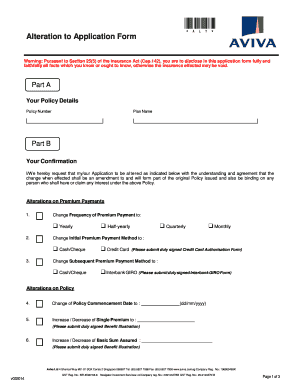
*ALT* ALTERATION TO APPLICATION FORM B58 (New Business - Individual Life and Health) A. Particulars of Life Assured / Assured Name : NRIC/ Passport No. : Contract No. : B. Amendments *I / We hereby.

How it works

  1. Open form

    Open form follow the instructions

  2. Easily sign form

    Easily sign the form with your finger

  3. Share form

    Send filled & signed form or save

How to fill out the Aviva B58 Form online

Filling out the Aviva B58 Form online is a straightforward process that allows users to request alterations to their existing insurance policies. This guide provides step-by-step instructions to ensure accurate completion of the form.

Follow the steps to complete the Aviva B58 Form online.

  1. Click ‘Get Form’ button to obtain the form. This action will allow you to access the necessary document in the editor.
  2. In Part A, enter your policy details, including the policy number and plan name, ensuring all information is accurate.
  3. Move to Part B, which contains confirmation fields. Indicate your requests for altering either premium payments or policy details. Clearly select the options that apply to your situation.
  4. For alterations on premium payments, specify the change frequency (e.g. yearly, quarterly, monthly, or half-yearly) and the payment methods by checking the corresponding boxes.
  5. Proceed to specify any alterations regarding the policy itself, including changes to the policy commencement date, single premium amounts, sum assured, premium terms, or investment choices. Ensure to submit any required documentation as specified in the form.
  6. Finally, in Part C, provide your authorization by confirming that there have been no changes in health conditions. Complete the signature fields including mobile number and email address for correspondence. Review all entries for accuracy.
  7. Once all sections are filled out correctly, save your changes to the form. You will have the option to download, print, or share the completed document as required.

Complete your alterations to the policy by filling out the Aviva B58 Form online today.

Get form

Experience a faster way to fill out and sign forms on the web. Access the most extensive library of templates available.

Related content

b-58 accident site: Topics by Science.gov
We observe the same Hα/[O III] ratio as cB58, which together with the redshift confirms...
Learn more
IEEE Std C95.6-2002, IEEE Standard for Safety...
Oct 23, 2002 — No part of this publication may be reproduced in any form, in an...
Learn more
Liste over megaprosjekter - List of megaprojects...
Convair B-58 Hustler , en all-weather supersonisk bombefly i stor høyde med en fast...
Learn more

Related links form

WA SBCTC Worker Retraining Self-Attestation Form WI WKC-16-B 2010 WY DWS Form INJRPT 2011 WY WY1C1WC 2007

Questions & Answers

Get answers to your most pressing questions about US Legal Forms API.

Contact support

To make an Aviva claim, start by accessing the Aviva B58 Form available on their website. Ensure you have all relevant information ready, including your policy details and any supporting documents. Fill out the form accurately, and submit it online or through customer support. If you need assistance, consider using the US Legal Forms platform to find helpful resources and templates to guide you.

The Aviva claims process begins when you report your incident and fill out the Aviva B58 Form. After submitting your claim, Aviva will review your documentation and may contact you for additional information. They aim to process claims efficiently, ensuring you receive updates throughout the process. Once approved, you will receive your compensation as specified in your policy.

Yes, Aviva provides 24-7 customer support to assist you with any questions or issues you may encounter. Whether you need help with the Aviva B58 Form or require assistance during the claims process, their dedicated support team is available at any hour. You can reach out via phone or chat through their website for immediate assistance.

You can submit a claim to Aviva by visiting their website and accessing the claims section. Here, you will find the Aviva B58 Form, which is essential for submitting your claim. Fill it out with accurate information and include any required documentation. After submitting the form online, you should receive confirmation of your claim's receipt within a few days.

To claim on Aviva, start by gathering all necessary documentation related to your policy. This includes your policy number, details of the incident, and any relevant receipts. You can fill out the Aviva B58 Form to streamline the process. Once you have everything ready, submit your claim through Aviva’s online portal or contact their customer service for assistance.

Similarly to when exporting, you can combine multiple call logs into a single printout. To do this, simply enable this option in Droid Transfer's Options, then in Call Logs, select multiple contacts, and hit Print.

0:00 1:02 How To Add And Merge Calls On iPhone - YouTube YouTube Start of suggested clip End of suggested clip Button this will then merge the people that you have on the two lines. You can then add more peopleMoreButton this will then merge the people that you have on the two lines. You can then add more people from here if you'd. Like when you're done you can either end the call like normal.

See your call history Open your device's Phone app . Tap Recents . You'll see one or more of these icons next to each call in your list: Missed calls (incoming) Calls you answered (incoming) Calls you made (outgoing)

Conference calling on an Android phone: Make a call. After connecting, press the “Add Call” icon. The graphic features a person with a “+” next to it. ... Dial the second party, and wait for them to answer. Press the “Merge” icon. This will appear as two arrows merging into one.

Merge Call Logs Select By contact and your phone will automatically merge the call logs of the same number or contact.

Get This Form Now!

Use professional pre-built templates to fill in and sign documents online faster. Get access to thousands of forms.
If you believe that this page should be taken down, please follow our DMCA take down processhere.

Industry-leading security and compliance

US Legal Forms protects your data by complying with industry-specific security standards.
  • In businnes since 1997
    25+ years providing professional legal documents.
  • Accredited business
    Guarantees that a business meets BBB accreditation standards in the US and Canada.
  • Secured by Braintree
    Validated Level 1 PCI DSS compliant payment gateway that accepts most major credit and debit card brands from across the globe.
Get Aviva B58 Form
Form Packages
Adoption
Bankruptcy
Contractors
Divorce
Home Sales
Employment
Identity Theft
Incorporation
Landlord Tenant
Living Trust
Name Change
Personal Planning
Small Business
Wills & Estates
Packages A-Z
Form Categories
Affidavits
Bankruptcy
Bill of Sale
Corporate - LLC
Divorce
Employment
Identity Theft
Internet Technology
Landlord Tenant
Living Wills
Name Change
Power of Attorney
Real Estate
Small Estates
Wills
All Forms
Forms A-Z
Form Library
Customer Service
Terms of Service
Privacy Notice
Legal Hub
Content Takedown Policy
Bug Bounty Program
About Us
Help Portal
Legal Resources
Blog
Affiliates
Contact Us
Delete My Account
Site Map
Industries
Forms in Spanish
Localized Forms
State-specific Forms
Forms Kit
Legal Guides
Real Estate Handbook
All Guides
Prepared for You
Notarize
Incorporation services
Our Customers
For Consumers
For Small Business
For Attorneys
Our Sites
US Legal Forms
USLegal
FormsPass
pdfFiller
signNow
airSlate WorkFlow
DocHub
Instapage
Social Media
Call us now toll free:
+1 833 426 79 33
As seen in:
  • USA Today logo picture
  • CBC News logo picture
  • LA Times logo picture
  • The Washington Post logo picture
  • AP logo picture
  • Forbes logo picture
© Copyright 1997-2025
airSlate Legal Forms, Inc.
3720 Flowood Dr, Flowood, Mississippi 39232
Form Packages
Adoption
Bankruptcy
Contractors
Divorce
Home Sales
Employment
Identity Theft
Incorporation
Landlord Tenant
Living Trust
Name Change
Personal Planning
Small Business
Wills & Estates
Packages A-Z
Form Categories
Affidavits
Bankruptcy
Bill of Sale
Corporate - LLC
Divorce
Employment
Identity Theft
Internet Technology
Landlord Tenant
Living Wills
Name Change
Power of Attorney
Real Estate
Small Estates
Wills
All Forms
Forms A-Z
Form Library
Customer Service
Terms of Service
Privacy Notice
Legal Hub
Content Takedown Policy
Bug Bounty Program
About Us
Help Portal
Legal Resources
Blog
Affiliates
Contact Us
Delete My Account
Site Map
Industries
Forms in Spanish
Localized Forms
State-specific Forms
Forms Kit
Legal Guides
Real Estate Handbook
All Guides
Prepared for You
Notarize
Incorporation services
Our Customers
For Consumers
For Small Business
For Attorneys
Our Sites
US Legal Forms
USLegal
FormsPass
pdfFiller
signNow
airSlate WorkFlow
DocHub
Instapage
Social Media
Call us now toll free:
+1 833 426 79 33
As seen in:
  • USA Today logo picture
  • CBC News logo picture
  • LA Times logo picture
  • The Washington Post logo picture
  • AP logo picture
  • Forbes logo picture
© Copyright 1997-2025
airSlate Legal Forms, Inc.
3720 Flowood Dr, Flowood, Mississippi 39232
Aviva B58 Form
This form is available in several versions.
Select the version you need from the drop-down list below.
2022 SG Singlife With Aviva UWB58.06
Select form
  • 2022 SG Singlife With Aviva UWB58.06
  • 2018 SG Singlife With Aviva UWB58.06
  • Aviva B58 Form
Select form