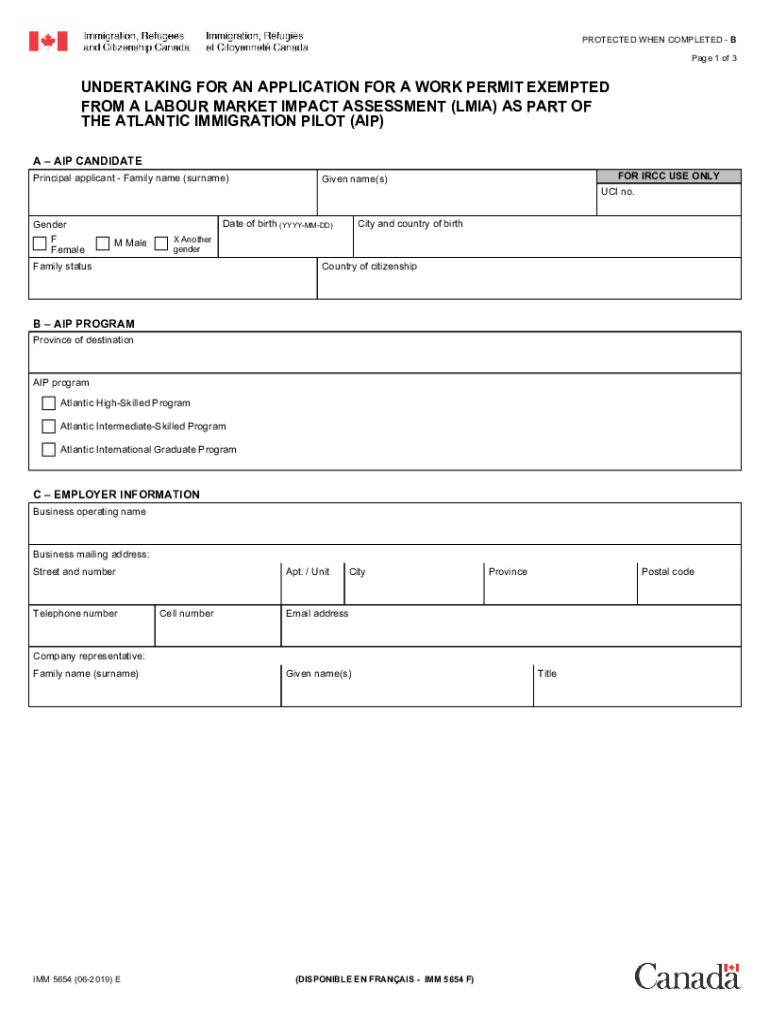
AIP CANDIDATE Principal applicant - Family name (surname) Gender F Female Date of birth (YYYY-MM-DD) M Male FOR IRCC USE ONLY UCI no. Given name(s) City and country of birth X Another gender Family status Country of citizenship B AIP PROGRAM Province of destination AIP program Atlantic High-Skilled Program Atlantic Intermediate-Skilled Program Atlantic International Graduate Program C EMPLOYER INFORMATION Business operating name Business mailing address: Street and numbe.
Loading

Open form follow the instructions

Easily sign the form with your finger

Send filled & signed form or save
How to fill out the Canada IMM 5654 E online
Filling out the Canada IMM 5654 E form is an essential step for individuals seeking a work permit exempt from a Labour Market Impact Assessment as part of the Atlantic Immigration Pilot. This guide will provide a clear and concise walkthrough of each section, helping users complete the form accurately and efficiently.
Follow the steps to fill out the Canada IMM 5654 E form online.
- Click ‘Get Form’ button to obtain the form and open it in the editor.
- Begin by filling in the principal applicant's details in Section A. This includes the family name (surname), given name(s), date of birth, gender, place of birth, family status, and country of citizenship.
- In Section B, choose the appropriate AIP program: Atlantic High-Skilled Program, Atlantic Intermediate-Skilled Program, or Atlantic International Graduate Program, and indicate the province of destination.
- Move to Section C and provide detailed employer information. This includes the business operating name, business mailing address (including street, unit number, city, province, and postal code), contact telephone and cell numbers, email address, and the name and title of the company representative.
- Complete Section D, which involves making important declarations. You will need to confirm that you are applying for a one-year, LMIA-exempt work permit, describe your valid job offer, and undertake to fulfill specific conditions, including applying for permanent residence and reporting any changes in employment.
- Read through the declaration carefully. Ensure that all provided information is true, complete, and accurate before signing the application. Make sure to enter the date of signing in the specified format.
- Finally, make sure to save your changes and double-check all completed fields. You can then download the form for your records, print it if necessary, or share it directly via your preferred method.
Take the next step in your journey by completing the Canada IMM 5654 E form online today.
Experience a faster way to fill out and sign forms on the web. Access the most extensive library of templates available.
Related content
Nov 4, 2020 — IMM 5654 E : Undertaking for an Application for a Work ... Visiting Canada...
Jun 5, 2020 - IMMIGRATION Canada Document Checklist Resident Visa ... imm 5654 (03-2017 )...
Template:COVID-19 pandemic data/Canada/Quebec medical cases chart ... COVID-19 cases in...
Get answers to your most pressing questions about US Legal Forms API.
Can I fill out a Canadian customs form online?
Yes, you can fill out certain Canadian customs forms online. This process is designed to simplify your travel experience and ensure compliance with customs regulations. Make sure to review all required information before submitting the form. For seamless navigation through the process related to Canada IMM 5654 E, US Legal Forms offers helpful resources and templates.
How do I submit my documents to IRCC?
Submitting documents to IRCC can be done online or by mail, depending on the application type. Ensure you follow the specific guidelines provided for your application to avoid delays. It is important to keep copies of all submitted documents for your records. For an efficient submission process regarding Canada IMM 5654 E, consider using US Legal Forms for guidance.
How to fill IMM 5645 E?
Filling out the IMM 5645 E requires you to collect personal information about your family members. Start with your details, then proceed to include information for each family member, ensuring accuracy and completeness. Double-check your entries before submission to prevent any issues with your application related to Canada IMM 5654 E. For additional assistance, US Legal Forms offers helpful tools and templates.
How to submit IMM 5475?
To submit the IMM 5475 form, complete it accurately, ensuring all necessary details are provided. After filling it out, review the form for any mistakes and then submit it according to the instructions provided by the IRCC. You can either submit it online or by mail, depending on your situation. For a smoother submission process related to Canada IMM 5654 E, consider using resources from US Legal Forms.
What are the common mistakes for spousal sponsorship?
Common mistakes in spousal sponsorship applications include incomplete forms, missing documents, and failure to provide accurate information. Many applicants overlook the importance of thoroughness, which can lead to delays or rejections. To enhance your application for Canada IMM 5654 E, ensure all documents are included and correctly filled out. Utilizing services like US Legal Forms can help you avoid these pitfalls.
How do I fill out and validate IRCC application forms with 2D barcodes?
When filling out IRCC application forms with 2D barcodes, start by downloading the latest version of the form from the official IRCC website. Enter your information accurately, and use the validation tool to check for errors. This step is crucial to avoid delays in processing your application related to Canada IMM 5654 E. Consider using US Legal Forms for additional support and resources.
How to fill IMM 5546 E?
Filling out the IMM 5546 E involves several key steps. First, gather all necessary information, including personal details and relevant documentation. Then, carefully enter this information into the form, ensuring accuracy throughout. Utilize resources like US Legal Forms to access guidance and templates that can simplify the process and ensure compliance with Canada IMM 5654 E.
What is the IMM number on a PR card in Canada?
The IMM number on a Permanent Resident (PR) card in Canada is a unique identifier assigned to each immigrant. This number is essential for tracking your immigration history and status. It typically appears on the card itself and is necessary for various processes, including applications and renewals. For more insights on immigration processes, check out US Legal Forms.
How to download forms from IRCC?
You can download forms from the IRCC website by visiting their official forms page. Look for the specific form you need, such as Canada IMM 5654 E, and click on the download link. Make sure to have a PDF reader installed to access the files. For a more straightforward experience, consider using US Legal Forms for organized access to immigration documents.
Is Canada rejecting 80% Indian visas?
Recent reports suggest that visa rejection rates for Indian applicants have increased, but the figure of 80% may not accurately represent the situation. Various factors contribute to these decisions, including incomplete applications or missing documentation. Always ensure your application, including forms like Canada IMM 5654 E, is thorough and accurate.
Use professional pre-built templates to fill in and sign documents online faster. Get access to thousands of forms.
If you believe that this page should be taken down, please follow our DMCA take down process here.