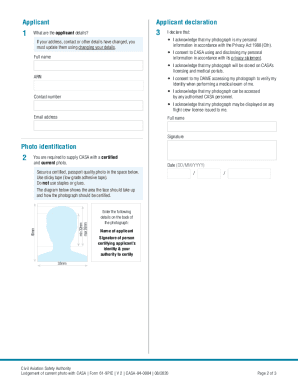
61-9PIC Application Lodgement of current photo with CASA CASR 61.155 Purpose of this form Aviation Reference Number (ARN) Use this form to submit a recent photograph to CASA. An ARN is an identifier.

How it works
  • Open form

    Open form follow the instructions

  • Easily sign form

    Easily sign the form with your finger

  • Share form

    Send filled & signed form or save

How to fill out the AU 61-9PIC online

This guide provides detailed instructions on how to complete the AU 61-9PIC form online, which is necessary for submitting a recent photograph to the Civil Aviation Safety Authority (CASA). Following these steps will help ensure that your application is completed accurately and efficiently.

Follow the steps to complete the AU 61-9PIC form online successfully.

  1. Click the ‘Get Form’ button to obtain the AU 61-9PIC form and open it in the form editor.
  2. Provide your Aviation Reference Number (ARN), as this is necessary for the application.
  3. Fill in your full name, contact number, and email address in the appropriate fields.
  4. Attach a certified, recent photograph in the designated area. Ensure it meets the outlined requirements including size and quality.
  5. Verify that all required fields are filled out accurately, and check that the form is both signed and dated.
  6. If applicable, the person certifying your photograph should fill out their details in the declaration section.
  7. Complete the declaration by the certifying individual, including their full name, signature, date, contact number, and capacity (e.g., Justice of the Peace, Nurse).
  8. Once completed, users can save changes, download, print, or share the form as necessary.

Start filling out your AU 61-9PIC form online today to ensure your application is processed without delay.

Get form

Experience a faster way to fill out and sign forms on the web. Access the most extensive library of templates available.

Related content

0001193125-20-319601.txt : 20201217...

... format="ixt:datemonthdayyearen">December 17, 2020...

Learn more
PIC Programming in Assembly - AZSLIDE.COM

Page 61. call DELAY. ; rrf PORTB,1. ; call DELAY. ; call DELAY. ; rrf PORTB,1. ; call...

Learn more
User's Manual - Network Webcams

User's Manual - 61. Media > Video ... quality, please refer to Stream settings on page 61...

Learn more
Questions & Answers

Get answers to your most pressing questions about US Legal Forms API.

Contact support

How do I convert my NZ licence to an Australian licence?

To convert your New Zealand licence to an Australian licence, you must apply through your local state or territory transport authority. Generally, you will need to provide identification, proof of residency, and your NZ licence. Following the AU 61-9PIC guidelines will help streamline this process. For comprehensive guidance and templates, consider using US Legal Forms to ensure you have all necessary documentation ready.

An NZ licence may not be directly valid in Australia, as recognition depends on the specific type of licence and its compatibility with Australian regulations. For most driving and operational licences, you will need to convert or apply for an equivalent Australian licence in line with AU 61-9PIC. Always verify with the relevant authority for the most accurate guidance. US Legal Forms offers resources that can assist you in understanding and navigating these requirements.

Converting a New Zealand Commercial Pilot Licence (CPL) to an Australian CPL involves submitting your NZ licence for validation along with the required documentation. You may also need to complete a few additional assessments to comply with AU 61-9PIC standards. It is advisable to consult with the Civil Aviation Safety Authority for the most accurate and updated information. US Legal Forms can provide you with helpful resources to make this process easier.

To obtain your Commercial Pilot Licence (CPL) in Australia, you must complete both theoretical and practical training. You will also need to pass medical examinations and meet the requirements set by the Civil Aviation Safety Authority. Following the AU 61-9PIC guidelines will ensure you are on the right track. Consider using platforms like US Legal Forms for useful documentation and resources to assist you.

Transferring a New Zealand forklift licence to Australia is possible, but it requires meeting specific requirements. You will need to provide proof of your NZ licence and may need to undergo an assessment or training in accordance with AU 61-9PIC regulations. It's important to check with local authorities to understand the exact steps. Utilizing resources like US Legal Forms can help you navigate this process smoothly.

To upload a photo in your application form, first ensure the image meets the required specifications set by the AU 61-9PIC guidelines. Next, locate the upload section within the application interface, and click on the 'Upload' button. From there, select the appropriate photo file from your device. Finally, confirm the upload to attach the photo to your application, ensuring all documentation is complete.

The aviation reference number, or ARN, is a unique identifier assigned to your application within the AU 61-9PIC system. This number helps track your application and ensures efficient processing. By using your ARN, you can easily check the status of your application and manage any necessary updates. Understanding the ARN is essential for navigating the aviation regulatory landscape.

Get This Form Now!

Use professional pre-built templates to fill in and sign documents online faster. Get access to thousands of forms.

If you believe that this page should be taken down, please follow our DMCA take down process here.

Get AU 61-9PIC