Loading
Get Miscellaneous Expenses
How it works
-

Open form follow the instructions
-

Easily sign the form with your finger
-

Send filled & signed form or save
How to fill out the Miscellaneous Expenses online
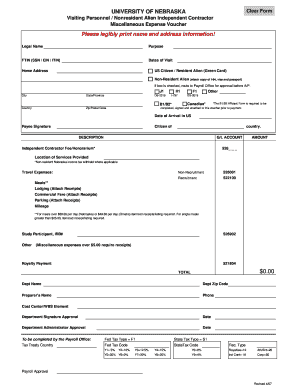
This guide provides clear, step-by-step instructions to assist you in completing the Miscellaneous Expenses voucher efficiently. By following these guidelines, you can ensure all necessary information is accurately submitted.
Follow the steps to complete your Miscellaneous Expenses voucher.
- Press the ‘Get Form’ button to access the Miscellaneous Expenses form in your preferred online editor.
- Begin by legibly entering your legal name and home address information in the designated fields. Ensure accuracy to avoid delays in processing.
- Indicate your purpose for the expenses in the corresponding section. This helps clarify the reason for the reimbursement.
- Provide your Federal Tax Identification Number (FTIN), which can be your Social Security Number (SSN), Employer Identification Number (EIN), or Individual Taxpayer Identification Number (ITIN).
- Fill in the dates of your visit, specifying arrival and departure dates as needed. This is crucial for documenting the timeline of your expenses.
- Select your non-resident status by checking the appropriate box, and if you are a Non-Resident Alien, ensure to attach a copy of your I-94, visa, and passport as required.
- In the section for expenses, describe each expense item thoroughly. Include details such as the G/L account number and the amount for each entry.
- For travel-related expenses, denote whether they are related to non-recruitment or recruitment activities, and attach the necessary receipts when applicable.
- For meals exceeding the set limits, provide itemized receipts as required. Remember that miscellaneous expenses over $5.00 must also have receipts attached.
- In the final section, enter the department name, zip code, preparer's name, and contact phone number. Ensure that the form is signed by the appropriate department administrators.
- After filling out all sections of the form and attaching necessary documents, you can save your changes, download a copy for your records, print the form, or share it as needed.
Complete your Miscellaneous Expenses voucher online today for faster processing.
To calculate miscellaneous expenses, gather all receipts and invoices related to these costs. Sort them into the miscellaneous category and add them up to find the total. It's important to ensure that these expenses are documented accurately for tax purposes. Tools from US Legal Forms can facilitate this process and help you stay organized.
Industry-leading security and compliance
US Legal Forms protects your data by complying with industry-specific security standards.
-
In businnes since 199725+ years providing professional legal documents.
-
Accredited businessGuarantees that a business meets BBB accreditation standards in the US and Canada.
-
Secured by BraintreeValidated Level 1 PCI DSS compliant payment gateway that accepts most major credit and debit card brands from across the globe.