Get Adobe Livecycle Designer Trial
How it works
-

Open form follow the instructions
-

Easily sign the form with your finger
-

Send filled & signed form or save
How to fill out the Adobe Livecycle Designer Trial online
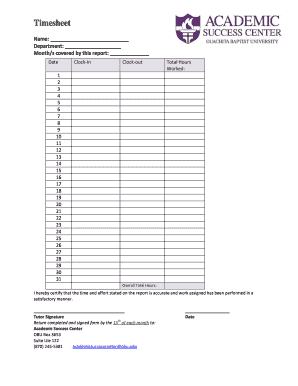
Filling out the Adobe Livecycle Designer Trial form online is a straightforward process that enables you to accurately report your time and tasks. This guide will provide step-by-step instructions to ensure that each section of the form is completed correctly and efficiently.
Follow the steps to accurately fill out your timesheet form.
- Press the ‘Get Form’ button to receive the form and open it in the editing interface.
- Begin by entering your name in the designated 'Name' field at the top of the form. Ensure that your name is spelled correctly.
- In the 'Department' section, specify the name of the department you are assigned to, providing clarity on your work area.
- In the 'Month/s covered by this report' field, indicate the month (or months) that this timesheet is reporting. Be specific to avoid confusion.
- For each day of the month, record your 'Clock-In' and 'Clock-Out' times. This data is essential for calculating your total hours worked.
- Fill in the 'Total Hours Worked' section by adding up the hours from your clock-in and clock-out times for the entire month.
- In the 'Overall Total Hours' field, provide the total hours worked for the reporting period. Double-check your calculations for accuracy.
- Review the certification statement regarding the accuracy of the reported time and effort. Ensure you agree with its terms.
- Sign the form in the area provided for the 'Tutor Signature.’ This confirms that the information recorded is truthful and complete.
- Finally, return the completed and signed form by the 15th of each month to the Academic Success Center using the provided contact details.
Complete your forms online today to ensure timely and accurate reporting.
To activate your Adobe Livecycle Designer Trial, first, download the trial version from the official Adobe website. Once the download is complete, open the application and follow the on-screen instructions. You will be prompted to enter your Adobe ID or create a new account if you don’t have one. After logging in, your trial will be activated, allowing you to explore the features of Adobe Livecycle Designer Trial fully.