Loading
Get Amendment/termination Of Standing Order For Overseas ... - Dbs Bank
How it works
-

Open form follow the instructions
-

Easily sign the form with your finger
-

Send filled & signed form or save
How to fill out the Amendment/Termination Of Standing Order For Overseas Remittances - DBS Bank online
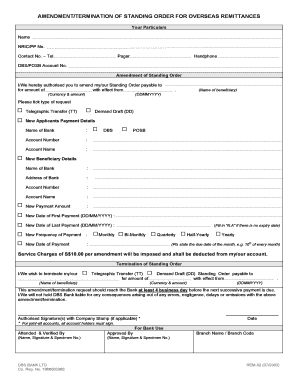
This guide provides step-by-step instructions for completing the Amendment/Termination of Standing Order for Overseas Remittances with DBS Bank. Following these directions will help you navigate the process smoothly and effectively.
Follow the steps to complete your amendment or termination request.
- Press the ‘Get Form’ button to access the form and open it in your editor.
- Fill in your particulars in the designated sections. This includes your name, NRIC/Passport number, contact numbers (telephone, pager, and handphone), and your DBS/POSB account number.
- If you are amending your standing order, indicate the beneficiary's name and the amount you wish to amend, along with the effective date in DDMMYYYY format. Specify the currency and payment amount clearly.
- Select the type of amendment request: either 'Telegraphic Transfer (TT)' or 'Demand Draft (DD)'.
- For new applicants, fill out the payment details, including the name of the bank, account number, and account name.
- In the new beneficiary details section, provide the necessary information: bank name, bank address, account number, and account name.
- Indicate the new payment amount, as well as the new dates for the first and last payments in DD/MM/YYYY format.
- Choose the new frequency of payment (Monthly, Bi-Monthly, Quarterly, Half-Yearly, or Yearly) and specify the due date of the month if it applies.
- A service charge of S$10.00 per amendment will be deducted from your account, so be aware of this fee.
- If you are terminating your standing order, provide the beneficiary’s name, the amount, and the effective termination date in DDMMYYYY format.
- Ensure that you review the statement indicating that your request must reach the bank at least 4 business days before the next payment is due.
- Finally, sign the form. For joint accounts, all account holders must sign. If applicable, apply your company stamp.
- Save your changes, download the completed form for your records, print it, or share it as necessary.
Complete your documents online today for a streamlined and efficient process.
Yes, you can cancel your standing order online through your DBS banking account. Simply log in, navigate to the 'Standing Instructions' section, and select the order you want to cancel. The Amendment/Termination Of Standing Order For Overseas ... - DBS Bank makes this process efficient, allowing you to manage your finances with ease.
Industry-leading security and compliance
US Legal Forms protects your data by complying with industry-specific security standards.
-
In businnes since 199725+ years providing professional legal documents.
-
Accredited businessGuarantees that a business meets BBB accreditation standards in the US and Canada.
-
Secured by BraintreeValidated Level 1 PCI DSS compliant payment gateway that accepts most major credit and debit card brands from across the globe.