Loading
Form preview
  • US Legal Forms
  • Form Library
  • More Forms
  • More Uncategorized Forms
  • Asme Forms Microsoft Word Format

Get Asme Forms Microsoft Word Format

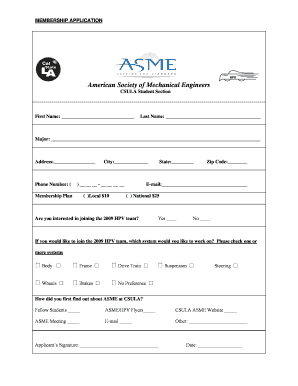
American Society of Mechanical Engineers. CSULA Student Section ... How did you first find out about ASME at CSULA? Fellow Students . ASME/HPV .

How it works

  1. Open form

    Open form follow the instructions

  2. Easily sign form

    Easily sign the form with your finger

  3. Share form

    Send filled & signed form or save

How to fill out the Asme Forms Microsoft Word Format online

Completing the Asme Forms Microsoft Word Format online is straightforward and efficient. This guide provides a step-by-step approach to assist you in accurately filling out each section of the membership application.

Follow the steps to successfully complete your form.

  1. Press the ‘Get Form’ button to access the form and open it in your document editor.
  2. Enter your first name in the designated field located at the top of the form.
  3. Next, fill in your last name in the space provided below your first name.
  4. Indicate your major by providing the relevant information in the specified section.
  5. Complete your address by entering the street address in the designated field.
  6. Input your phone number in the specified format, ensuring to include your area code.
  7. Fill in your city, state, and zip code in the appropriate sections.
  8. Choose your preferred membership plan by marking the appropriate box for either Local or National membership.
  9. Provide your email address in the given field.
  10. Indicate your interest in joining the 2009 HPV team by marking yes or no.
  11. If interested in the 2009 HPV team, select one or more systems you would like to work on by checking the relevant boxes.
  12. Specify how you first found out about ASME at CSULA by marking one or more of the provided options.
  13. Sign the application in the designated space and enter the date.
  14. Once all sections are completed, save your changes, download the form, print, or share it as necessary.

Complete your membership application online today!

Get form

Experience a faster way to fill out and sign forms on the web. Access the most extensive library of templates available.
Get form

Related content

Guidelines for pressure vessel safety assessment...
API 510 REPORT FORM FOR INSPECTION RESULTS. 65. APPENDIX G - ... rules and requirements of...
Learn more
ASME Citation Guide - Mechanical & Aerospace...
Dec 1, 2020 — The citation is a short code (within the body of the document) that...
Learn more
Identifier - Wikipedia
An identifier is a name that identifies either a unique object or a unique class of...
Learn more

Related links form

CO DR 2376 2016 CO DR 2489A 2012 CO DR 2810 2015 CT DoT CTDOT-CDL-1 2011

Questions & Answers

Get answers to your most pressing questions about US Legal Forms API.

Contact support

Creating electronic forms in Microsoft Word is straightforward. You can use the 'Developer' tab to insert form controls, such as text boxes or checkboxes, which allow users to fill in information digitally. By utilizing ASME Forms in Microsoft Word Format, you can design forms that not only look professional but also meet ASME standards.

ASME stands for the American Society of Mechanical Engineers. This organization is dedicated to promoting the art, science, and practice of mechanical engineering. By using ASME Forms in Microsoft Word Format, you can easily create documents that adhere to their standards and improve your professional presentations.

The word limit for an ASME abstract is usually around 250 words, though specific conferences may have different requirements. This concise summary should highlight the key aspects of your research or paper. To easily format your abstract to meet ASME standards, you can use Asme Forms in Microsoft Word format, which ensures you stay within the word limit while maintaining proper structure.

Citing a figure in ASME involves labeling the figure with a number and providing a caption that describes its content. In-text, you should refer to the figure by its number, ensuring that readers can easily locate it. By using Asme Forms in Microsoft Word format, you can streamline the process of inserting and citing figures correctly within your document.

To download your ASME membership certificate, you need to log into your ASME account on their official website. Once logged in, navigate to the membership section, where you will find the option to download your certificate. If you prefer a more straightforward approach, consider using Asme Forms in Microsoft Word format to create your own certificate as needed.

ASME uses a specific citation style that typically involves numbering references in the order they appear within the text. This numerical citation system helps maintain clarity and organization throughout your document. By employing ASME forms in Microsoft Word format, you can easily incorporate the correct citation format into your work. This not only enhances professionalism but also aligns with the standards expected in technical writing.

The format for an ASME essay usually includes an introduction, body paragraphs, and a conclusion, following a logical flow of ideas. Proper citations and references are also crucial to maintain academic integrity. If you're drafting an essay, consider using ASME forms in Microsoft Word format to structure your writing effectively. This helps ensure you adhere to the necessary guidelines while presenting your arguments convincingly.

ASME guidelines generally recommend single spacing for technical papers, although double spacing may be used in certain sections, such as for readability during reviews. Always check the specific requirements for your submission, as they can vary. By utilizing ASME forms in Microsoft Word format, you can easily adjust your document to meet these spacing requirements. This ensures that your work is both professional and compliant.

The IEEE paper format includes guidelines for font size, margins, and section headings. It typically requires a two-column layout, making the paper visually organized. While this format is distinct from ASME, you can still utilize ASME forms in Microsoft Word format to create documents that adhere to ASME standards. This flexibility helps you maintain organization while switching between different formatting requirements.

ASME paper format typically requires specific elements such as title, abstract, introduction, methodology, results, and conclusion. The layout often follows a structured approach to enhance readability and comprehension. If you need to format your document, consider using ASME forms in Microsoft Word format, which provide a clear template for your writing. This allows you to focus on your content while ensuring compliance with ASME guidelines.

Get This Form Now!

Use professional pre-built templates to fill in and sign documents online faster. Get access to thousands of forms.
Get form
If you believe that this page should be taken down, please follow our DMCA take down processhere.

Industry-leading security and compliance

US Legal Forms protects your data by complying with industry-specific security standards.
  • In businnes since 1997
    25+ years providing professional legal documents.
  • Accredited business
    Guarantees that a business meets BBB accreditation standards in the US and Canada.
  • Secured by Braintree
    Validated Level 1 PCI DSS compliant payment gateway that accepts most major credit and debit card brands from across the globe.
Get Asme Forms Microsoft Word Format
Get form
Form Packages
Adoption
Bankruptcy
Contractors
Divorce
Home Sales
Employment
Identity Theft
Incorporation
Landlord Tenant
Living Trust
Name Change
Personal Planning
Small Business
Wills & Estates
Packages A-Z
Form Categories
Affidavits
Bankruptcy
Bill of Sale
Corporate - LLC
Divorce
Employment
Identity Theft
Internet Technology
Landlord Tenant
Living Wills
Name Change
Power of Attorney
Real Estate
Small Estates
Wills
All Forms
Forms A-Z
Form Library
Customer Service
Your Privacy Choices
Terms of Service
Privacy Notice
Legal Hub
Content Takedown Policy
Bug Bounty Program
About Us
Help Portal
Legal Resources
Blog
Affiliates
Contact Us
Delete My Account
Site Map
Industries
Forms in Spanish
Localized Forms
State-specific Forms
Forms Kit
Legal Guides
Real Estate Handbook
All Guides
Prepared for You
Notarize
Incorporation services
Our Customers
For Consumers
For Small Business
For Attorneys
Our Sites
US Legal Forms
USLegal
FormsPass
pdfFiller
signNow
altaFlow
DocHub
Instapage
Social Media
Call us now toll free:
+1 833 426 79 33
As seen in:
  • USA Today logo picture
  • CBC News logo picture
  • LA Times logo picture
  • The Washington Post logo picture
  • AP logo picture
  • Forbes logo picture
© Copyright 1997-2025
airSlate Legal Forms, Inc.
3720 Flowood Dr, Flowood, Mississippi 39232
Form Packages
Adoption
Bankruptcy
Contractors
Divorce
Home Sales
Employment
Identity Theft
Incorporation
Landlord Tenant
Living Trust
Name Change
Personal Planning
Small Business
Wills & Estates
Packages A-Z
Form Categories
Affidavits
Bankruptcy
Bill of Sale
Corporate - LLC
Divorce
Employment
Identity Theft
Internet Technology
Landlord Tenant
Living Wills
Name Change
Power of Attorney
Real Estate
Small Estates
Wills
All Forms
Forms A-Z
Form Library
Customer Service
Your Privacy Choices
Terms of Service
Privacy Notice
Legal Hub
Content Takedown Policy
Bug Bounty Program
About Us
Help Portal
Legal Resources
Blog
Affiliates
Contact Us
Delete My Account
Site Map
Industries
Forms in Spanish
Localized Forms
State-specific Forms
Forms Kit
Legal Guides
Real Estate Handbook
All Guides
Prepared for You
Notarize
Incorporation services
Our Customers
For Consumers
For Small Business
For Attorneys
Our Sites
US Legal Forms
USLegal
FormsPass
pdfFiller
signNow
altaFlow
DocHub
Instapage
Social Media
Call us now toll free:
+1 833 426 79 33
As seen in:
  • USA Today logo picture
  • CBC News logo picture
  • LA Times logo picture
  • The Washington Post logo picture
  • AP logo picture
  • Forbes logo picture
© Copyright 1997-2025
airSlate Legal Forms, Inc.
3720 Flowood Dr, Flowood, Mississippi 39232