Loading
Form preview
  • US Legal Forms
  • Other Templates
  • More Forms
  • More Uncategorized Forms
  • Missing Receipt Form - Xavier University - Xavier

Get Missing Receipt Form - Xavier University - Xavier

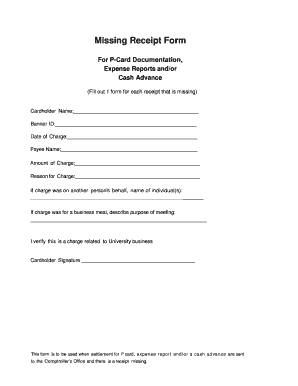
Missing Receipt Form For P-Card Documentation, Expense Reports and/or Cash Advance (Fill out 1 form for each receipt that is missing) Cardholder Name: Banner ID: Date of Charge: Payee Name: Amount.

How it works

  1. Open form

    Open form follow the instructions

  2. Easily sign form

    Easily sign the form with your finger

  3. Share form

    Send filled & signed form or save

How to fill out the Missing Receipt Form - Xavier University - Xavier online

The Missing Receipt Form is an essential document for individuals needing to account for expenses without supporting receipts. This guide offers clear, step-by-step instructions on how to fill out this form effectively to ensure accurate processing of your financial documentation.

Follow the steps to complete the Missing Receipt Form accurately

  1. Click the ‘Get Form’ button to access the Missing Receipt Form. This will allow you to open the document for editing.
  2. In the 'Cardholder Name' field, enter the name of the individual responsible for the expense. This identifies who is submitting the form.
  3. Fill in your 'Banner ID' in the designated field. This unique identifier is necessary for processing your request.
  4. Next, provide the 'Date of Charge' corresponding to the missing receipt. This helps in tracking the transaction.
  5. In the 'Payee Name' section, list the name of the vendor or service provider to whom the charge relates.
  6. Input the 'Amount of Charge', clearly stating the cost associated with the missing receipt.
  7. Describe the 'Reason for Charge'. This gives context to the transaction and is important for financial records.
  8. If the charge was made on behalf of another individual, specify their name(s) in the respective section to clarify responsibility.
  9. For charges related to business meals, provide a description of the purpose of the meeting in the given space.
  10. Finally, affirm the authenticity of the claim by signing in the 'Cardholder Signature' field, indicating that the charge pertains to University-related business.
  11. Once all fields are completed, save your changes, and prepare to download, print, or share the form as needed for submission.

Complete your Missing Receipt Form online today to ensure proper expense documentation.

Get form

Experience a faster way to fill out and sign forms on the web. Access the most extensive library of templates available.
Get form

Related content

Xavier University Tennis Courts - FEMA
Oct 25, 2011 — failure and subsequent flooding across the Xavier University campus and...
Learn more
Missing Receipt Form - NanoPDF
Missing Receipt Form. For P-Card ... Cash Advance. (Fill out 1 form for each receipt that...
Learn more
MATH 2223 Finite Mathematics - Arkansas Tech...
Aug 10, 2012 — Arkansas Tech University. Department of ... Sample Spaces, Events, and...
Learn more

Related links form

NZ INZ 1198 2016 UK Form C1 2001 UK MG 11 2004 ZA SACE Application form

Questions & Answers

Get answers to your most pressing questions about US Legal Forms API.

Contact support

The mailing address for Xavier University is 3800 Victory Parkway, Cincinnati, OH 45207. When sending correspondence, be sure to include any specific department or office you wish to reach to ensure your mail arrives promptly. For matters regarding the Missing Receipt Form - Xavier University - Xavier, you may want to direct your mail to the finance office or the department handling reimbursements.

A missing receipt declaration is a formal statement used when an individual cannot provide the original receipt for an expense. This declaration serves as a way to document the transaction and request reimbursement despite the absence of a physical receipt. At Xavier University, utilizing the Missing Receipt Form - Xavier University - Xavier helps streamline this process and ensures compliance with university policies.

To declare a missing receipt, first, gather all relevant details about the transaction, such as the date, amount, and purpose of the expense. Then, complete the Missing Receipt Form - Xavier University - Xavier, ensuring you provide clear and accurate information. Once completed, submit the form to the appropriate department for review and approval, allowing you to continue with your reimbursement process.

To complete a missing receipt declaration in Concur, start by logging into your account and navigating to the expense report section. From there, select the option to add a missing receipt declaration, and fill out the required details about your expense. Remember to mention that you are using the Missing Receipt Form - Xavier University - Xavier to ensure your declaration is properly linked to Xavier's policies.

A missing receipt form is a document used by individuals to report expenses when the original receipt is lost or unavailable. At Xavier University, this form helps maintain accurate financial records and ensures that you can still get reimbursed for your expenses. By submitting a Missing Receipt Form - Xavier University - Xavier, you provide necessary information about the expense, which aids in processing your request efficiently.

Getting a missing receipt is straightforward. Begin by completing the Missing Receipt Form - Xavier University - Xavier, where you will provide key information about the transaction. This form allows you to officially report the missing receipt and seek a resolution. After submission, the university will review your request and guide you on how to proceed, ensuring that you receive the documentation you need.

To obtain a copy of a lost receipt, start by contacting the vendor or service provider. Often, they can reissue a duplicate receipt if you provide them with details about the transaction. Additionally, if your transaction was made through the university, you can fill out the Missing Receipt Form - Xavier University - Xavier for further assistance in retrieving necessary documentation. This form serves as a helpful tool to streamline your request.

If you lost your receipt, the first step is to complete the Missing Receipt Form - Xavier University - Xavier. This form allows you to officially report the missing receipt and request an alternative verification method. Be sure to include all relevant transaction information to help facilitate the process. Once submitted, the university will guide you on the next steps to take.

If you lose your receipt, it can complicate your expense reporting, but there are solutions available. You can utilize the Missing Receipt Form - Xavier University - Xavier to declare the loss and explain the circumstances. This process ensures your expenses are still considered in compliance with university policies.

To find a missing receipt, start by checking your email for any digital copies or confirmations. You can also look through your physical documents or files where you typically store receipts. If you still cannot locate the receipt, consider using the Missing Receipt Form - Xavier University - Xavier to officially document the situation and seek guidance.

Get This Form Now!

Use professional pre-built templates to fill in and sign documents online faster. Get access to thousands of forms.
Get form
If you believe that this page should be taken down, please follow our DMCA take down processhere.
Get Missing Receipt Form - Xavier University - Xavier
Get form
  • Adoption
  • Bankruptcy
  • Contractors
  • Divorce
  • Home Sales
  • Employment
  • Identity Theft
  • Incorporation
  • Landlord Tenant
  • Living Trust
  • Name Change
  • Personal Planning
  • Small Business
  • Wills & Estates
  • Packages A-Z
  • Affidavits
  • Bankruptcy
  • Bill of Sale
  • Corporate - LLC
  • Divorce
  • Employment
  • Identity Theft
  • Internet Technology
  • Landlord Tenant
  • Living Wills
  • Name Change
  • Power of Attorney
  • Real Estate
  • Small Estates
  • Wills
  • All Forms
  • Forms A-Z
  • Other Templates
  • Legal Hub
  • About Us
  • Help Portal
  • Legal Resources
  • Blog
  • Affiliates
  • Contact Us
  • Delete My Account
  • Site Map
  • Industries
  • Forms in Spanish
  • Localized Forms
  • State-specific Forms
  • Forms Kit
  • Real Estate Handbook
  • All Guides
  • Notarize
  • Incorporation services
  • For Consumers
  • For Small Business
  • For Attorneys
  • USLegal
  • FormsPass
  • pdfFiller
  • signNow
  • altaFlow
  • DocHub
  • Instapage
Form Packages
  • Adoption
  • Bankruptcy
  • Contractors
  • Divorce
  • Home Sales
  • Employment
  • Identity Theft
  • Incorporation
  • Landlord Tenant
  • Living Trust
  • Name Change
  • Personal Planning
  • Small Business
  • Wills & Estates
  • Packages A-Z
Form Categories
  • Affidavits
  • Bankruptcy
  • Bill of Sale
  • Corporate - LLC
  • Divorce
  • Employment
  • Identity Theft
  • Internet Technology
  • Landlord Tenant
  • Living Wills
  • Name Change
  • Power of Attorney
  • Real Estate
  • Small Estates
  • Wills
  • All Forms
  • Forms A-Z
  • Other Templates
Customer Service
  • Legal Hub
  • About Us
  • Help Portal
  • Legal Resources
  • Blog
  • Affiliates
  • Contact Us
  • Delete My Account
  • Site Map
  • Industries
  • Forms in Spanish
  • Localized Forms
  • State-specific Forms
  • Forms Kit
Legal Guides
  • Real Estate Handbook
  • All Guides
Prepared for you
  • Notarize
  • Incorporation services
Our Customers
  • For Consumers
  • For Small Business
  • For Attorneys
Our Sites
  • USLegal
  • FormsPass
  • pdfFiller
  • signNow
  • altaFlow
  • DocHub
  • Instapage
Social Media
Call us now toll free:
+1 833 426 79 33
As seen in:
© Copyright 1999-2026 airSlate Legal Forms, Inc. 17 Station Street, Suite 303, Brookline, MA 02445
  • Your Privacy Choices
  • Terms of Service
  • Privacy Notice
  • Content Takedown Policy
  • Bug Bounty Program