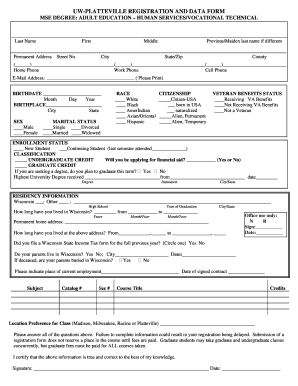
Get Uwplatteville Continuing Education Registration And Data Form
How it works
-

Open form follow the instructions
-

Easily sign the form with your finger
-

Send filled & signed form or save
How to fill out the Uwplatteville Continuing Education Registration And Data Form online
Filling out the Uwplatteville Continuing Education Registration And Data Form online can streamline your registration process and ensure that all necessary information is accurately captured. This guide is designed to help you navigate each section of the form effectively.
Follow the steps to complete the registration form online.
- Press the ‘Get Form’ button to access the registration form and open it in your online document editor.
- Fill out your last name, first name, middle name, and any previous or maiden last names in the designated fields.
- Provide your permanent address, including street number, city, state/zip, and county in the corresponding sections.
- Enter your contact information, including home phone, work phone, cell phone, and email address.
- Indicate your birthdate by selecting the month, day, and year from the provided options.
- Specify your birthplace by entering the city and state.
- Select your sex by marking the appropriate box for male or female.
- Choose your marital status by selecting one of the listed options.
- Indicate your race by marking the relevant option that applies to you.
- Select your citizenship status by checking the appropriate category.
- State your status regarding veteran benefits by marking whether you are receiving benefits, not receiving them, or are not a veteran.
- Choose your enrollment status as a new student or continuing student, and if you are a continuing student, note the last semester you attended.
- Indicate your classification as either undergraduate or graduate and answer whether you will be applying for financial aid.
- If applicable, specify if you plan to graduate this term and enter your highest university degree received and the institution details.
- Provide your residency information, including how long you have lived in Wisconsin and at your current address.
- Respond to the questions about your parent's residency status.
- Fill in your current employment information and details about the courses you are interested in, along with location preferences.
- Review all entries to ensure accuracy, as incomplete forms may delay registration.
- After filling out all sections, save your changes and utilize the options to download, print, or share the form as necessary.
Complete your Uwplatteville Continuing Education Registration And Data Form online now to secure your place in the program.
Gaining admission to UW-Platteville is manageable for most applicants, as the university evaluates candidates based on their academic performance and potential. The acceptance rate is favorable, making it accessible for many students. If you are considering continuing education, the Uwplatteville Continuing Education Registration And Data Form can help you find pathways to further your education and career, regardless of your admission status.