We use cookies to improve security, personalize the user experience, enhance our marketing activities (including cooperating with our marketing partners) and for other business use.
Click "here" to read our Cookie Policy. By clicking "Accept" you agree to the use of cookies. Read less
Read more
Accept
Loading
Form preview
  • US Legal Forms
  • Form Library
  • More Forms
  • More Uncategorized Forms
  • Federal Aid Adjustment Request Form - Brockport

Get Federal Aid Adjustment Request Form - Brockport

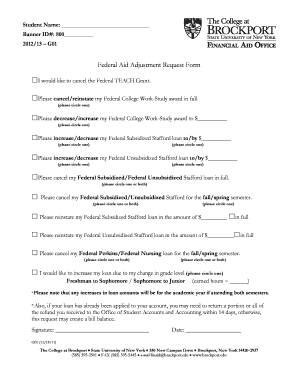
Student Name: Banner ID#: 800 2012/13 G01 Federal Aid Adjustment Request Form I would like to cancel the Federal TEACH Grant. Please cancel/reinstate my Federal College Work-Study award in full. (please.

How it works

  1. Open form

    Open form follow the instructions

  2. Easily sign form

    Easily sign the form with your finger

  3. Share form

    Send filled & signed form or save

How to fill out the Federal Aid Adjustment Request Form - Brockport online

Filling out the Federal Aid Adjustment Request Form is an essential step for students wishing to modify their financial aid. This guide provides a clear and supportive approach to completing the form online, ensuring that users understand each section and requirement.

Follow the steps to successfully complete the form.

  1. Click ‘Get Form’ button to obtain the form and open it in the editor.
  2. Begin by entering your student name and Banner ID number in the designated fields. This personal information is crucial for identifying your request.
  3. Indicate your preferences regarding the Federal TEACH Grant and Federal College Work-Study award by checking the appropriate boxes. You can choose to cancel or reinstate your awards as needed.
  4. Specify any increases or decreases in your Federal Subsidized or Unsubsidized Stafford loans by writing the desired amounts in the provided spaces. Remember to circle your choice to ensure it is clearly noted.
  5. If you need to cancel your Federal loans for a specific semester or for the academic year, indicate this by circling the appropriate options.
  6. For reinstating loans, fill in the amount you are requesting to reinstate and make sure to note whether it is in full or for a semester.
  7. Indicate any changes due to moving to a different grade level by circling your current and new status and providing your earned hours.
  8. Review all the information filled in to ensure accuracy. Once confirmed, add your signature and date at the bottom of the form.
  9. After completing the form, you can save changes, download a copy for your records, print it out, or share it as needed.

Take action now by completing your Federal Aid Adjustment Request Form online.

Get form

Experience a faster way to fill out and sign forms on the web. Access the most extensive library of templates available.
Get form

Related content

2018 FOIA Log - Redacted.xlsx - US Department of...
Jan 1, 2018 — All documents included in the change of ownership pertaining to the ... We...
Learn more
Federal Aid Adjustment Request Form
Federal Aid Adjustment Request Form. Please make the below adjustment(s) in my financial...
Learn more
Form IT 203 I PBF203B It203i - UserManual.wiki
New York State (NYS) source income definition A recent law change amended ... See Form...
Learn more

Related links form

NJ LWD DS-1 2011 UT DCC 882 2005 DC Clean Hands Self Certification 2006 ME Electrical Permit Application

Questions & Answers

Get answers to your most pressing questions about US Legal Forms API.

Contact support

Filling out a financial aid appeal form requires you to provide personal information, details about your financial situation, and the reasons for your appeal. Be sure to follow the instructions carefully and attach any supporting documents. The Federal Aid Adjustment Request Form - Brockport is designed to guide you through this process, ensuring you submit a complete and compelling request.

A good reason to appeal financial aid is a significant change in your financial situation, such as job loss or medical expenses. Other valid reasons include unexpected family circumstances or changes in enrollment status. By addressing these issues, you may qualify for additional support through the Federal Aid Adjustment Request Form - Brockport.

You received a 1098-T form from SUNY Brockport because you were enrolled in classes and incurred qualified tuition expenses during the year. This form is intended to help you accurately report these expenses on your tax return. It’s particularly important to keep this form in mind when considering financial aid options, including the Federal Aid Adjustment Request Form - Brockport.

The 1098-T form for SUNY Brockport is a tax document that reports the amount of qualified tuition and related expenses charged to students during the tax year. This form is crucial for students seeking to maximize their educational tax benefits. When you prepare your Federal Aid Adjustment Request Form - Brockport, having accurate information from your 1098-T will be essential.

To email the financial aid office at SUNY Brockport, you can find their contact information on the official university website. Typically, they have a dedicated email address for inquiries related to financial aid. If you have questions regarding your Federal Aid Adjustment Request Form - Brockport, reach out to them for the most accurate and timely assistance.

Including the 1098-T form in your tax return can potentially increase your refund through education tax credits. It allows you to claim credits like the American Opportunity Credit or Lifetime Learning Credit. When planning your finances, remember that this form might also impact your Federal Aid Adjustment Request Form - Brockport, so consider all aspects carefully.

You can find your 1098-T form in your student account on the SUNY Brockport website, typically under the financial or billing sections. If you struggle to locate it, consider reaching out to the financial aid office for guidance. This form is essential, especially when completing your Federal Aid Adjustment Request Form - Brockport, so ensure you have it on hand.

The 1098-T form is used to help you report qualified tuition and related expenses when filing your federal taxes. If you are a student at SUNY Brockport, this form can provide you with information needed to claim educational tax credits. Understanding your 1098-T can also assist you in the Federal Aid Adjustment Request Form - Brockport process if you seek financial aid adjustments.

When writing a special circumstances letter for financial aid, clearly explain your situation, including any changes in income or unexpected expenses. Be concise yet thorough, and attach any supporting documentation to strengthen your case. This letter should accompany your Federal Aid Adjustment Request Form - Brockport to help the financial aid office understand your needs.

To request an aid adjustment, begin by completing the Federal Aid Adjustment Request Form - Brockport. Make sure to include all necessary documentation that supports your request for a change in your financial aid. This process is essential for ensuring that your aid accurately reflects your current financial situation.

Get This Form Now!

Use professional pre-built templates to fill in and sign documents online faster. Get access to thousands of forms.
Get form
If you believe that this page should be taken down, please follow our DMCA take down processhere.

Industry-leading security and compliance

US Legal Forms protects your data by complying with industry-specific security standards.
  • In businnes since 1997
    25+ years providing professional legal documents.
  • Accredited business
    Guarantees that a business meets BBB accreditation standards in the US and Canada.
  • Secured by Braintree
    Validated Level 1 PCI DSS compliant payment gateway that accepts most major credit and debit card brands from across the globe.
Get Federal Aid Adjustment Request Form - Brockport
Get form
Form Packages
Adoption
Bankruptcy
Contractors
Divorce
Home Sales
Employment
Identity Theft
Incorporation
Landlord Tenant
Living Trust
Name Change
Personal Planning
Small Business
Wills & Estates
Packages A-Z
Form Categories
Affidavits
Bankruptcy
Bill of Sale
Corporate - LLC
Divorce
Employment
Identity Theft
Internet Technology
Landlord Tenant
Living Wills
Name Change
Power of Attorney
Real Estate
Small Estates
Wills
All Forms
Forms A-Z
Form Library
Customer Service
Terms of Service
Privacy Notice
Legal Hub
Content Takedown Policy
Bug Bounty Program
About Us
Blog
Affiliates
Contact Us
Delete My Account
Site Map
Industries
Forms in Spanish
Localized Forms
State-specific Forms
Forms Kit
Legal Guides
Real Estate Handbook
All Guides
Prepared for You
Notarize
Incorporation services
Our Customers
For Consumers
For Small Business
For Attorneys
Our Sites
US Legal Forms
USLegal
FormsPass
pdfFiller
signNow
airSlate WorkFlow
DocHub
Instapage
Social Media
Call us now toll free:
+1 833 426 79 33
As seen in:
  • USA Today logo picture
  • CBC News logo picture
  • LA Times logo picture
  • The Washington Post logo picture
  • AP logo picture
  • Forbes logo picture
© Copyright 1997-2025
airSlate Legal Forms, Inc.
3720 Flowood Dr, Flowood, Mississippi 39232
Form Packages
Adoption
Bankruptcy
Contractors
Divorce
Home Sales
Employment
Identity Theft
Incorporation
Landlord Tenant
Living Trust
Name Change
Personal Planning
Small Business
Wills & Estates
Packages A-Z
Form Categories
Affidavits
Bankruptcy
Bill of Sale
Corporate - LLC
Divorce
Employment
Identity Theft
Internet Technology
Landlord Tenant
Living Wills
Name Change
Power of Attorney
Real Estate
Small Estates
Wills
All Forms
Forms A-Z
Form Library
Customer Service
Terms of Service
Privacy Notice
Legal Hub
Content Takedown Policy
Bug Bounty Program
About Us
Blog
Affiliates
Contact Us
Delete My Account
Site Map
Industries
Forms in Spanish
Localized Forms
State-specific Forms
Forms Kit
Legal Guides
Real Estate Handbook
All Guides
Prepared for You
Notarize
Incorporation services
Our Customers
For Consumers
For Small Business
For Attorneys
Our Sites
US Legal Forms
USLegal
FormsPass
pdfFiller
signNow
airSlate WorkFlow
DocHub
Instapage
Social Media
Call us now toll free:
+1 833 426 79 33
As seen in:
  • USA Today logo picture
  • CBC News logo picture
  • LA Times logo picture
  • The Washington Post logo picture
  • AP logo picture
  • Forbes logo picture
© Copyright 1997-2025
airSlate Legal Forms, Inc.
3720 Flowood Dr, Flowood, Mississippi 39232