We use cookies to improve security, personalize the user experience, enhance our marketing activities (including cooperating with our marketing partners) and for other business use.
Click "here" to read our Cookie Policy. By clicking "Accept" you agree to the use of cookies. Read less
Read more
Accept
Loading
Form preview
  • US Legal Forms
  • Form Library
  • More Forms
  • More Uncategorized Forms
  • Stanford University Lost/missing Receipt Form - Stanford

Get Stanford University Lost/missing Receipt Form - Stanford

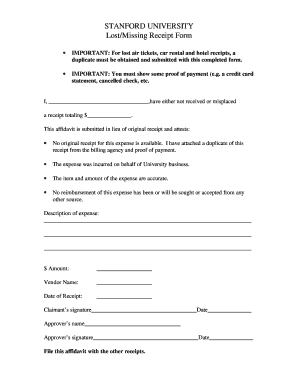
STANFORD UNIVERSITY Lost/Missing Receipt Form IMPORTANT: For lost air tickets, car rental and hotel receipts, a duplicate must be obtained and submitted with this completed form. IMPORTANT: You must.

How it works

  1. Open form

    Open form follow the instructions

  2. Easily sign form

    Easily sign the form with your finger

  3. Share form

    Send filled & signed form or save

How to fill out the STANFORD UNIVERSITY Lost/Missing Receipt Form - Stanford online

This guide provides detailed instructions on how to complete the STANFORD UNIVERSITY Lost/Missing Receipt Form. Whether you are a first-time user or familiar with digital forms, this comprehensive approach will help you navigate the filing process effectively.

Follow the steps to complete the form seamlessly.

  1. Press the ‘Get Form’ button to obtain the form and access it in your designated editing platform.
  2. Begin by filling in your name where indicated as 'I, __________________________________,' confirming your identity.
  3. State the total amount of the lost or missing receipt in the designated field labeled '$_______________'.
  4. Provide a detailed description of the expense in the allotted space. Ensure you include sufficient information to clarify the nature of the expense.
  5. Enter the amount of the expense again in the '$ Amount:' section.
  6. Input the vendor's name in the 'Vendor Name:' field.
  7. Specify the date of the receipt in the 'Date of Receipt:' area.
  8. Sign the form with your name in the 'Claimant’s signature' section, and date it.
  9. Have the approver fill in their name in the 'Approver’s name' area, followed by their signature and date.
  10. Once all sections are completed, save your changes, and choose to download, print, or share the form as necessary.

Start completing your documents online today for a seamless filing experience.

Get form

Experience a faster way to fill out and sign forms on the web. Access the most extensive library of templates available.
Get form

Related content

stanford linear accelerator center - OSTI.gov
AEC Contract AT(04-3)-515, both held by Stanford University. The period ... E-69...
Learn more
STANFORD UNIVERSITY Lost/Missing Receipt Form
STANFORD UNIVERSITY. Lost/Missing Receipt Form. • IMPORTANT: For lost air tickets, car...
Learn more
National Collegiate Athletic Association...
The National Collegiate Athletic Association (NCAA) is a nonprofit organization that...
Learn more

Related links form

TX TREC NO. 9-12 2015 TX TREC No. OP-H 2015 VT LC-142 2016 RHA WA State Lease Rental Deposit Receipt 2012

Questions & Answers

Get answers to your most pressing questions about US Legal Forms API.

Contact support

To complete a missing receipt declaration in Concur, log into your account and locate the expense related to the missing receipt. Use the STANFORD UNIVERSITY Lost/Missing Receipt Form - Stanford to provide the necessary details. Follow the prompts in Concur to ensure you submit the declaration correctly for reimbursement.

The required documents for Stanford University typically include your application, transcripts, and any specific forms related to financial aid or services. When dealing with expenses, such as those requiring the STANFORD UNIVERSITY Lost/Missing Receipt Form - Stanford, ensure you have the necessary supporting documents to validate your claims effectively.

You can reach Stanford student services through their official website or by visiting their office on campus. They provide various resources and support options to assist students with any inquiries. If you have questions regarding the STANFORD UNIVERSITY Lost/Missing Receipt Form - Stanford, their team is ready to help you navigate the process.

To obtain your W2 from Stanford University, you generally need to access it through the Stanford University financial portal. Log in with your credentials and navigate to the appropriate section for tax documents. You can print your W2 directly from there. If you encounter issues, referring to the STANFORD UNIVERSITY Lost/Missing Receipt Form - Stanford could help if your request involves any missing documentation.

To complete a missing receipt declaration, you should fill out the appropriate form, providing details about the missing receipt, including the date and nature of the expense. After filling it out, submit it according to the guidelines provided by your finance department. Make sure to mention the STANFORD UNIVERSITY Lost/Missing Receipt Form - Stanford, as it streamlines the process for proper record-keeping and accountability. If there are any uncertainties, you can refer to the resources available on uslegalforms.

To declare a missing receipt in Concur, first log into your Concur account and locate the expense report where the receipt is missing. Then, choose the option to add a missing receipt declaration. Ensure you provide all necessary information regarding the transaction and clearly indicate that you are filing the STANFORD UNIVERSITY Lost/Missing Receipt Form - Stanford for further processing.

To contact Stanford University by email, you typically need to visit their official website and navigate to the relevant department's contact page. You will find specific email addresses listed for various inquiries, ensuring that your questions reach the right office. When reaching out, especially regarding the STANFORD UNIVERSITY Lost/Missing Receipt Form - Stanford, provide clear details about your issue to facilitate a prompt response.

A missing receipt declaration is a formal statement that explains a situation where you cannot produce a receipt for an expense. This declaration is essential for maintaining transparency in your financial reporting, especially within the context of the STANFORD UNIVERSITY Lost/Missing Receipt Form - Stanford. By submitting this declaration, you enable the university to process your reimbursement requests effectively, ensuring that all financial records remain accurate.

I, _________________________________________ hereby declare that I have lost or accidently destroyed the orginal receipt. I further declare that I have not and will not use this receipt (if found) to claim reimbursement from any other source, or to support any claim for income tax deductions in the future.

This form is to be used as documentation only if the original receipt is unavailable and attempts have been made to acquire a duplicate receipt from the vendor.

Get This Form Now!

Use professional pre-built templates to fill in and sign documents online faster. Get access to thousands of forms.
Get form
If you believe that this page should be taken down, please follow our DMCA take down processhere.

Industry-leading security and compliance

US Legal Forms protects your data by complying with industry-specific security standards.
  • In businnes since 1997
    25+ years providing professional legal documents.
  • Accredited business
    Guarantees that a business meets BBB accreditation standards in the US and Canada.
  • Secured by Braintree
    Validated Level 1 PCI DSS compliant payment gateway that accepts most major credit and debit card brands from across the globe.
Get STANFORD UNIVERSITY Lost/Missing Receipt Form - Stanford
Get form
Form Packages
Adoption
Bankruptcy
Contractors
Divorce
Home Sales
Employment
Identity Theft
Incorporation
Landlord Tenant
Living Trust
Name Change
Personal Planning
Small Business
Wills & Estates
Packages A-Z
Form Categories
Affidavits
Bankruptcy
Bill of Sale
Corporate - LLC
Divorce
Employment
Identity Theft
Internet Technology
Landlord Tenant
Living Wills
Name Change
Power of Attorney
Real Estate
Small Estates
Wills
All Forms
Forms A-Z
Form Library
Customer Service
Terms of Service
Privacy Notice
Legal Hub
Content Takedown Policy
Bug Bounty Program
About Us
Help Portal
Legal Resources
Blog
Affiliates
Contact Us
Delete My Account
Site Map
Industries
Forms in Spanish
Localized Forms
State-specific Forms
Forms Kit
Legal Guides
Real Estate Handbook
All Guides
Prepared for You
Notarize
Incorporation services
Our Customers
For Consumers
For Small Business
For Attorneys
Our Sites
US Legal Forms
USLegal
FormsPass
pdfFiller
signNow
airSlate WorkFlow
DocHub
Instapage
Social Media
Call us now toll free:
+1 833 426 79 33
As seen in:
  • USA Today logo picture
  • CBC News logo picture
  • LA Times logo picture
  • The Washington Post logo picture
  • AP logo picture
  • Forbes logo picture
© Copyright 1997-2025
airSlate Legal Forms, Inc.
3720 Flowood Dr, Flowood, Mississippi 39232
Form Packages
Adoption
Bankruptcy
Contractors
Divorce
Home Sales
Employment
Identity Theft
Incorporation
Landlord Tenant
Living Trust
Name Change
Personal Planning
Small Business
Wills & Estates
Packages A-Z
Form Categories
Affidavits
Bankruptcy
Bill of Sale
Corporate - LLC
Divorce
Employment
Identity Theft
Internet Technology
Landlord Tenant
Living Wills
Name Change
Power of Attorney
Real Estate
Small Estates
Wills
All Forms
Forms A-Z
Form Library
Customer Service
Terms of Service
Privacy Notice
Legal Hub
Content Takedown Policy
Bug Bounty Program
About Us
Help Portal
Legal Resources
Blog
Affiliates
Contact Us
Delete My Account
Site Map
Industries
Forms in Spanish
Localized Forms
State-specific Forms
Forms Kit
Legal Guides
Real Estate Handbook
All Guides
Prepared for You
Notarize
Incorporation services
Our Customers
For Consumers
For Small Business
For Attorneys
Our Sites
US Legal Forms
USLegal
FormsPass
pdfFiller
signNow
airSlate WorkFlow
DocHub
Instapage
Social Media
Call us now toll free:
+1 833 426 79 33
As seen in:
  • USA Today logo picture
  • CBC News logo picture
  • LA Times logo picture
  • The Washington Post logo picture
  • AP logo picture
  • Forbes logo picture
© Copyright 1997-2025
airSlate Legal Forms, Inc.
3720 Flowood Dr, Flowood, Mississippi 39232