We use cookies to improve security, personalize the user experience, enhance our marketing activities (including cooperating with our marketing partners) and for other business use.
Click "here" to read our Cookie Policy. By clicking "Accept" you agree to the use of cookies. Read less
Read more
Accept
Loading
Form preview
  • US Legal Forms
  • Form Library
  • More Forms
  • More Uncategorized Forms
  • Cross Register Salem College And Wake Forest Form

Get Cross Register Salem College And Wake Forest Form

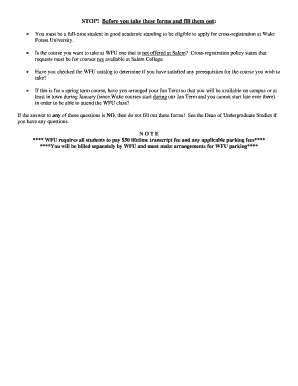
NOTE WFU requires all students to pay 50 lifetime transcript fee and any applicable parking fees You will be billed separately by WFU and must make arrangements for WFU parking SALEM COLLEGE APPLICATION TO CROSS-REGISTER FOR COURSE WORK AT WAKE FOREST UNIVERSITY STUDENT NAME LAST CLASS SALEM ID MIDDLE MAJOR FIRST LOCAL MAILING ADDRESS SALEM EMAIL TERM DURING WHICH COURSE WILL BE TAKEN DEPT DATE PHONE NO. STOP Before you take these forms and fill them out You must be a full-time student in good academic standing to be eligible to apply for cross-registration at Wake Forest University. Is the course you want to take at WFU one that is not offered at Salem Cross-registration policy states that requests must be for courses not available at Salem College. Have you checked the WFU catalog to determine if you have satisfied any prerequisites for the course you wish to take If this is for a spring term course have you arranged your Jan Term so that you will be available on campus or at least i....

How it works

  1. Open form

    Open form follow the instructions

  2. Easily sign form

    Easily sign the form with your finger

  3. Share form

    Send filled & signed form or save

How to fill out the Cross Register Salem College And Wake Forest Form online

This guide provides clear, step-by-step instructions for filling out the Cross Register Salem College And Wake Forest Form online. Follow these directions to ensure a smooth application process.

Follow the steps to successfully complete your application.

  1. Click ‘Get Form’ button to access the form and open it in your preferred digital format.
  2. Fill in your personal information in the designated fields. This includes your last name, first name, middle initial, and Salem ID number. Ensure that all details are accurate to avoid processing delays.
  3. Enter your local mailing address, Salem email, and phone number in the appropriate sections. This information is necessary for communication regarding your application.
  4. Indicate the term when you plan to take the course by selecting the correct option from the available choices.
  5. Provide the course number, title, days, and time for the course you wish to take at Wake Forest University. Specify the Wake Forest credit value as well.
  6. Select your preferred grade mode from the options provided: Grade, Pass/Fail, or Audit.
  7. In the section for reasons for course selection, briefly explain why you have chosen this particular course.
  8. Ensure you have obtained the necessary approvals by having the relevant personnel sign the form, including the department head, dean of undergraduate studies, and your faculty adviser.
  9. After completing all sections, review the form for accuracy. Save your changes, and proceed to download, print, or share the form as required.

Complete your documentation online to streamline your cross-registration process.

Get form

Experience a faster way to fill out and sign forms on the web. Access the most extensive library of templates available.
Get form

Related content

Traditions | Town of Wake Forest, NC
Adult Athletics Survey · Free Agent Registration Form ... To begin, the maltese cross is...
Learn more
STOP! Before you take these forms and fill them...
You must be a full-time student in good academic standing to be eligible to apply for...
Learn more
Sewanee: The University of the South - Wikipedia
The university's School of Letters offers graduate degrees in American Literature and...
Learn more

Related links form

NY DS-115 2012 TN DoR RV-F1310901 RDA-692 2007 TN SF-0395 2010 GCAAR 1301 2012

Questions & Answers

Get answers to your most pressing questions about US Legal Forms API.

Contact support

The director of admissions at Salem College plays a crucial role in guiding prospective students through the enrollment process. They provide important information about programs, financial aid, and campus life. If you wish to learn more about the Cross Register Salem College And Wake Forest Form, reaching out to the director can provide you with additional insights and guidance.

Cross enrollment refers to the process where a student enrolls in courses at more than one college simultaneously. This option allows you to broaden your course selection and learning experience. Utilizing the Cross Register Salem College And Wake Forest Form helps you seamlessly manage your classes across both institutions, enhancing your educational path.

When a class is crosslisted, it is offered under multiple departments or programs. This system enables students to receive credit for the same course in different fields of study. The Cross Register Salem College And Wake Forest Form makes it easier for you to explore various disciplines, ensuring a richer academic journey.

Cross registration means that students are allowed to take courses at multiple colleges or universities during the same academic term. This system promotes a broader learning experience and ensures that students can access diverse curricula. Utilizing the Cross Register Salem College And Wake Forest Form facilitates the registration process, allowing students to easily navigate their cross-registration needs and maximize their educational opportunities.

Cross registration in college refers to the process where students enroll in courses at another institution while maintaining their primary enrollment. This system enhances academic opportunities and allows students to experience varied instructional styles and resources. By leveraging the Cross Register Salem College And Wake Forest Form, students can seamlessly transition into courses at both Salem College and Wake Forest, making the most of their college experience.

Yes, students can cross-register in college, allowing them to take classes at another institution while remaining enrolled at their primary school. This flexible approach gives students the opportunity to diversify their education and explore different academic areas. To initiate the process, you need to fill out the Cross Register Salem College And Wake Forest Form. This form streamlines the registration process and helps you access courses across institutions.

Being cross-registered means that a student is enrolled in courses at two different institutions simultaneously. This arrangement allows students to expand their academic experience and take advantage of unique course offerings at both schools. By completing the Cross Register Salem College And Wake Forest Form, students can easily manage their enrollment at Salem College and Wake Forest University. This option enriches your education and enhances your academic journey.

Many renowned individuals are proud alumni of Salem College, including poets and educators. Not only does this legacy bolster the college's reputation, but it also provides a rich network for current students. Using the Cross Register Salem College And Wake Forest Form can help you tap into this heritage and expand your professional connections.

Salem College boasts an impressive list of notable alumnae, including authors, politicians, and innovators. Individuals such as Jennifer McBride, who made significant strides in public service, have called Salem their alma mater. Pursuing your education here enhances your connections and opportunities, especially if you plan to use the Cross Register Salem College And Wake Forest Form.

Yes, Salem College has a strong reputation for academic excellence and a rich history. It is one of the oldest women's colleges in the United States and is known for its commitment to fostering leadership and empowerment. This prestige can add value, especially for those looking to cross register with Wake Forest through the Cross Register Salem College And Wake Forest Form.

Get This Form Now!

Use professional pre-built templates to fill in and sign documents online faster. Get access to thousands of forms.
Get form
If you believe that this page should be taken down, please follow our DMCA take down processhere.

Industry-leading security and compliance

US Legal Forms protects your data by complying with industry-specific security standards.
  • In businnes since 1997
    25+ years providing professional legal documents.
  • Accredited business
    Guarantees that a business meets BBB accreditation standards in the US and Canada.
  • Secured by Braintree
    Validated Level 1 PCI DSS compliant payment gateway that accepts most major credit and debit card brands from across the globe.
Get Cross Register Salem College And Wake Forest Form
Get form
Form Packages
Adoption
Bankruptcy
Contractors
Divorce
Home Sales
Employment
Identity Theft
Incorporation
Landlord Tenant
Living Trust
Name Change
Personal Planning
Small Business
Wills & Estates
Packages A-Z
Form Categories
Affidavits
Bankruptcy
Bill of Sale
Corporate - LLC
Divorce
Employment
Identity Theft
Internet Technology
Landlord Tenant
Living Wills
Name Change
Power of Attorney
Real Estate
Small Estates
Wills
All Forms
Forms A-Z
Form Library
Customer Service
Terms of Service
Privacy Notice
Legal Hub
Content Takedown Policy
Bug Bounty Program
About Us
Help Portal
Legal Resources
Blog
Affiliates
Contact Us
Delete My Account
Site Map
Industries
Forms in Spanish
Localized Forms
State-specific Forms
Forms Kit
Legal Guides
Real Estate Handbook
All Guides
Prepared for You
Notarize
Incorporation services
Our Customers
For Consumers
For Small Business
For Attorneys
Our Sites
US Legal Forms
USLegal
FormsPass
pdfFiller
signNow
altaFlow
DocHub
Instapage
Social Media
Call us now toll free:
+1 833 426 79 33
As seen in:
  • USA Today logo picture
  • CBC News logo picture
  • LA Times logo picture
  • The Washington Post logo picture
  • AP logo picture
  • Forbes logo picture
© Copyright 1997-2025
airSlate Legal Forms, Inc.
3720 Flowood Dr, Flowood, Mississippi 39232
Form Packages
Adoption
Bankruptcy
Contractors
Divorce
Home Sales
Employment
Identity Theft
Incorporation
Landlord Tenant
Living Trust
Name Change
Personal Planning
Small Business
Wills & Estates
Packages A-Z
Form Categories
Affidavits
Bankruptcy
Bill of Sale
Corporate - LLC
Divorce
Employment
Identity Theft
Internet Technology
Landlord Tenant
Living Wills
Name Change
Power of Attorney
Real Estate
Small Estates
Wills
All Forms
Forms A-Z
Form Library
Customer Service
Terms of Service
Privacy Notice
Legal Hub
Content Takedown Policy
Bug Bounty Program
About Us
Help Portal
Legal Resources
Blog
Affiliates
Contact Us
Delete My Account
Site Map
Industries
Forms in Spanish
Localized Forms
State-specific Forms
Forms Kit
Legal Guides
Real Estate Handbook
All Guides
Prepared for You
Notarize
Incorporation services
Our Customers
For Consumers
For Small Business
For Attorneys
Our Sites
US Legal Forms
USLegal
FormsPass
pdfFiller
signNow
altaFlow
DocHub
Instapage
Social Media
Call us now toll free:
+1 833 426 79 33
As seen in:
  • USA Today logo picture
  • CBC News logo picture
  • LA Times logo picture
  • The Washington Post logo picture
  • AP logo picture
  • Forbes logo picture
© Copyright 1997-2025
airSlate Legal Forms, Inc.
3720 Flowood Dr, Flowood, Mississippi 39232