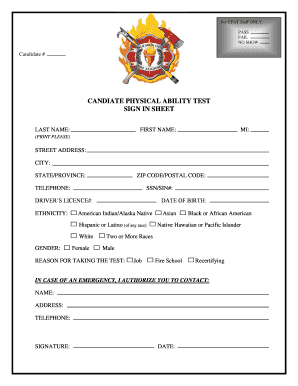
Get Candidate Physical Ability Test Sign In Sheet Form
How it works
-

Open form follow the instructions
-

Easily sign the form with your finger
-

Send filled & signed form or save
How to fill out the Candidate Physical Ability Test Sign In Sheet Form online
This guide provides a clear and supportive approach for completing the Candidate Physical Ability Test Sign In Sheet Form online. By following these steps, users can effectively and accurately fill out the necessary information to participate in the test.
Follow the steps to complete the form accurately
- Press the ‘Get Form’ button to acquire the form and access it in your preferred online tool.
- Begin filling in your last name in the designated field. Make sure to print clearly to ensure readability.
- Enter your first name in the next field, followed by your middle initial, ensuring that it is also in a clear print.
- Provide your complete street address. This should include any relevant apartment or unit numbers.
- Fill in your city and state/province as these are vital for your identification.
- Input your ZIP code/postal code accurately to ensure proper processing of your information.
- Enter a valid telephone number where you can be reached. This may help in case of any follow-up.
- Include your Social Security Number or Social Insurance Number, as required on the form.
- If applicable, provide your driver's license number for identity verification purposes.
- Fill in your date of birth, formatted as month/day/year.
- Select your ethnicity by checking one of the provided options to ensure accurate demographic representation.
- Indicate your gender by selecting the appropriate option from the choices given.
- State the reason for taking the test by selecting from the options provided such as job, fire school, or recertifying.
- In case of an emergency, list the contact name, their address, and telephone number so they can be reached if needed.
- Provide your signature to confirm the information is accurate and that you consent to the test conditions.
- Finally, include the current date next to your signature to affirm your acknowledgment.
- Once you have completed the form, ensure to save your changes. You will have the option to download, print, or share the completed form.
Complete your Candidate Physical Ability Test Sign In Sheet Form online today to ensure your participation in the test.
Typically, statistics show that around 40% of candidates do not pass the Candidate Physical Ability Test on their first attempt. This percentage emphasizes the importance of rigorous training and preparation. Using resources such as the Candidate Physical Ability Test Sign In Sheet Form on platforms like US Legal Forms can provide critical insights and assist you in your preparation.