Loading
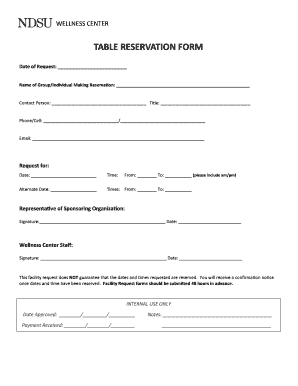
Get Table Reservation Form-sport Organizations - Ndsu
How it works
-

Open form follow the instructions
-

Easily sign the form with your finger
-

Send filled & signed form or save
How to fill out the Table Reservation Form-Sport Organizations - Ndsu online
This guide provides users with a comprehensive overview of how to effectively complete the Table Reservation Form for Sport Organizations at Ndsu. Follow the steps outlined to ensure that your reservation is properly submitted and processed.
Follow the steps to complete your table reservation form accurately.
- Click the ‘Get Form’ button to access the Table Reservation Form and open it in the digital editing interface.
- In the 'Date of Request' field, input the current date when you are submitting the reservation request.
- Enter the 'Name of Group/Individual Making Reservation' in the appropriate field. This should reflect the name under which the reservation is being made.
- Fill out the 'Contact Person' section with the name of the individual who will be the point of contact regarding this reservation.
- Specify the 'Title' of the contact person in the corresponding field to provide their role within the organization.
- Provide a primary phone number and an alternative phone number in the 'Phone/Cell' field for communication purposes.
- Input the email address in the designated field. This will be used for sending confirmation and any further correspondence.
- In the 'Request for' section, select the 'Date' for the reservation and indicate the time period by filling out the 'From' and 'To' fields, ensuring you include am/pm designations.
- If required, suggest an 'Alternate Date' for the reservation along with the corresponding times 'From' and 'To'.
- Obtain the required signature from the 'Representative of Sponsoring Organization' and include the date of signing.
- Leave space for 'Wellness Center Staff' to sign and provide their date of approval, which will be filled out upon processing.
- Be aware that submitting this form does not guarantee your requested date and time are confirmed. A confirmation notice will be sent once reservations are finalized.
- Finally, review your completed form for accuracy. Once satisfied, you may save changes, download, print, or share the form as necessary.
Take the next step in securing your reservation by completing the Table Reservation Form online today!
Related links form
You will need to contact our payment team on 0300 200 3822 to set up your payment plan.
Industry-leading security and compliance
US Legal Forms protects your data by complying with industry-specific security standards.
-
In businnes since 199725+ years providing professional legal documents.
-
Accredited businessGuarantees that a business meets BBB accreditation standards in the US and Canada.
-
Secured by BraintreeValidated Level 1 PCI DSS compliant payment gateway that accepts most major credit and debit card brands from across the globe.