Loading
Get Niskanen Community Center
How it works
-

Open form follow the instructions
-

Easily sign the form with your finger
-

Send filled & signed form or save
How to fill out the Niskanen Community Center online
Completing the Niskanen Community Center reservation and policy form online is a straightforward process. This guide will walk you through each step to ensure you provide all necessary information accurately and efficiently.
Follow the steps to complete the form with ease.
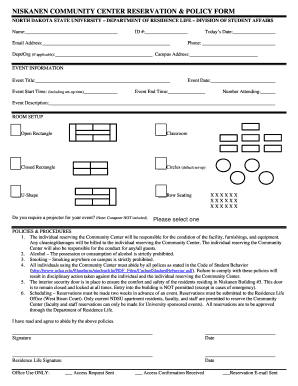
- Press the ‘Get Form’ button to receive the form and open it in your preferred editor.
- Begin by entering your name in the designated field. Ensure you provide your full legal name for identification purposes.
- Next, input your ID number in the appropriate box. This number is crucial for verifying your identity and affiliation with the institution.
- Fill in today’s date to indicate when you are completing the form. Make sure the date is current.
- Provide your email address. This will be used for communication regarding your reservation.
- Enter your phone number for additional contact if needed. Ensure the number is active and reachable.
- If applicable, include the department or organization you are representing.
- Indicate your campus address, where any correspondence or notifications can be sent.
- For event information, start by noting the event title. Clearly articulate the name of your event here.
- Select the event date using the calendar feature provided. Ensure that this date aligns with your planned schedule.
- Input the event start time, including the time you need for set-up. Be mindful of choosing a time that allows for all preparations.
- Specify the event end time, ensuring it reflects the actual duration of your event.
- Enter the number of attendees you expect. This helps in planning appropriate accommodations.
- Provide a brief description of the event. This section should summarize the purpose and activities planned.
- Choose the desired room setup format from the options provided. Select the one that best facilitates your event activities.
- Indicate whether you require a projector for your event by selecting 'Yes' or 'No'. Remember that a computer is not included with the projector.
- Review the policies and procedures outlined in the form carefully. Note the responsibilities and regulations associated with using the Community Center.
- At the end of the form, include your signature and the date to affirm that you agree to abide by the stated policies.
- The Residence Life representative will also sign and date the form for official processing.
- Finally, after checking all information for accuracy, choose to save changes, download, print, or share the completed form as required.
Complete your documents online today and ensure a successful reservation process.
Related links form
NDSU is a public school that offers a variety of programs and services to its students. The community at NDSU includes vibrant activities supported by facilities like the Niskanen Community Center. This environment promotes academic and social development for all enrolled.