Loading
Get Study Tour Application
How it works
-

Open form follow the instructions
-

Easily sign the form with your finger
-

Send filled & signed form or save
How to fill out the Study Tour Application online
Filling out the Study Tour Application online is a straightforward process designed to gather essential information for your participation in the program. This guide provides clear, step-by-step instructions to help you complete each section accurately and confidently.
Follow the steps to successfully complete your application.
- Press the ‘Get Form’ button to access the application form and open it in your editor.
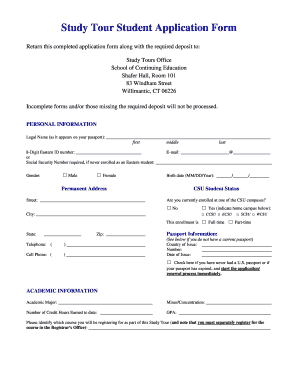
- Begin with the personal information section. Enter your legal name as it appears on your passport, your 8-digit Eastern ID number, and your email address. If you have never enrolled as an Eastern student, provide your Social Security number here.
- Indicate your gender by selecting the appropriate checkbox. Enter your birth date in the format MM/DD/YYYY, and provide your permanent address, including street, city, state, and zip code.
- Provide your phone numbers, including a home telephone and cell phone. Specify whether you are currently enrolled at a CSU campus and indicate your student status as either full-time or part-time.
- In the passport information section, fill in the country of issue, passport number, and date of issue. If applicable, check the box if you need to start the application or renewal process for a U.S. passport.
- Next, complete the academic information section. Enter your academic major, minor/concentration, number of credit hours earned, and your GPA. Specify the course you will be registering for as part of this Study Tour.
- If you have special needs or disabilities, respond to the respective questions and provide necessary documentation information. Indicate whether you have studied abroad before and whether you receive financial aid.
- Describe prior travel experiences and how participation in the Study Tour contributes to your educational goals. Include the approximate cost of the Study Tour and how you plan to fund your experience.
- Review the statement of understanding carefully, ensuring you understand your financial responsibilities, cancellation policies, and release terms. Sign and date where indicated.
- Finally, complete the health insurance and emergency contact information section by providing details of your primary and secondary emergency contacts. Ensure to indicate your health insurance provider and attach evidence of coverage.
- After filling out all sections, save your changes, and choose to download, print, or share the application form as needed.
Begin your Study Tour Application online today to ensure a smooth and successful submission.
Related links form
To write an application to your principal for permission to go on an excursion, address your message respectfully and state your purpose clearly. Mention the excursion's educational relevance and include details such as the date and location. Emphasize how attending reinforces your academic growth, making a stronger case for your study tour application.
Industry-leading security and compliance
US Legal Forms protects your data by complying with industry-specific security standards.
-
In businnes since 199725+ years providing professional legal documents.
-
Accredited businessGuarantees that a business meets BBB accreditation standards in the US and Canada.
-
Secured by BraintreeValidated Level 1 PCI DSS compliant payment gateway that accepts most major credit and debit card brands from across the globe.