Get Trs 667 Trs Care Employer Health Benefit Surcharge Information
How it works
-

Open form follow the instructions
-

Easily sign the form with your finger
-

Send filled & signed form or save
How to fill out the Trs 667 Trs Care Employer Health Benefit Surcharge Information online
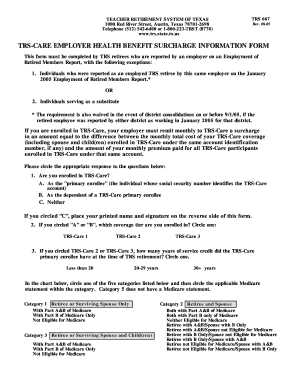
Completing the Trs 667 Trs Care Employer Health Benefit Surcharge Information form is essential for TRS retirees to ensure accurate health benefit surcharge processing. This guide provides step-by-step instructions to assist users in filling out the form online efficiently.
Follow the steps to complete your TRS 667 form accurately.
- Click ‘Get Form’ button to access the form and open it for editing.
- Begin by indicating whether you are enrolled in TRS-Care by selecting the appropriate option from the choices provided: A, B, or C. Make sure to circle your choice clearly.
- If you circled A or B, indicate which TRS-Care coverage tier you are enrolled in by circling TRS-Care 1, TRS-Care 2, or TRS-Care 3.
- For those who selected TRS-Care 2 or TRS-Care 3, indicate how many years of service credit the primary enrollee had upon retirement by selecting one of the options: Less than 20, 20-29 years, or 30+ years.
- Refer to the chart on the form and select the appropriate category that represents your situation regarding Medicare eligibility. Circle one category and then circle the applicable Medicare statement within that category.
- If you are working for more than one TRS reporting entity, provide the name, address, and telephone number for each entity in the space provided.
- If another retiree is enrolled under the same account identification number, list their name, social security number, and the details of the TRS reporting entity they are associated with.
- Lastly, certify that the information you provided is accurate by signing and printing your name along with the date on the designated lines.
- Once all fields are completed, save your changes, download a copy, or choose to print or share the form as necessary.
Complete your TRS 667 Trs Care Employer Health Benefit Surcharge Information form online now.
Related links form
TRS-Care on your paycheck signifies your contributions to your healthcare benefits. It ensures that you have access to necessary medical services as part of your employment compensation. By comprehending the TRS 667 TRS Care Employer Health Benefit Surcharge Information, you can better navigate your payroll deductions and appreciate the value of your coverage. Knowledge is empowering.
Industry-leading security and compliance
-
In businnes since 199725+ years providing professional legal documents.
-
Accredited businessGuarantees that a business meets BBB accreditation standards in the US and Canada.
-
Secured by BraintreeValidated Level 1 PCI DSS compliant payment gateway that accepts most major credit and debit card brands from across the globe.