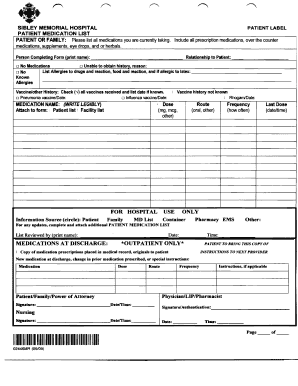
PATIENT LABEL SIBLEY MEMORIAL HOSPITAL PATIENT MEDICATION LIST PATIENT OR FAMILY: Please list all medications you are currently taking. Indude all prescription medications, over the counter medications,.
Open form follow the instructions
Easily sign the form with your finger
Send filled & signed form or save
How to use or fill out the Fillable Medication List online
The Fillable Medication List is an essential tool for documenting medications, allergies, and vaccine history. This guide provides clear instructions to help you complete the form effectively and accurately.
Follow the steps to complete your Fillable Medication List online.
- Press ‘Get Form’ button to access the Fillable Medication List and open it in your preferred online editor.
- In the 'Patient or Family' section, list all medications currently being taken, including prescriptions, over-the-counter medications, supplements, eye drops, and herbal treatments.
- Provide the name of the person completing the form by printing their name in the designated field.
- Indicate the relationship of the person filling out the form to the patient.
- If applicable, check 'No Medications' or specify if unable to obtain the patient's medication history, providing a brief reason.
- In the 'Allergies' section, indicate any known drug or food allergies, reactions experienced, and check 'No Known Allergies' if applicable.
- Document vaccine history by checking all vaccines received and include the dates, noting any specific vaccines such as pneumonia and influenza.
- For each medication listed, provide the medication name, dosage, route of administration (e.g., oral), frequency, and last dose taken with date and time.
- Attach any additional forms as necessary if updates to medication history are needed.
- Have the form reviewed and signed where indicated, providing the name and signatures of relevant parties.
- Finally, save your changes, download a copy of the completed form, print it, or share it as needed.
Begin filling out your Fillable Medication List online today!
Experience a faster way to fill out and sign forms on the web. Access the most extensive library of templates available.
Related content
Fill in the record for any new medicine, prescription (Rx) or over-the-counter (OTC), or...
Psychotropic Medication Forms, for more information about the required ... List the...
Choose from the list below. Enter the code in the ... S11 – Monitoring reactions to...
Get answers to your most pressing questions about US Legal Forms API.
How do I create a medication list?
Creating a medication list is simple with our Fillable Medication List. Start by downloading the template from our platform, then fill in your prescribed medications, their dosages, and any important instructions. Once completed, you can save and print your list to share with healthcare providers or keep it for personal reference, ensuring you never miss a dose or mix up your medications.
What is the app for medication list?
The app for medication list is a user-friendly tool designed to create and manage your Fillable Medication List easily. This application allows you to input your medications, dosages, and schedules in an organized manner. By using this app, you ensure that all your medication information is readily available and accessible whenever you need it, which is essential for managing your health effectively.
Is there an app to organize medications?
Yes, there are several apps available for organizing medications. These applications often allow you to input your medications and set reminders for doses. Utilizing a Fillable Medication List within such an app enhances your experience by providing a clear and structured overview of your prescriptions. Explore options that also integrate with healthcare providers to streamline your medication management process.
How to make a medication spreadsheet?
Creating a medication spreadsheet is straightforward. Begin by listing each medication's name, dosage, frequency, and any relevant notes in a Fillable Medication List format. You can use software like Microsoft Excel or Google Sheets to build your spreadsheet, allowing easy access and updates. This digital version can be shared with healthcare providers for better communication and care.
What's the best way to organize medications?
The best way to organize medications is to categorize them by type or purpose, such as prescriptions, over-the-counter drugs, or supplements. A Fillable Medication List can help you achieve this organization seamlessly. Additionally, consider arranging them by the frequency of use, which makes it simpler to manage your regimen. Staying organized helps you avoid missed doses and ensures your safety.
How do I document a medication list?
To document a medication list effectively, start by gathering all relevant information about your medications, including names, dosages, and frequencies. Use a Fillable Medication List to easily record and organize this information. You can expand this list to include notes about your doctor and potential side effects. Regularly updating your list ensures that you have the most accurate information available.
What are the 7 items that should be included on medication labels?
Medication labels should include key details to ensure safe usage. The seven essential items are the medication name, dosage, route of administration, frequency, prescribing physician, expiration date, and any warnings or special instructions. Using a Fillable Medication List can help you keep track of this information effectively. This ensures you have all necessary data at your fingertips for your safety and health.
How to prepare a drug list?
Preparing a drug list requires gathering all medications you currently take and writing them down in a systematic way. Utilize a Fillable Medication List for a structured approach, where you can categorize medications by type or purpose. Be sure to include any supplements or over-the-counter drugs, as well. This comprehensive list not only aids in managing your medications but also serves as a valuable resource for healthcare providers.
How to fill out a medication list?
Filling out a medication list is straightforward if you organize your information. Start by listing each medication, followed by the dosage and how often you take it. The Fillable Medication List facilitates this process by providing a clear format to complete your information easily. Don't forget to review your list regularly, especially after any medication changes.
How to write out a medication list?
Writing out a medication list involves clearly detailing each medication you take. Begin with the medication name, dosage, and frequency of intake. Using a Fillable Medication List can streamline this process, allowing you to add any relevant notes such as side effects or purposes for the medications. Having this list on hand will make doctor's visits simpler and improve your overall health management.
Use professional pre-built templates to fill in and sign documents online faster. Get access to thousands of forms.
If you believe that this page should be taken down, please follow our DMCA take down process here.