Loading
Form preview
  • US Legal Forms
  • Other Templates
  • More Forms
  • More Uncategorized Forms
  • Tdcj Employer Identification Number

Get Tdcj Employer Identification Number

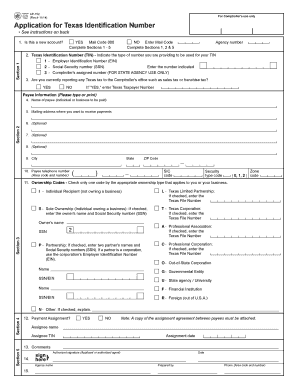
Code 000 Complete Sections 1 - 5 NO Enter Mail Code Complete Sections 1, 2 & 5 Agency number 2. Texas Identification Number (TIN) - Indicate the type of number you are providing to be used for your TIN 1 - Employer Identification Number (EIN) 2 - Social Security number (SSN) Enter the number indicated 3 - Comptroller's assigned number (FOR STATE AGENCY USE ONLY) 3. Are you currently reporting any Texas tax to the Comptroller's office such as sales tax or franchise tax.

How it works

  1. Open form

    Open form follow the instructions

  2. Easily sign form

    Easily sign the form with your finger

  3. Share form

    Send filled & signed form or save

How to fill out the Tdcj Employer Identification Number online

Filling out the Tdcj Employer Identification Number form online is a straightforward process that allows users to efficiently provide required information for Texas state billing. This guide will help you navigate each section of the form with ease, ensuring all necessary details are completed correctly.

Follow the steps to successfully complete the form.

  1. Click the ‘Get Form’ button to obtain the form and open it in the editor.
  2. Indicate whether this is a new account or an existing one by selecting 'YES' or 'NO'. If 'YES', complete Sections 1 - 5; if 'NO', enter the Mail Code and complete Sections 1, 2 & 5.
  3. In Section 1, provide the Texas Identification Number (TIN) by selecting the type of number you are providing: Employer Identification Number (EIN), Social Security number (SSN), or Comptroller's assigned number.
  4. Indicate if you are currently reporting any Texas tax to the Comptroller's office by selecting 'YES' or 'NO'. If 'YES', enter your Texas Taxpayer Number.
  5. Provide your name in the payee information section (Item 4) and input the mailing address where payments should be sent (Item 5). Ensure to follow the specified character limits.
  6. Complete the city, state, and ZIP Code fields in Item 9, and enter the payee telephone number in Item 10.
  7. In Section 3, check the appropriate ownership code that applies to you or your business and provide any necessary additional information as required.
  8. If applicable, complete Section 4 regarding payment assignment, ensuring to include the assignee's name, TIN, and assignment date.
  9. Fill in any comments that may assist in processing the application in Section 5, and provide your authorized signature and date.
  10. Once all sections are completed, save your changes, and choose to download, print, or share the form as necessary.

Complete your Tdcj Employer Identification Number form online today for seamless state billing.

Get form

Experience a faster way to fill out and sign forms on the web. Access the most extensive library of templates available.
Get form

Related content

Important Employment Verification Information for...
➂ Obtain the verification from The Work Number by using one of the options below. Proof...
Learn more
TDCJ Search of Individuals Policy
May 5, 2017 — of Public Safety (DPS) ID card; (3) Texas Department of Criminal Justice...
Learn more
Département de justice pénale du Texas - Texas...
Nov 28, 2020 — Code vestimentaire des délinquants. Les délinquants de toutes les...
Learn more

Related links form

OFFER DOCUMENT FOR SALE OF SHOPS IN NBCC SHOPPING CENTRE POST BOARD ACTION AGENDA Request For Domain Name Username And Password Terms And Conditions

Questions & Answers

Get answers to your most pressing questions about US Legal Forms API.

Contact support

The Texas employer state ID number is a unique identification assigned by the Texas Workforce Commission to employers in the state. You need this number to report unemployment taxes and maintain compliance with state regulations. As you work towards obtaining your Tdcj Employer Identification Number, don't overlook the importance of also securing your Texas employer state ID number to facilitate smooth business operations.

An Employer Identification Number (EIN) follows a standard format of nine digits, which is represented as XX-XXXXXXX. This format ensures ease of identification for businesses. Accurately using your Tdcj Employer Identification Number is crucial for tax filing and compliance.

You can find your employer's state ID number on various tax documents, such as Form 941 or Texas unemployment tax filings. If you have recently registered as an employer, your state ID will be provided in the confirmation from Texas. Additionally, for assistance, you may leverage the resources available on the uslegalforms platform, which can guide you in accessing your Tdcj Employer Identification Number.

The format of an Employer Identification Number (EIN) in Texas consists of nine digits, structured as XX-XXXXXXX. This format is consistent across the United States, and using your Tdcj Employer Identification Number correctly ensures compliance with federal and state regulations.

A Texas employer's state ID number is a unique identifier assigned to employers in Texas for state tax purposes. This number is necessary for reporting state taxes and unemployment contributions. When obtaining your Tdcj Employer Identification Number, it's essential to ensure that you also register for a Texas employer's state ID number.

A Texas state ID is an identification card issued by the Texas Department of Public Safety. It serves as an official form of ID for residents who do not hold a driver's license. If you are applying for a Tdcj Employer Identification Number, having a valid Texas state ID can help verify your identity.

To set up an Employer Identification Number (EIN), you will need to complete the application process through the IRS. You can apply online, by mail, or by fax. Having your Tdcj Employer Identification Number can help streamline your business operations, ensuring you meet all necessary tax requirements.

There are several factors that can disqualify you from obtaining a Tdcj Employer Identification Number. If you do not have a valid Taxpayer Identification Number or if your business is not in compliance with federal regulations, you may face difficulties. Additionally, any discrepancies in provided information can lead to application denial.

When applying for a Tdcj Employer Identification Number in Texas, follow the IRS application process. Ensure that you provide accurate information about your Texas-based business. If you require assistance, platforms like uslegalforms can support you in completing your application correctly.

To acquire a Tdcj Employer Identification Number, you need to gather specific information about your business. This includes your business structure, location, and type of activities. Having this information ready can streamline your application process, whether online or via traditional mail.

Get This Form Now!

Use professional pre-built templates to fill in and sign documents online faster. Get access to thousands of forms.
Get form
If you believe that this page should be taken down, please follow our DMCA take down processhere.
Get Tdcj Employer Identification Number
Get form
  • Adoption
  • Bankruptcy
  • Contractors
  • Divorce
  • Home Sales
  • Employment
  • Identity Theft
  • Incorporation
  • Landlord Tenant
  • Living Trust
  • Name Change
  • Personal Planning
  • Small Business
  • Wills & Estates
  • Packages A-Z
  • Affidavits
  • Bankruptcy
  • Bill of Sale
  • Corporate - LLC
  • Divorce
  • Employment
  • Identity Theft
  • Internet Technology
  • Landlord Tenant
  • Living Wills
  • Name Change
  • Power of Attorney
  • Real Estate
  • Small Estates
  • Wills
  • All Forms
  • Forms A-Z
  • Other Templates
  • Legal Hub
  • About Us
  • Help Portal
  • Legal Resources
  • Blog
  • Affiliates
  • Contact Us
  • Delete My Account
  • Site Map
  • Industries
  • Forms in Spanish
  • Localized Forms
  • State-specific Forms
  • Forms Kit
  • Real Estate Handbook
  • All Guides
  • Notarize
  • Incorporation services
  • For Consumers
  • For Small Business
  • For Attorneys
  • USLegal
  • FormsPass
  • pdfFiller
  • signNow
  • altaFlow
  • DocHub
  • Instapage
Form Packages
  • Adoption
  • Bankruptcy
  • Contractors
  • Divorce
  • Home Sales
  • Employment
  • Identity Theft
  • Incorporation
  • Landlord Tenant
  • Living Trust
  • Name Change
  • Personal Planning
  • Small Business
  • Wills & Estates
  • Packages A-Z
Form Categories
  • Affidavits
  • Bankruptcy
  • Bill of Sale
  • Corporate - LLC
  • Divorce
  • Employment
  • Identity Theft
  • Internet Technology
  • Landlord Tenant
  • Living Wills
  • Name Change
  • Power of Attorney
  • Real Estate
  • Small Estates
  • Wills
  • All Forms
  • Forms A-Z
  • Other Templates
Customer Service
  • Legal Hub
  • About Us
  • Help Portal
  • Legal Resources
  • Blog
  • Affiliates
  • Contact Us
  • Delete My Account
  • Site Map
  • Industries
  • Forms in Spanish
  • Localized Forms
  • State-specific Forms
  • Forms Kit
Legal Guides
  • Real Estate Handbook
  • All Guides
Prepared for you
  • Notarize
  • Incorporation services
Our Customers
  • For Consumers
  • For Small Business
  • For Attorneys
Our Sites
  • USLegal
  • FormsPass
  • pdfFiller
  • signNow
  • altaFlow
  • DocHub
  • Instapage
Social Media
Call us now toll free:
+1 833 426 79 33
As seen in:
© Copyright 1999-2026 airSlate Legal Forms, Inc. 17 Station Street, Suite 303, Brookline, MA 02445
  • Your Privacy Choices
  • Terms of Service
  • Privacy Notice
  • Content Takedown Policy
  • Bug Bounty Program