We use cookies to improve security, personalize the user experience, enhance our marketing activities (including cooperating with our marketing partners) and for other business use.
Click "here" to read our Cookie Policy. By clicking "Accept" you agree to the use of cookies. Read less
Read more
Accept
Loading
Form preview
  • US Legal Forms
  • Form Library
  • More Forms
  • More Uncategorized Forms
  • Nc Dhsr Hcpr: Faculty Removal Form - Nc Department Of Health ... - Ncdhhs

Get Nc Dhsr Hcpr: Faculty Removal Form - Nc Department Of Health ... - Ncdhhs

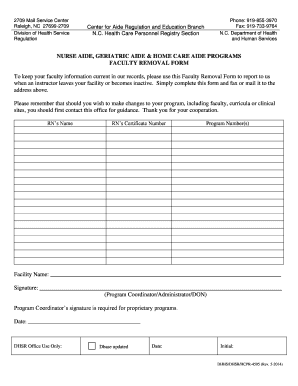
2709 Mail Service Center Raleigh, NC 27699-2709 Division of Health Service Regulation Center for Aide Regulation and Education Branch N.C. Health Care Personnel Registry Section Phone: 919-855-3970.

How it works

  1. Open form

    Open form follow the instructions

  2. Easily sign form

    Easily sign the form with your finger

  3. Share form

    Send filled & signed form or save

How to fill out the NC DHSR HCPR: Faculty Removal Form - NC Department of Health online

Filling out the NC DHSR HCPR: Faculty Removal Form is essential for maintaining accurate faculty information within the North Carolina Department of Health. This guide provides easy-to-follow instructions to complete the form online, ensuring a smooth submission process.

Follow the steps to complete the Faculty Removal Form.

  1. Press the ‘Get Form’ button to access the form and open it in your browser.
  2. Begin by entering the RN's name in the designated field. Ensure that the name is accurately spelled to prevent issues with processing.
  3. Input the RN's certificate number as required. This number is essential for identification and verification purposes.
  4. List the program number(s) relevant to the faculty member being reported. This helps maintain the accuracy of the programs under which they taught.
  5. Provide the facility name in the designated area. This should be the official name of the facility where the faculty member was employed.
  6. Secure the necessary signature from the program coordinator, administrator, or director of nursing (DON). A signature is required for proprietary programs to validate the submission.
  7. Enter the date of completion in the space provided. This helps track when the notification was submitted.
  8. Once all fields are completed, review the form for any errors before submitting. Consider saving changes, downloading a copy for your records, or printing it if needed.
  9. Finally, send the completed form via fax or mail to the specified address at the top of the document.

Start completing the Faculty Removal Form online today to ensure your faculty records are up-to-date.

Get form

Experience a faster way to fill out and sign forms on the web. Access the most extensive library of templates available.
Get form

Related content

NC DHSR: Forms and Applications - ncdhhs
Online forms are available from various sections of the Division of Health Service...
Learn more
2017-2018 College Catalog - Central Carolina...
TRiO Student Support Services & STEM-Health Science ...... 49. Developmental ... College's...
Learn more

Related links form

PRO FIGHTERS CONTRACT Patient Data Lifecycle Day Seven: Report Definitions D.C. DIVAS Parental Permission To Participate In 2012 Champions Youth Camp

Questions & Answers

Get answers to your most pressing questions about US Legal Forms API.

Contact support

To contact the Department of Social Services (DSS) in North Carolina, you can find contact information listed on the NC DHHS website. They provide specific phone numbers and email addresses for various inquiries. For matters related to the NC DHSR HCPR: Faculty Removal Form - NC Department Of Health - Ncdhhs, you may visit the specific DSS page that aligns with your needs.

You can email the US Department of Health and Human Services by visiting their official website. There, you will find contact options specific to various divisions and services. If your inquiry relates to the NC DHSR HCPR: Faculty Removal Form - NC Department Of Health - Ncdhhs, ensure you look up the right division for accurate communication.

The email format for the NC Department of Health and Human Services generally follows a standard format, typically including the department name followed by '@ncdhhs'. For specific inquiries regarding subjects like the NC DHSR HCPR: Faculty Removal Form - NC Department Of Health - Ncdhhs, refer to their official email list found on their website.

You can email the North Carolina Department of Health and Human Services through their official contact page. This page provides several email options based on different services, including those related to the NC DHSR HCPR: Faculty Removal Form - NC Department Of Health - Ncdhhs. Be sure to choose the correct department for a prompt response.

To email the NC Department of Health and Human Services, visit their official website. There, you can find a dedicated contact page with various department email addresses listed. Make sure to select the appropriate department related to your query about the NC DHSR HCPR: Faculty Removal Form - NC Department Of Health - Ncdhhs.

To make a complaint against the NC Department of Health and Human Services, you should start by reviewing their complaint process on their website. Clearly outline your complaint and include essential details for a thorough assessment. Using the NC DHSR HCPR: Faculty Removal Form can help you organize your information and present your issue coherently, ensuring that it receives appropriate attention and response.

The North Carolina Health Care Personnel Education and Credentialing Section oversees the education, training, and certification of health care personnel in the state. This section plays a crucial role in ensuring that all health care providers meet the necessary standards to ensure patient safety. If you need further assistance with issues related to these personnel, the NC DHSR HCPR: Faculty Removal Form is a valuable tool to assist in your concerns about faculty or personnel.

Filing a complaint against the Department of Social Services in North Carolina involves reaching out to the local office for guidance. You can submit a written complaint detailing your concerns, either online or via mail. Utilizing the NC DHSR HCPR: Faculty Removal Form may also be beneficial for organizing your complaint, especially in cases related to personnel misconduct. Make sure to keep a copy of your submitted complaint for records.

To file a complaint with the NC Department of Health and Human Services (DHHs), you can visit their official website or contact their office directly. Make sure to gather all necessary details about your complaint, as this can help expedite the review process. You may also consider using the NC DHSR HCPR: Faculty Removal Form for specific complaints related to health care personnel. This form can enhance the clarity of your issue and support your case effectively.

To contact the NC Department of Health and Human Services, you should check their official website for updated contact details. They offer several options for reaching out, including phone calls and emails, to address any concerns you may have. If you require assistance with issues related to the NC DHSR HCPR: Faculty Removal Form, their representatives are available to help.

Get This Form Now!

Use professional pre-built templates to fill in and sign documents online faster. Get access to thousands of forms.
Get form
If you believe that this page should be taken down, please follow our DMCA take down processhere.

Industry-leading security and compliance

US Legal Forms protects your data by complying with industry-specific security standards.
  • In businnes since 1997
    25+ years providing professional legal documents.
  • Accredited business
    Guarantees that a business meets BBB accreditation standards in the US and Canada.
  • Secured by Braintree
    Validated Level 1 PCI DSS compliant payment gateway that accepts most major credit and debit card brands from across the globe.
Get NC DHSR HCPR: Faculty Removal Form - NC Department Of Health ... - Ncdhhs
Get form
Form Packages
Adoption
Bankruptcy
Contractors
Divorce
Home Sales
Employment
Identity Theft
Incorporation
Landlord Tenant
Living Trust
Name Change
Personal Planning
Small Business
Wills & Estates
Packages A-Z
Form Categories
Affidavits
Bankruptcy
Bill of Sale
Corporate - LLC
Divorce
Employment
Identity Theft
Internet Technology
Landlord Tenant
Living Wills
Name Change
Power of Attorney
Real Estate
Small Estates
Wills
All Forms
Forms A-Z
Form Library
Customer Service
Terms of Service
Privacy Notice
Legal Hub
Content Takedown Policy
Bug Bounty Program
About Us
Help Portal
Legal Resources
Blog
Affiliates
Contact Us
Delete My Account
Site Map
Industries
Forms in Spanish
Localized Forms
State-specific Forms
Forms Kit
Legal Guides
Real Estate Handbook
All Guides
Prepared for You
Notarize
Incorporation services
Our Customers
For Consumers
For Small Business
For Attorneys
Our Sites
US Legal Forms
USLegal
FormsPass
pdfFiller
signNow
airSlate WorkFlow
DocHub
Instapage
Social Media
Call us now toll free:
+1 833 426 79 33
As seen in:
  • USA Today logo picture
  • CBC News logo picture
  • LA Times logo picture
  • The Washington Post logo picture
  • AP logo picture
  • Forbes logo picture
© Copyright 1997-2025
airSlate Legal Forms, Inc.
3720 Flowood Dr, Flowood, Mississippi 39232
Form Packages
Adoption
Bankruptcy
Contractors
Divorce
Home Sales
Employment
Identity Theft
Incorporation
Landlord Tenant
Living Trust
Name Change
Personal Planning
Small Business
Wills & Estates
Packages A-Z
Form Categories
Affidavits
Bankruptcy
Bill of Sale
Corporate - LLC
Divorce
Employment
Identity Theft
Internet Technology
Landlord Tenant
Living Wills
Name Change
Power of Attorney
Real Estate
Small Estates
Wills
All Forms
Forms A-Z
Form Library
Customer Service
Terms of Service
Privacy Notice
Legal Hub
Content Takedown Policy
Bug Bounty Program
About Us
Help Portal
Legal Resources
Blog
Affiliates
Contact Us
Delete My Account
Site Map
Industries
Forms in Spanish
Localized Forms
State-specific Forms
Forms Kit
Legal Guides
Real Estate Handbook
All Guides
Prepared for You
Notarize
Incorporation services
Our Customers
For Consumers
For Small Business
For Attorneys
Our Sites
US Legal Forms
USLegal
FormsPass
pdfFiller
signNow
airSlate WorkFlow
DocHub
Instapage
Social Media
Call us now toll free:
+1 833 426 79 33
As seen in:
  • USA Today logo picture
  • CBC News logo picture
  • LA Times logo picture
  • The Washington Post logo picture
  • AP logo picture
  • Forbes logo picture
© Copyright 1997-2025
airSlate Legal Forms, Inc.
3720 Flowood Dr, Flowood, Mississippi 39232