Loading
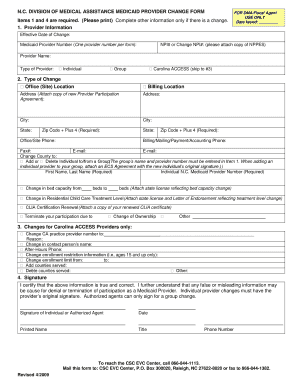
Get Dma Map Form
How it works
-

Open form follow the instructions
-

Easily sign the form with your finger
-

Send filled & signed form or save
How to fill out the Dma Map Form online
Filling out the Dma Map Form online can streamline the process of updating your Medicaid provider information. This guide will walk you through each section and field of the form to ensure that you complete it accurately and efficiently.
Follow the steps to successfully complete the Dma Map Form online.
- Click the ‘Get Form’ button to access the form and open it in your preferred editor.
- Begin by providing your provider information, including the effective date of change, Medicaid provider number, NPI number, and your name. Indicate your type of provider by selecting either 'Individual', 'Group', or 'Carolina ACCESS' if applicable.
- Specify the type of change you are reporting by checking the appropriate box. This includes options such as office location, billing location, or changes in individual providers. Provide detailed information including addresses and contact numbers as required.
- If relevant, complete the section for Carolina ACCESS providers specifically, including changes to practice provider numbers and enrollment details.
- In the signature section, ensure the individual or authorized agent certifies that the information provided is truthful. Include the date, printed name, title, and phone number.
- Once all sections are completed, save your changes. You may choose to download, print, or share the finalized form as needed.
Begin filling out your Dma Map Form online today to ensure your Medicaid provider information is up to date.
A DMA map is a visual tool that outlines the different designated market areas across regions. It aids in showcasing the reach of various media services and assists companies in focusing their marketing strategies. Utilizing a Dma Map Form can enhance your understanding of these areas and drive more effective engagements.