We use cookies to improve security, personalize the user experience, enhance our marketing activities (including cooperating with our marketing partners) and for other business use.
Click "here" to read our Cookie Policy. By clicking "Accept" you agree to the use of cookies. Read less
Read more
Accept
Loading
Form preview
  • US Legal Forms
  • Form Library
  • More Forms
  • More Uncategorized Forms
  • Gl3187e Form

Get Gl3187e Form

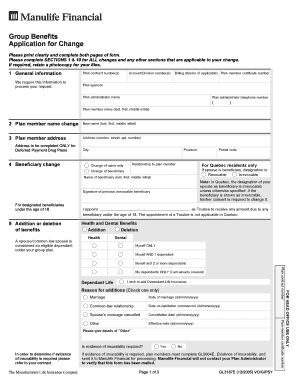
Group Benefits Application for Change Please print clearly and complete both pages of form. Please complete SECTIONS 1 & 10 for ALL changes and any other sections that are applicable to your change.

How it works

  1. Open form

    Open form follow the instructions

  2. Easily sign form

    Easily sign the form with your finger

  3. Share form

    Send filled & signed form or save

How to fill out the Gl3187e Form online

Filling out the Gl3187e Form online is an essential process for making changes to your group benefits. This guide provides clear and step-by-step instructions to assist you in accurately completing the form, ensuring your request is processed smoothly.

Follow the steps to complete the Gl3187e Form online successfully.

  1. Click the ‘Get Form’ button to access the Gl3187e Form. This will open the form in your online editor, allowing you to begin filling it out.
  2. Begin with Section 1, which requires general information. Fill in the plan contract number, account/division number, billing division (if applicable), plan member certificate number, plan sponsor, the name of the plan administrator, and their telephone number.
  3. If you are making a name change, proceed to Section 2 and enter the new name in the designated fields (last, first, middle initial).
  4. Section 3 addresses the plan member's address. Fill in your complete address, including the city, province, and postal code, ensuring accuracy.
  5. In Section 4, you can make a beneficiary change. Indicate the relationship to the plan member, and if changing the beneficiary, provide their name. Remember to sign from previous irrevocable beneficiaries if required.
  6. Section 5 allows you to add or delete benefits. Indicate whether you wish to add or delete health and dental benefits and provide information about dependents if applicable.
  7. The next section, Section 6, involves coordination of benefits. Answer questions regarding your spouse's health and dental coverage for claims adjudication.
  8. Complete Section 7 with family information, ensuring changes for dependents are noted accurately. Include all necessary dates and names.
  9. In Section 10, provide your signature and date to apply for coverage under the group benefits plan.
  10. Once all sections are filled out, review the entire form for accuracy before saving changes. You can then download, print, or share the completed form as needed.

Complete your Gl3187e Form online today to ensure your benefits are updated.

Get form

Experience a faster way to fill out and sign forms on the web. Access the most extensive library of templates available.
Get form

Related links form

U.S. Air Force Form AFI31-202 AFMCSUP1. Free Download Standard Form 2817 Minnesota Valley Ski Team Summer Registration Form AFSPC INSTRUCTION 36-280501

Questions & Answers

Get answers to your most pressing questions about US Legal Forms API.

Contact support

To send documents to Manulife, you can use their secure online portal or mail them directly to the address noted on their website. If you use the online option, make sure to include the Gl3187e Form and any other necessary paperwork. Double-check that you have all documents ready and that they are legible to avoid processing delays.

When filling out the Gl3187e Form, ensure that you detail the beneficiary percentage accurately. This percentage determines how assets are distributed among beneficiaries after your passing. Typically, you should specify clear percentages that total 100, avoiding any ambiguity. If you have questions about this, you might find valuable guidance through the US Legal Forms platform.

Manulife's mailing address is provided on their website and in any correspondence you receive from them. Generally, you should send your completed forms, like the Gl3187e Form, to this address for efficient processing. If you're unsure, check the latest information on their site to avoid delays in communication.

You can reach Manulife customer service by sending an email to their official support address found on their website. When composing your email, include all relevant information regarding your inquiry, such as your claim number or policy details, which may include the Gl3187e Form. This helps to ensure a timely response to your questions or concerns.

To submit claims to Manulife, you need to complete the Gl3187e Form accurately. After completing the form, you can submit it online through Manulife's website or send it by mail. Make sure to keep a copy of your submission for your records. If you need further assistance, consider visiting the US Legal Forms platform for helpful resources.

With Manulife, you typically have a set time limit to submit a claim, often ranging from 90 to 365 days, depending on the type of insurance. It's important to carefully read your policy for specific details. To streamline your claims process and ensure nothing is overlooked, consider using the Gl3187e Form to keep track of your submissions and deadlines.

Yes, you can generally change beneficiaries at any time, as long as your policy does not have restrictions. It's essential to follow the process outlined by your insurance provider, as some may require specific forms. The Gl3187e Form can assist you in making these changes efficiently, ensuring your wishes are accurately documented and updated.

You should send your Fegli designation of beneficiary form to the address provided on the form itself or check the official website for further instructions. It’s crucial to ensure this document is sent to the right location to avoid delays or complications. If you’re not sure, the Gl3187e Form is a useful tool to help manage your beneficiary designations and keep everything organized.

Typically, you can add your fiance to your health insurance plan if you are married or if your plan allows domestic partners. However, many insurance providers require legal documentation. To navigate these options efficiently, consider using the Gl3187e Form. This form can help clarify your dependent status to the insurance company.

An 1187 form is a specific document that federal employees use to authorize or revoke union membership and its associated dues. Filling out this form correctly is crucial for making any changes to your deductions. To maintain clarity and compliance, you might want to look at the Gl3187e Form for similar administrative tasks.

Get This Form Now!

Use professional pre-built templates to fill in and sign documents online faster. Get access to thousands of forms.
Get form
If you believe that this page should be taken down, please follow our DMCA take down processhere.

Industry-leading security and compliance

US Legal Forms protects your data by complying with industry-specific security standards.
  • In businnes since 1997
    25+ years providing professional legal documents.
  • Accredited business
    Guarantees that a business meets BBB accreditation standards in the US and Canada.
  • Secured by Braintree
    Validated Level 1 PCI DSS compliant payment gateway that accepts most major credit and debit card brands from across the globe.
Get Gl3187e Form
Get form
Form Packages
Adoption
Bankruptcy
Contractors
Divorce
Home Sales
Employment
Identity Theft
Incorporation
Landlord Tenant
Living Trust
Name Change
Personal Planning
Small Business
Wills & Estates
Packages A-Z
Form Categories
Affidavits
Bankruptcy
Bill of Sale
Corporate - LLC
Divorce
Employment
Identity Theft
Internet Technology
Landlord Tenant
Living Wills
Name Change
Power of Attorney
Real Estate
Small Estates
Wills
All Forms
Forms A-Z
Form Library
Customer Service
Terms of Service
Privacy Notice
Legal Hub
Content Takedown Policy
Bug Bounty Program
About Us
Help Portal
Legal Resources
Blog
Affiliates
Contact Us
Delete My Account
Site Map
Industries
Forms in Spanish
Localized Forms
State-specific Forms
Forms Kit
Legal Guides
Real Estate Handbook
All Guides
Prepared for You
Notarize
Incorporation services
Our Customers
For Consumers
For Small Business
For Attorneys
Our Sites
US Legal Forms
USLegal
FormsPass
pdfFiller
signNow
airSlate WorkFlow
DocHub
Instapage
Social Media
Call us now toll free:
+1 833 426 79 33
As seen in:
  • USA Today logo picture
  • CBC News logo picture
  • LA Times logo picture
  • The Washington Post logo picture
  • AP logo picture
  • Forbes logo picture
© Copyright 1997-2025
airSlate Legal Forms, Inc.
3720 Flowood Dr, Flowood, Mississippi 39232
Form Packages
Adoption
Bankruptcy
Contractors
Divorce
Home Sales
Employment
Identity Theft
Incorporation
Landlord Tenant
Living Trust
Name Change
Personal Planning
Small Business
Wills & Estates
Packages A-Z
Form Categories
Affidavits
Bankruptcy
Bill of Sale
Corporate - LLC
Divorce
Employment
Identity Theft
Internet Technology
Landlord Tenant
Living Wills
Name Change
Power of Attorney
Real Estate
Small Estates
Wills
All Forms
Forms A-Z
Form Library
Customer Service
Terms of Service
Privacy Notice
Legal Hub
Content Takedown Policy
Bug Bounty Program
About Us
Help Portal
Legal Resources
Blog
Affiliates
Contact Us
Delete My Account
Site Map
Industries
Forms in Spanish
Localized Forms
State-specific Forms
Forms Kit
Legal Guides
Real Estate Handbook
All Guides
Prepared for You
Notarize
Incorporation services
Our Customers
For Consumers
For Small Business
For Attorneys
Our Sites
US Legal Forms
USLegal
FormsPass
pdfFiller
signNow
airSlate WorkFlow
DocHub
Instapage
Social Media
Call us now toll free:
+1 833 426 79 33
As seen in:
  • USA Today logo picture
  • CBC News logo picture
  • LA Times logo picture
  • The Washington Post logo picture
  • AP logo picture
  • Forbes logo picture
© Copyright 1997-2025
airSlate Legal Forms, Inc.
3720 Flowood Dr, Flowood, Mississippi 39232