Loading
Get Casa Form 465
How it works
-

Open form follow the instructions
-

Easily sign the form with your finger
-

Send filled & signed form or save
How to fill out the Casa Form 465 online
Filling out the Casa Form 465 online is essential for notifying training outcomes in the aviation maintenance sector. This guide provides step-by-step instructions to help you complete the form accurately and efficiently.
Follow the steps to complete the Casa Form 465 online.
- Press the ‘Get Form’ button to download the Casa Form 465 and open it in your preferred editor.
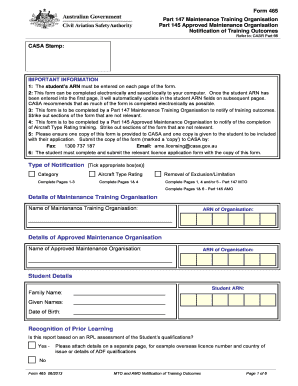
- Begin by entering the student's Aviation Reference Number (ARN) on every page of the form. This number will automatically update in the ARN fields on subsequent pages once entered on the first page.
- Identify which sections of the form are relevant to your situation and strike out any sections that do not apply to your case. Ensure you complete the necessary sections for your organization type (Part 147 or Part 145).
- Fill in the details of the Maintenance Training Organisation and the Approved Maintenance Organisation, including the names and ARN of both organizations.
- Complete the student details, including the family name, given names, date of birth, and student ARN.
- Indicate whether the report is based on Recognition of Prior Learning (RPL) by answering 'Yes' or 'No' and attaching any relevant supporting documents if applicable.
- Proceed to Part 1 and verify the category training report eligibility criteria. Provide the required signatures and dates where necessary.
- In Part 2, specify the applicable training reports, including theoretical training and practical experience. Complete the relevant sections as indicated.
- Continue to fill out Part 3 on the removal of exclusions or limitations report, providing necessary signatures and dates.
- Complete Part 4 dedicated to Aircraft Type Rating training, ensuring you verify and sign the declarations.
- Once all sections of the form are filled out, save your changes, and download or print the completed form for your records.
- Share the appropriate copy of the completed form with CASA via fax or email, and provide one copy to the student for their application.
Complete your Casa Form 465 online today to ensure all training outcomes are accurately reported.