Get 0178e - Repeat Employer Application.doc
How it works
-

Open form follow the instructions
-

Easily sign the form with your finger
-

Send filled & signed form or save
How to use or fill out the 0178E - Repeat Employer Application.doc online
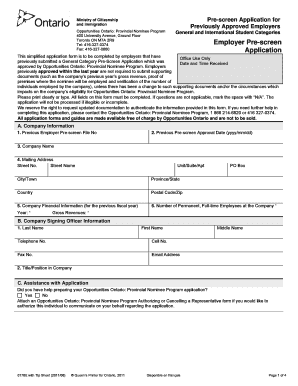
Filling out the 0178E - Repeat Employer Application is an essential step for employers wishing to participate in the Opportunities Ontario: Provincial Nominee Program. This guide outlines the necessary steps for completing the form accurately and efficiently online.
Follow the steps to complete the application online.
- Click ‘Get Form’ button to obtain the form and open it in the online editor.
- In section A, begin by entering your company's previous Employer Pre-screen File number and the previous pre-screen approval date in the specified format (yyyy/mm/dd).
- Provide your company name and mailing address, including street number, street name, unit/suite/apartment, city/town, province/state, country, and postal code/zip.
- In section A5, input the company financial information, including the fiscal year and gross revenues. Specify the number of permanent, full-time employees at your company.
- Proceed to section B, where you must fill in the signing officer's details, including last name, first name, middle name, contact numbers, email address, and title/position within the company.
- Section C requires you to indicate whether you had assistance in preparing the application. If you did, attach the necessary authorizing form to allow this individual to communicate on your behalf.
- In section D, detail the positions being recruited for. You must fill this out for each position, including the title, rate of pay, number of work hours per week, and location of employment.
- For each position, provide the four-digit National Occupational Classification (NOC) code and indicate the skill level required. Identify the category of the prospective nominee and their status.
- Complete the information about recruitment efforts prior to applying to the Provincial Nominee Program. Include proof of efforts if applicable.
- In section E, check off each box to confirm that you have included all required documents in your application package before submission.
- Finally, in section F, an authorized officer must initial each statement, sign the form, and include the date.
- Once you have filled out all sections and verified the information, save your changes, download a copy for your records, and print or share the form as needed.
Complete your 0178E - Repeat Employer Application online today to ensure a smooth application process.
To renew your employment authorization document, you need to fill out the appropriate forms, including the 0178E - Repeat Employer Application.doc. This document ensures you can continue working without interruptions. Make sure to submit your application before your current authorization expires to prevent any gaps in your employment status. You can easily access the 0178E - Repeat Employer Application.doc through the uslegalforms platform, which provides guidance and resources for a smooth renewal process.
Industry-leading security and compliance
-
In businnes since 199725+ years providing professional legal documents.
-
Accredited businessGuarantees that a business meets BBB accreditation standards in the US and Canada.
-
Secured by BraintreeValidated Level 1 PCI DSS compliant payment gateway that accepts most major credit and debit card brands from across the globe.