Loading
Form preview
  • US Legal Forms
  • Form Library
  • More Forms
  • More Uncategorized Forms
  • 33 Cfr 325

Get 33 Cfr 325

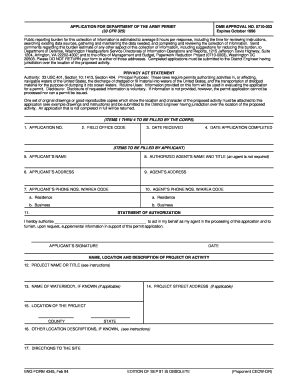
APPLICATION FOR DEPARTMENT OF THE ARMY PERMIT (33 CFR 325) OMB APPROVAL NO. 0710-003 Expires October 1996 Public reporting burden for this collection of information is estimated to average 5 hours.

How it works

  1. Open form

    Open form follow the instructions

  2. Easily sign form

    Easily sign the form with your finger

  3. Share form

    Send filled & signed form or save

How to fill out the 33 Cfr 325 online

Filling out the 33 Cfr 325 form is an essential step in applying for a permit from the Department of the Army. This guide provides a clear and supportive walkthrough to help users understand each section of the form and complete it accurately online.

Follow the steps to successfully complete the 33 Cfr 325 form online.

  1. Click the ‘Get Form’ button to access the form and open it in the editor.
  2. Begin by filling in items 1 through 4, which are to be completed by the Corps. Enter the application number, field office code, the date the application was received, and the date the application was completed.
  3. Proceed to complete items 5 through 10, which require your personal information. This includes your name, address, phone numbers, and if applicable, the name and address of an authorized agent who can represent you.
  4. For item 11, provide a statement of authorization if you are using an agent. Ensure that you complete this section by signing and dating as the applicant.
  5. In item 12, enter the project name or title. For item 13, specify the name of the waterbody relevant to your project. If applicable, complete item 14 with the project street address.
  6. Continue filling items 15 and 16 with the specific location information of your project, including county, state, and any other location descriptions.
  7. Provide directions to the project site in item 17. Then, in item 18, describe the nature of the activity including all relevant features and aspects of the project.
  8. For item 19, articulate the project purpose clearly. If your project involves dredged and/or fill material, complete items 20-22 with details regarding reasons for discharge, types of material, and surface area affected.
  9. Indicate whether any portion of the work is already complete in item 23, and if yes, provide a description of the completed work.
  10. Fill in item 24 with the addresses of adjoining property owners. Include a supplemental list if necessary.
  11. In item 25, list any other certifications or approvals received from federal, state, or local agencies regarding the work detailed in this application.
  12. Complete section 26 by signing and dating the application, certifying the information is accurate and that you have the authority to undertake the work.
  13. Once all fields are filled, save your changes, and consider downloading or printing the form for your records. Ensure you share the completed application with the appropriate District Engineer.

Prepare and submit your 33 Cfr 325 application online today!

Get form

Experience a faster way to fill out and sign forms on the web. Access the most extensive library of templates available.
Get form

Related content

33 CFR 325 - PROCESSING OF DEPARTMENT OF THE ...
Title 33 - Navigation and Navigable Waters Chapter II - CORPS OF ENGINEERS, DEPARTMENT OF...
Learn more
33 CFR Part 325 - PROCESSING OF DEPARTMENT OF THE...
33 CFR Part 325 - PROCESSING OF DEPARTMENT OF THE ARMY PERMITS. CFR. prev | next · §...
Learn more
Model 325
Feb 23, 2007 — Lake Shore Model 325 Temperature Controller User's Manual ... resistor...
Learn more

Related links form

Wellness Program ALCOHOL PERMIT Utility Contractor's License Application Funeral Home BApplicationb - City Of Annapolis

Questions & Answers

Get answers to your most pressing questions about US Legal Forms API.

Contact support

The Corps of Engineers Appendix C provides specific instructions for complying with Section 106 during project reviews. It acts as a framework within 33 CFR 325 for assessing the potential impact on historic properties. Understanding this appendix is vital for anyone involved in federal project applications. Utilizing platforms like uslegalforms can aid in navigating these regulations and streamline the documentation needed for compliance.

The four steps of the section 106 process include initiating the review, identifying historic properties, assessing the effects, and resolving adverse effects. Each step is critical for compliance with 33 CFR 325 and includes collaboration with various stakeholders. Engaging with the public and other interested parties enhances project outcomes. Following this structured approach helps avoid delays and ensures considerate treatment of cultural heritage.

Section 106 of the USACE appendix C refers specifically to the guidelines that govern how the U.S. Army Corps of Engineers implements the review process. This appendix outlines the procedures for compliance with the National Historic Preservation Act. It is essential to understand these guidelines under 33 CFR 325 to avoid potential pitfalls in your project. Knowing these details can help navigate regulatory complexities and ensure proper engagement with stakeholders.

The purpose of Section 106 is to protect historic properties by ensuring federal agencies consider their effects on these resources. This regulation requires careful evaluation of projects under 33 CFR 325 before decisions are made. It promotes a partnership between federal agencies and the public, fostering transparency and community involvement. By following these guidelines, you contribute to the preservation of our nation's heritage.

A section 106 review is triggered when a federal agency undertakes an action that could affect historic properties. Under 33 CFR 325, this process helps ensure that agencies consider the impact of their projects on cultural resources. If your project involves federal funding, permits, or licenses, it is likely to undergo this review. Be proactive in assessing potential historic sites early in your project.

What is the difference between Helm and Helmfile? Helm is a tool for templating and sharing Kubernetes manifests for your applications, while a Helmfile is a declarative specification for deploying Helm charts that adds functionality to Helm.

A Helm chart packages together YAML files and templates that can be used to generate additional configuration files based on parametrized values. This allows you to customize configuration files to suit different environments and to create reusable configurations for use across multiple deployments.

In Helm, one chart may depend on any number of other charts. These dependencies can be dynamically linked using the dependencies field in Chart.yaml or brought in to the charts/ directory and managed manually.

There are two different ways to add dependency charts to parent charts: Listing all the dependencies inside the Chart. yaml file and helm will download the dependencies and store them in the 'charts/' directory. Manually populate the dependency chart inside the 'charts/' directory.

There are 2 Helm repository types defined by the HelmRepository API: Helm HTTP/S repository, which defines a Source to produce an Artifact for a Helm repository index YAML ( index. yaml ). OCI Helm repository, which defines a source that does not produce an Artifact.

Get This Form Now!

Use professional pre-built templates to fill in and sign documents online faster. Get access to thousands of forms.
Get form
If you believe that this page should be taken down, please follow our DMCA take down processhere.

Industry-leading security and compliance

US Legal Forms protects your data by complying with industry-specific security standards.
  • In businnes since 1997
    25+ years providing professional legal documents.
  • Accredited business
    Guarantees that a business meets BBB accreditation standards in the US and Canada.
  • Secured by Braintree
    Validated Level 1 PCI DSS compliant payment gateway that accepts most major credit and debit card brands from across the globe.
Get 33 Cfr 325
Get form
Form Packages
Adoption
Bankruptcy
Contractors
Divorce
Home Sales
Employment
Identity Theft
Incorporation
Landlord Tenant
Living Trust
Name Change
Personal Planning
Small Business
Wills & Estates
Packages A-Z
Form Categories
Affidavits
Bankruptcy
Bill of Sale
Corporate - LLC
Divorce
Employment
Identity Theft
Internet Technology
Landlord Tenant
Living Wills
Name Change
Power of Attorney
Real Estate
Small Estates
Wills
All Forms
Forms A-Z
Form Library
Customer Service
Your Privacy Choices
Terms of Service
Privacy Notice
Legal Hub
Content Takedown Policy
Bug Bounty Program
About Us
Help Portal
Legal Resources
Blog
Affiliates
Contact Us
Delete My Account
Site Map
Industries
Forms in Spanish
Localized Forms
State-specific Forms
Forms Kit
Legal Guides
Real Estate Handbook
All Guides
Prepared for You
Notarize
Incorporation services
Our Customers
For Consumers
For Small Business
For Attorneys
Our Sites
US Legal Forms
USLegal
FormsPass
pdfFiller
signNow
altaFlow
DocHub
Instapage
Social Media
Call us now toll free:
+1 833 426 79 33
As seen in:
  • USA Today logo picture
  • CBC News logo picture
  • LA Times logo picture
  • The Washington Post logo picture
  • AP logo picture
  • Forbes logo picture
© Copyright 1997-2026
airSlate Legal Forms, Inc.
3720 Flowood Dr, Flowood, Mississippi 39232
Form Packages
Adoption
Bankruptcy
Contractors
Divorce
Home Sales
Employment
Identity Theft
Incorporation
Landlord Tenant
Living Trust
Name Change
Personal Planning
Small Business
Wills & Estates
Packages A-Z
Form Categories
Affidavits
Bankruptcy
Bill of Sale
Corporate - LLC
Divorce
Employment
Identity Theft
Internet Technology
Landlord Tenant
Living Wills
Name Change
Power of Attorney
Real Estate
Small Estates
Wills
All Forms
Forms A-Z
Form Library
Customer Service
Your Privacy Choices
Terms of Service
Privacy Notice
Legal Hub
Content Takedown Policy
Bug Bounty Program
About Us
Help Portal
Legal Resources
Blog
Affiliates
Contact Us
Delete My Account
Site Map
Industries
Forms in Spanish
Localized Forms
State-specific Forms
Forms Kit
Legal Guides
Real Estate Handbook
All Guides
Prepared for You
Notarize
Incorporation services
Our Customers
For Consumers
For Small Business
For Attorneys
Our Sites
US Legal Forms
USLegal
FormsPass
pdfFiller
signNow
altaFlow
DocHub
Instapage
Social Media
Call us now toll free:
+1 833 426 79 33
As seen in:
  • USA Today logo picture
  • CBC News logo picture
  • LA Times logo picture
  • The Washington Post logo picture
  • AP logo picture
  • Forbes logo picture
© Copyright 1997-2026
airSlate Legal Forms, Inc.
3720 Flowood Dr, Flowood, Mississippi 39232