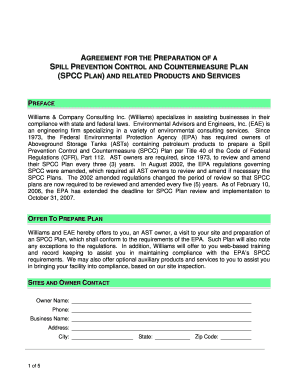
Get Sppc 43
How it works
-

Open form follow the instructions
-

Easily sign the form with your finger
-

Send filled & signed form or save
How to fill out the Sppc 43 online
Filling out the Sppc 43 form is a critical step for owners of aboveground storage tanks to ensure compliance with environmental regulations. This guide provides a clear, step-by-step approach to assist users in completing the form online with confidence.
Follow the steps to successfully fill out the Sppc 43 form online.
- Click the ‘Get Form’ button to access the form and open it in your preferred editor.
- Begin by entering your personal information in the 'Owner' section. This includes your name, phone number, business name, and complete address, including city, state, and zip code.
- In the 'Sites and Owner Contact' section, input the site name, contact name, phone number, and address of each site. If there are more than one site, make sure to provide all necessary details for each, ensuring accuracy.
- Refer to the 'Williams Contact' section to locate relevant contact information for any questions regarding contract and compliance issues.
- Fill in the 'Date of Delivery' section with the expected delivery date of the SPCC plan, making yourself aware of any deadlines.
- In the 'Cost and Fees' section, indicate the agreed price per SPCC plan and total amount. Make sure to review any additional fees for optional products or services.
- Understand the 'Defense of the Plan and Indemnification' section to know your rights and the support offered by Williams in case of any regulatory questioning.
- Review the 'Terms of Payment' section thoroughly, noting the payment schedule and any finance charges applicable.
- Once all sections are completed accurately, proceed to the 'Execution of the Agreement' section. Sign and print your name, along with your company's name and date to finalize the document.
- After completing the form, you can save your changes, download it for personal records, print, or share it with relevant parties.
Complete your Sppc 43 form online today to ensure compliance and protect your business.
To fill out Schedule C as an independent contractor, first gather your income details along with any business expenses. Be sure to account for all self-employment income under SPPC 43, as it influences your tax obligations. Ensure you accurately categorize your income and deductions to help minimize your tax liability. Platforms like uslegalforms provide templates and guidance, making it easier to complete your Schedule C.
Industry-leading security and compliance
-
In businnes since 199725+ years providing professional legal documents.
-
Accredited businessGuarantees that a business meets BBB accreditation standards in the US and Canada.
-
Secured by BraintreeValidated Level 1 PCI DSS compliant payment gateway that accepts most major credit and debit card brands from across the globe.