Loading
Form preview
  • US Legal Forms
  • Form Library
  • More Forms
  • More Uncategorized Forms
  • 4056 Cny Enrollform T

Get 4056 Cny Enrollform T

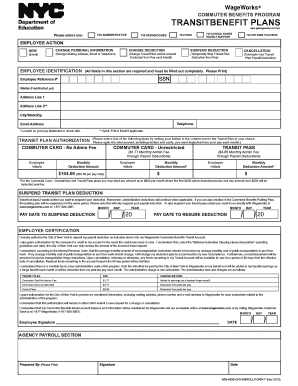
WageWorks ? THE CITY OF NEW YORK COMMUTER BENEFITS PROGRAM TRANSITBENEFIT PLANS www.getwageworks.com/nyc 740 ADMINISTRATIVE Submit completed form to: Your Agency TransitBenefit Coordinator. PEDAGOGUES.

How it works

  1. Open form

    Open form follow the instructions

  2. Easily sign form

    Easily sign the form with your finger

  3. Share form

    Send filled & signed form or save

How to fill out the 4056 Cny Enrollform T online

The 4056 Cny Enrollform T is an essential document for individuals participating in the City of New York Commuter Benefits Program. This guide will provide detailed, step-by-step instructions on how to complete the form online, ensuring that users can navigate the process with confidence.

Follow the steps to complete the 4056 Cny Enrollform T online.

  1. Click the ‘Get Form’ button to obtain the form and open it in the editor.
  2. Begin by filling out the 'Employee Identification' section. Enter your social security number (SSN), employee reference number, full name (first, middle, and last), address (including city, state, and zip code), telephone number, and email address. Ensure all fields are filled out completely.
  3. In the 'Transit Plan Authorization' section, select one of the available plans by writing your initials next to the plan of your choice. Specify the total amount you want deducted from your pay each month, keeping in mind the limits established for pre-tax and post-tax deductions.
  4. If you are opting to suspend your transit plan deduction, indicate the pay dates for when you want to suspend and resume deductions. It is important to submit this request at least two weeks prior to the desired suspension date.
  5. Review the 'Employee Certification' statement. By signing this section, you authorize your payroll deduction and agree to the terms provided regarding the management of your funds. Make sure to date your signature.
  6. Complete additional sections as necessary, such as the 'Agency Payroll Section,' where payroll numbers and personal information updates must be entered. This area typically requires verification by the payroll representative.
  7. After reviewing all information for accuracy, save any changes made to the form. You may then download, print, or share the completed form as needed.

Visit the necessary platforms to compete and submit your 4056 Cny Enrollform T online.

Get form

Experience a faster way to fill out and sign forms on the web. Access the most extensive library of templates available.
Get form

Related content

transitbenefit plans - NYC.gov
I certify that the above data was entered in NYCAPS via EForms: Prepared By (Please...
Learn more
tcodeDict_030119_0.pdf - Student Financial...
Mar 1, 2019 — 8016- BAD DEBT ADJUSTMENT TO SAR. 9000- FINANCIAL ... return to top. 0003...
Learn more

Related links form

Content Creation Contract Template Flat Contract Template Food Truck Cater Contract Template Employee Termination Contract Template

Questions & Answers

Get answers to your most pressing questions about US Legal Forms API.

Contact support

To fill out a 4506-T form, you must provide your personal information, including your name and Social Security number. Next, indicate the specific tax years for which you’re requesting transcripts. Ensure that you sign and date the form, as an unsign form may lead to processing delays. Utilizing the organized structure of the 4056 Cny Enrollform T can guide you through this entire process more effectively.

The processing time for a 4506-T form typically ranges from five to ten business days. However, factors like current IRS workload may affect this timeline. If you need the data sooner, using the efficient layout of the 4056 Cny Enrollform T may expedite the submission process, contributing to a faster resolution.

Filling out withholding exemptions involves calculating your eligibility based on your personal financial situation. Start by assessing your total income and any applicable deductions. When completing the form, clearly state the number of exemptions you qualify for. Remember, using the 4056 Cny Enrollform T can help you ensure accuracy in your calculations and declarations.

To fill out a transcript request form, start by providing your basic details like name and address. Then, specify the type of transcript you need, whether it’s for personal use or for a third party. It’s essential to include any necessary identification numbers, helping to streamline the processing. Using the 4056 Cny Enrollform T can simplify this process by providing an organized format for your request.

Filling out a tax withholding form is straightforward. First, gather your personal information such as your name, address, and Social Security number. Next, declare your income and exemptions accurately. Make sure to review the instructions provided with the 4056 Cny Enrollform T to ensure each section is completed according to your financial situation.

Log into Facebook on a computer. Click your profile picture in the top right of Facebook. Click Settings and privacy, then click Settings. Click Accounts Center, then click Personal details. Click Birthday, then click Who can see your birthday. Click Change visibility on Facebook.

0:00 1:03 How To Change Your Birthday On Instagram - YouTube YouTube Start of suggested clip End of suggested clip App. And we'll tap on your profile at the bottom right here. And then just tap on edit profile. AndMoreApp. And we'll tap on your profile at the bottom right here. And then just tap on edit profile. And you can see at the very bottom is personal information settings.

Q 1: How to Find Someone's Birthday on Facebook without Being Friends? To check it, you need to Search them on Facebook >> Click on their profile >> Tap on the About section and scroll down to retrieve this information.

One easy way to discover someone's birthday is to look them up on Facebook. If you have an account of your own, log in and type their name into the search bar at the top of the screen. Once you get to their profile, you should see their date of birth displayed in the info box below their profile picture.

Facebook's birthday rules, explained You can only change your birthday three times overall. There's no time limit on this - once you've changed your account's birthday three times, you can never change it again, unless you contact Facebook's customer support team.

Get This Form Now!

Use professional pre-built templates to fill in and sign documents online faster. Get access to thousands of forms.
Get form
If you believe that this page should be taken down, please follow our DMCA take down processhere.

Industry-leading security and compliance

US Legal Forms protects your data by complying with industry-specific security standards.
  • In businnes since 1997
    25+ years providing professional legal documents.
  • Accredited business
    Guarantees that a business meets BBB accreditation standards in the US and Canada.
  • Secured by Braintree
    Validated Level 1 PCI DSS compliant payment gateway that accepts most major credit and debit card brands from across the globe.
Get 4056 Cny Enrollform T
Get form
  • Adoption
  • Bankruptcy
  • Contractors
  • Divorce
  • Home Sales
  • Employment
  • Identity Theft
  • Incorporation
  • Landlord Tenant
  • Living Trust
  • Name Change
  • Personal Planning
  • Small Business
  • Wills & Estates
  • Packages A-Z
  • Affidavits
  • Bankruptcy
  • Bill of Sale
  • Corporate - LLC
  • Divorce
  • Employment
  • Identity Theft
  • Internet Technology
  • Landlord Tenant
  • Living Wills
  • Name Change
  • Power of Attorney
  • Real Estate
  • Small Estates
  • Wills
  • All Forms
  • Forms A-Z
  • Form Library
  • Legal Hub
  • About Us
  • Help Portal
  • Legal Resources
  • Blog
  • Affiliates
  • Contact Us
  • Delete My Account
  • Site Map
  • Industries
  • Forms in Spanish
  • Localized Forms
  • State-specific Forms
  • Forms Kit
  • Real Estate Handbook
  • All Guides
  • Notarize
  • Incorporation services
  • For Consumers
  • For Small Business
  • For Attorneys
  • USLegal
  • FormsPass
  • pdfFiller
  • signNow
  • altaFlow
  • DocHub
  • Instapage
Form Packages
  • Adoption
  • Bankruptcy
  • Contractors
  • Divorce
  • Home Sales
  • Employment
  • Identity Theft
  • Incorporation
  • Landlord Tenant
  • Living Trust
  • Name Change
  • Personal Planning
  • Small Business
  • Wills & Estates
  • Packages A-Z
Form Categories
  • Affidavits
  • Bankruptcy
  • Bill of Sale
  • Corporate - LLC
  • Divorce
  • Employment
  • Identity Theft
  • Internet Technology
  • Landlord Tenant
  • Living Wills
  • Name Change
  • Power of Attorney
  • Real Estate
  • Small Estates
  • Wills
  • All Forms
  • Forms A-Z
  • Form Library
Customer Service
  • Legal Hub
  • About Us
  • Help Portal
  • Legal Resources
  • Blog
  • Affiliates
  • Contact Us
  • Delete My Account
  • Site Map
  • Industries
  • Forms in Spanish
  • Localized Forms
  • State-specific Forms
  • Forms Kit
Legal Guides
  • Real Estate Handbook
  • All Guides
Prepared for you
  • Notarize
  • Incorporation services
Our Customers
  • For Consumers
  • For Small Business
  • For Attorneys
Our Sites
  • USLegal
  • FormsPass
  • pdfFiller
  • signNow
  • altaFlow
  • DocHub
  • Instapage
Social Media
Call us now toll free:
+1 833 426 79 33
As seen in:
© Copyright 1999-2026 airSlate Legal Forms, Inc. 3720 Flowood Dr, Flowood, Mississippi 39232
  • Your Privacy Choices
  • Terms of Service
  • Privacy Notice
  • Content Takedown Policy
  • Bug Bounty Program