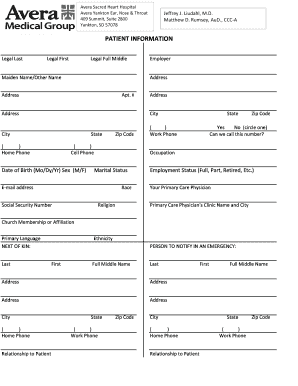
Get Ayent Patient Registration Form 7-18-11.xls - Avera
How it works
-

Open form follow the instructions
-

Easily sign the form with your finger
-

Send filled & signed form or save
How to fill out the AYENT Patient Registration Form 7-18-11.xls - Avera online
This guide provides clear instructions for completing the AYENT Patient Registration Form 7-18-11.xls effectively and accurately. By following these steps, users can ensure that all necessary information is submitted to facilitate their care at Avera.
Follow the steps to fill out the patient registration form accurately.
- Click the ‘Get Form’ button to access the AYENT Patient Registration Form 7-18-11.xls and open it in your preferred editor.
- Begin by entering your patient information in the designated fields. Include your legal last name, first name, full middle name, and any other names you may use, such as your maiden name.
- Fill in your employer's name and your address in the provided fields, making sure to include your city, state, and zip code. Provide your home and cell phone numbers, and indicate if you can be contacted at your cell number.
- Continue entering your date of birth in the format Month/Day/Year and select your sex. Additionally, provide your occupation and marital status, along with your email address.
- Next, indicate your race, social security number, and employment status. Choose your primary care physician and provide the clinic name and city.
- For next of kin, fill out their last name, first name, middle name, and address. Include the relationship to the patient and their contact numbers.
- In the responsible party information section, if it is the same as the patient, simply write 'same.' Otherwise, provide the required details of the responsible party including their name, address, phone number, and relation to the patient.
- Proceed to enter insurance information for primary, secondary, and potentially tertiary policies, including subscriber details and policy effective dates.
- Complete the family listing section by providing information about other family members living in the same household, if desired.
- Finally, authorize the release of your medical information by providing a signature and date, ensuring all other sections are filled out accurately.
- Once all information is correctly entered, save your changes, and choose to download, print, or share the completed form as required.
Complete your AYENT Patient Registration Form 7-18-11.xls online today for a smooth registration experience.
Filling in a patient report form involves providing detailed information about your medical history and current health status. You should describe any symptoms, medications you are currently taking, and previous treatments. The AYENT Patient Registration Form 7-18-11.xls - Avera is designed to help you document these key aspects clearly, aiding healthcare professionals in understanding your needs.
Industry-leading security and compliance
-
In businnes since 199725+ years providing professional legal documents.
-
Accredited businessGuarantees that a business meets BBB accreditation standards in the US and Canada.
-
Secured by BraintreeValidated Level 1 PCI DSS compliant payment gateway that accepts most major credit and debit card brands from across the globe.