Loading
Get Regence Sure Pay Form
How it works
-

Open form follow the instructions
-

Easily sign the form with your finger
-

Send filled & signed form or save
How to fill out the Regence Sure Pay Form online
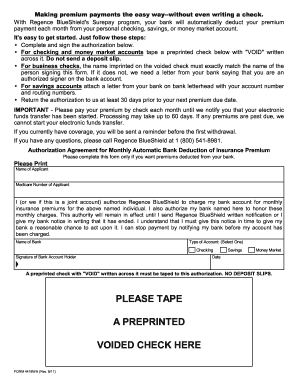
Filling out the Regence Sure Pay Form online is a straightforward process that allows you to set up automatic deductions for your insurance premiums. This guide will walk you through each section of the form to ensure a smooth completion.
Follow the steps to fill out the Regence Sure Pay Form
- Press the ‘Get Form’ button to access the Regence Sure Pay Form and open it for editing.
- Begin by entering your name in the 'Name of Applicant' field. Ensure it is spelled correctly.
- Next, provide your Medicare number in the designated field titled 'Medicare Number of Applicant.' This information is important for processing.
- In the section that follows, authorize Regence BlueShield to charge your bank account by selecting the type of account (checking, savings, or money market) and providing the name of your bank.
- Record the date in the specified format (mm/dd/yyyy) to indicate when you are signing the form.
- To validate your account authorization, tape a preprinted check with 'VOID' written across it to this form. Do not include deposit slips.
- Review your entries carefully to ensure all information is accurate, as this will help prevent processing delays.
- Once you've completed the form, save your changes, and you can choose to download, print, or share the document as needed.
Complete your Regence Sure Pay Form online today for a hassle-free premium payment experience.
Regence offers several payment options to simplify your experience. Members can pay through online portals, including the Regence Sure Pay Form, which allows for quick and secure transactions. You may also have the option to pay by phone or by mail with a check. Explore these choices to find what works best for your financial needs, ensuring you maintain your valuable health coverage.