Loading
Get Nrw 2
How it works
-

Open form follow the instructions
-

Easily sign the form with your finger
-

Send filled & signed form or save
How to fill out the NRW-2 online
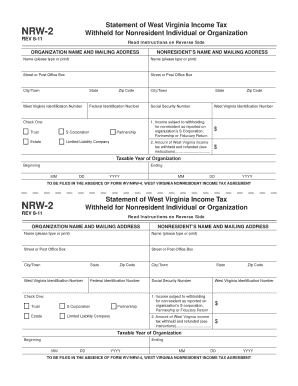
Filling out the NRW-2 form is essential for organizations in West Virginia that need to report income tax withholding for nonresident individuals or organizations. This guide provides a clear, step-by-step approach to completing the NRW-2 online.
Follow the steps to successfully complete the NRW-2 form.
- Click the ‘Get Form’ button to access the NRW-2 form and open it in the editor.
- Enter the organization name and mailing address in the appropriate fields. Ensure that the information is accurate and up to date.
- Complete the nonresident’s name and mailing address sections, using clear and legible type or print.
- Select the type of organization by checking the corresponding box. Options include Trust, S Corporation, Partnership, Estate, or Limited Liability Company.
- Fill in the relevant identification numbers, including the West Virginia Identification Number and the Federal Identification Number.
- Indicate the amount of income subject to withholding by entering the correct figure in the specified field.
- Enter the amount of West Virginia income tax that was withheld in the designated space.
- Identify the taxable year of the organization by filling in the beginning and ending dates.
- Once all fields are complete, review the form for accuracy and completeness. Make any necessary adjustments.
- Save your changes. You can download, print, or share the completed NRW-2 form as needed.
Complete your NRW-2 form online today to ensure compliance with West Virginia tax regulations.
Form NRW 2 is designed for reporting income earned in West Virginia by non-residents. It allows taxpayers to detail their income sources and calculate their tax obligations accurately. Using resources like US Legal Forms can simplify the process of filling out the NRW 2 and ensure compliance with state tax laws.