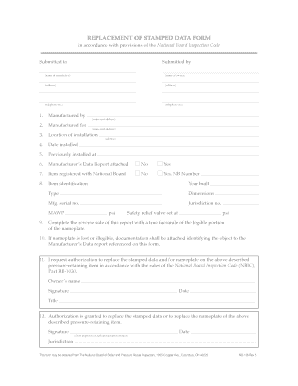
Get National Board Inspection Code Replacement Stamped Data Form
How it works
-

Open form follow the instructions
-

Easily sign the form with your finger
-

Send filled & signed form or save
How to fill out the National Board Inspection Code Replacement Stamped Data Form online
Filling out the National Board Inspection Code Replacement Stamped Data Form online is a crucial step in maintaining compliance with safety regulations. This guide will provide you with a clear and structured approach to completing each section of the form effectively.
Follow the steps to accurately complete the form.
- Click ‘Get Form’ button to obtain the form and open it in the editor.
- Enter the name of the jurisdiction in the 'Submitted to' field, followed by the owner's name in the 'Submitted by' section.
- Provide the address details in the corresponding fields for both the jurisdiction and the owner.
- Fill in the telephone numbers for both the jurisdiction and the owner, ensuring accuracy for contact purposes.
- In the next sections, provide details about the manufactured by and manufactured for entities, including their contact information.
- Indicate the location of installation and the date it was installed in the relevant fields.
- If the item was previously installed at a different location, provide that information in the designated section.
- Specify whether the Manufacturer’s Data Report is attached by selecting 'Yes' or 'No'. If 'Yes', ensure the report is included.
- Indicate if the item is registered with the National Board by selecting 'Yes' or 'No'. If 'Yes', include the NB number.
- Fill out the item identification section, which includes the year built, type, dimensions, manufacturer serial number, jurisdiction number, and Maximum Allowable Working Pressure (MAWP).
- Provide the details for the safety relief valve, including the settings.
- Complete the reverse side of the form with a true facsimile of the nameplate.
- If the nameplate is lost or illegible, attach the necessary documentation to identify the object with the referenced Manufacturer’s Data report.
- Sign and date the request for authorization to replace the stamped data or nameplate, indicating the owner's title.
- The chief inspector or authorized representative should sign and date the authorization grant section.
- Review all entered information for accuracy before proceeding.
- Once the form is complete, you can save changes, download, print, or share the document as needed.
Ensure you fill out and file your documents online to stay compliant with the National Board Inspection Code.
A Form U 1 manufacturer's data report is an important document that provides essential information about pressure vessels built to comply with the ASME Code. This report includes details about materials, construction, and any testing performed, which are necessary for the National Board Inspection Code Replacement Stamped Data Form. By ensuring that your Form U 1 is accurate and complete, you can facilitate smoother inspections and compliance. If you need assistance, US Legal Forms can provide you with the necessary forms and support to navigate the process effectively.