Get Universal Form 1.8 For Owner/operators To Apply For A License - State Nj
How it works
-

Open form follow the instructions
-

Easily sign the form with your finger
-

Send filled & signed form or save
How to fill out the Universal Form 1.8 For Owner/Operators To Apply For A License - State Nj online
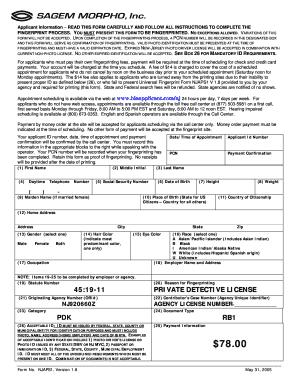
This guide provides a clear and supportive walkthrough for completing the Universal Form 1.8, which is essential for owner/operators applying for a license in New Jersey. By following these steps, users can confidently navigate the online form and ensure all necessary information is provided accurately.
Follow the steps to successfully complete the Universal Form 1.8 online.
- Press the ‘Get Form’ button to access the Universal Form 1.8. This will allow you to open the form in the designated online editor where you can start entering your information.
- Begin by filling out the applicant information fields. This includes your first name, middle initial, and last name, as well as your daytime telephone number.
- Provide your social security number, date of birth, height, weight, and, if applicable, maiden name if you are a married female.
- Indicate your place of birth (state for U.S. citizens, country for all others) and country of citizenship.
- Fill out your home address, including street address, city, state, and zip code.
- Select your gender by choosing one of the provided options: male, female, or both.
- Indicate your hair color and eye color, selecting the most predominant color for each.
- Select your race from the options provided. Be sure to indicate your occupation and employer name and address.
- Items 19-25 are to be completed by your employer or agency. Ensure they fill out the corresponding fields, which include statute number, originating agency number, category, reason for fingerprinting, and any other pertinent information.
- Before submission, review all entered information for accuracy. Once confirmed, you can save changes, download a copy of the form, print it, or share the form as needed.
Complete your Universal Form 1.8 online to ensure a smooth application process!
Filling out the NJ vehicle registration form involves a few straightforward steps. First, gather your vehicle title, proof of insurance, and identification. Use the Universal Form 1.8 For Owner/Operators To Apply For A License - State Nj as your guide to fill out the necessary information correctly. After completing the form, review it for accuracy before submitting it to the DMV, ensuring you follow all instructions for a smooth registration process.
Industry-leading security and compliance
-
In businnes since 199725+ years providing professional legal documents.
-
Accredited businessGuarantees that a business meets BBB accreditation standards in the US and Canada.
-
Secured by BraintreeValidated Level 1 PCI DSS compliant payment gateway that accepts most major credit and debit card brands from across the globe.