Get Instructions For Completing Report Of The Guardian Of The Person ... - Courts State Nh
How it works
-

Open form follow the instructions
-

Easily sign the form with your finger
-

Send filled & signed form or save
How to fill out the Instructions For Completing Report Of The Guardian Of The Person - Courts State Nh online
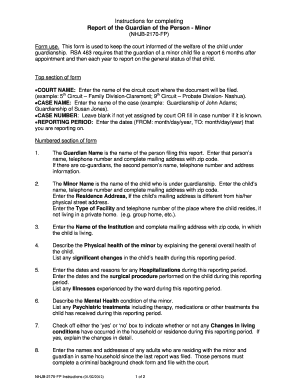
This guide provides step-by-step instructions for completing the Report of the Guardian of the Person for a minor. This essential form ensures that the court remains informed about the well-being and status of the child under guardianship.
Follow the steps to complete your report efficiently.
- Click ‘Get Form’ button to obtain the form and open it in the editor.
- In the top section of the form, enter the COURT NAME where the document will be filed, followed by the CASE NAME. If a case number is assigned, fill it in, or leave it blank if not known. Specify the REPORTING PERIOD by entering the relevant dates in the format of month/day/year.
- Provide the guardian's information in the numbered section: Enter the Guardian Name, telephone number, and complete mailing address including zip code. If applicable, include information for co-guardians.
- Enter the Minor Name for the child under guardianship, including their telephone number and complete mailing address. If different, specify the child's Residence Address. If the child is in a facility, provide the Type of Facility and telephone number.
- List the Name of the Institution where the child resides and provide the complete mailing address including zip code.
- Describe the child's Physical health by detailing their overall health condition and any significant changes during the reporting period.
- Record any Hospitalizations by entering the dates and reasons along with any surgical procedures undergone by the child during the reporting period.
- Describe the Mental Health condition of the minor, noting any treatments received such as therapy or medication during this period.
- Indicate whether there have been any Changes in living conditions by checking ‘yes’ or ‘no’. If yes, provide a detailed explanation.
- List the names and addresses of any adults residing with the minor and guardian. Ensure they complete a criminal background check form.
- Check ‘yes’ or ‘no’ for Changes in financial status affecting the guardian’s ability to provide for the child.
- Provide the child's Present School and Grade level. Mention any Special educational issues the child is facing and how those needs are being addressed.
- Indicate whether the guardianship should continue or be terminated. If terminating, note that a Motion to Terminate Guardianship must be filed.
- Sign and date the form in the designated sections. Review the completed form to ensure accuracy before submitting it to the court.
- Note that while filling out the form online, some fields may auto-populate based on previous entries. If space is insufficient for any question, attach additional sheets as necessary.
Take the next step by completing your report online today.
Guardianship typically takes away specific rights related to personal and financial decisions, such as the ability to consent to medical treatment or manage personal finances. This can vary based on the terms set by the court during the guardianship hearing. Understanding which rights are affected is essential for all parties involved. To assist in navigating these complexities, refer to the Instructions For Completing Report Of The Guardian Of The Person ... - Courts State Nh.
Industry-leading security and compliance
-
In businnes since 199725+ years providing professional legal documents.
-
Accredited businessGuarantees that a business meets BBB accreditation standards in the US and Canada.
-
Secured by BraintreeValidated Level 1 PCI DSS compliant payment gateway that accepts most major credit and debit card brands from across the globe.