Loading
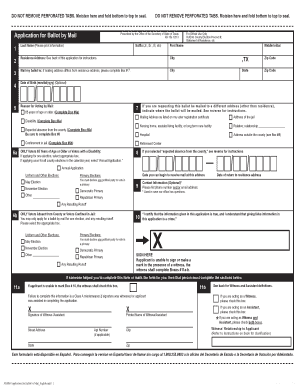
Get Application For Ballot By Mail - Texas Secretary Of State - Sos State Tx
How it works
-

Open form follow the instructions
-

Easily sign the form with your finger
-

Send filled & signed form or save
How to fill out the Application For Ballot By Mail - Texas Secretary Of State - Sos State Tx online
Filling out the Application For Ballot By Mail for Texas is an important step for those wishing to vote by mail. This guide provides clear instructions on how to complete the application online, ensuring that your ballot is delivered to you promptly.
Follow the steps to successfully fill out your application for ballot by mail.
- Click 'Get Form' button to obtain the form and open it for editing.
- Begin with entering your last name in the designated field. Make sure to print clearly.
- Next, fill in your first name followed by your middle initial, if applicable.
- Enter your residence address in the respective fields, including city, state (TX), and zip code.
- If your mailing address differs from your residence address, indicate this by completing Box #3 with the mailing address details.
- Optionally, provide your date of birth in the format of mm/dd/yyyy.
- Select your reason for voting by mail from the options provided. For example, you may select '65 years of age or older' or 'disability' which will direct you to complete Box #6a.
- If requesting the ballot to be mailed elsewhere, complete Box #6a with the appropriate address, based on your current status.
- If you are a voter absent from the county or confined in jail, ensure to check Box #6b and select the appropriate option.
- Provide optional contact information such as a phone number or email address in Box #9.
- Sign the application in Box #10. If you are unable to sign, follow the instructions regarding the witness or assistant.
- If applicable, have the witness complete Boxes #11a-b. Ensure that all necessary witness information is filled out.
- Finally, review your application for accuracy and ensure all required fields are completed. You can then save your changes, download, print, or share the application as needed.
Complete your application for ballot by mail online now to ensure your voice is heard in the upcoming elections.
Under the patient-provider dispute resolution process, an uninsured (or self-pay) consumer, or their authorized representative, may initiate the dispute process. This process brings in an independent third-party called a dispute resolution entity to determine the appropriate amount the consumer must pay.
Industry-leading security and compliance
US Legal Forms protects your data by complying with industry-specific security standards.
-
In businnes since 199725+ years providing professional legal documents.
-
Accredited businessGuarantees that a business meets BBB accreditation standards in the US and Canada.
-
Secured by BraintreeValidated Level 1 PCI DSS compliant payment gateway that accepts most major credit and debit card brands from across the globe.