Loading
Get 3-m Prescribed By Secretary Of State (06-10) - Sos State Oh
How it works
-

Open form follow the instructions
-

Easily sign the form with your finger
-

Send filled & signed form or save
How to fill out the 3-M Prescribed By Secretary Of State (06-10) - Sos State Oh online
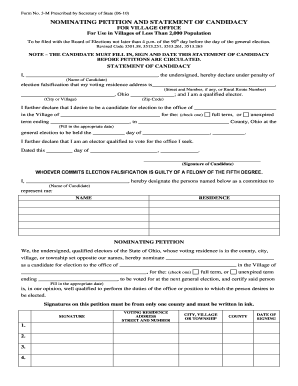
Filling out the 3-M Prescribed By Secretary Of State (06-10) form is an essential task for candidates seeking election to village offices in Ohio. This guide provides clear, step-by-step instructions to help you complete the form online with confidence.
Follow the steps to successfully complete the 3-M form online.
- Click the ‘Get Form’ button to obtain the form and open it in your editor.
- Begin by filling in your name in the 'Name of Candidate' section. Ensure you have your full name as it appears on your identification.
- Next, enter your voting residence address, including the street number and name. If you live on a rural route, provide that information as well.
- Continue with your city or village name and complete the ZIP code to accurately reflect your voting residence.
- Indicate the office you are seeking by filling in the space provided for the office title.
- Choose whether you are running for a full term or an unexpired term by checking the appropriate box.
- Enter the date on which the unexpired term ends, if applicable.
- Fill in the date for the general election where indicated.
- Sign and date the statement of candidacy at the bottom of the section to confirm your intent to run.
- Designate individuals to represent you by filling in their names and residence addresses in the provided section.
- Gather signatures from qualified electors by ensuring that each signer fills out their voting residence address, city, county, and date of signing. Remind them to sign in ink.
- Complete the circulator statement after collecting signatures. Ensure that the circulator fills in their printed name, signature, and permanent residence address.
- Once all sections are filled out, review the entire form for accuracy and completeness.
- Save your changes, and then download or print the completed form for submission.
Complete your filing process by submitting the 3-M form online today.
You can use the Ohio Secretary of State's Business Search portal to see if a business is registered to do business in Ohio.
Industry-leading security and compliance
US Legal Forms protects your data by complying with industry-specific security standards.
-
In businnes since 199725+ years providing professional legal documents.
-
Accredited businessGuarantees that a business meets BBB accreditation standards in the US and Canada.
-
Secured by BraintreeValidated Level 1 PCI DSS compliant payment gateway that accepts most major credit and debit card brands from across the globe.