We use cookies to improve security, personalize the user experience, enhance our marketing activities (including cooperating with our marketing partners) and for other business use.
Click "here" to read our Cookie Policy. By clicking "Accept" you agree to the use of cookies. Read less
Read more
Accept
Loading
Form preview
  • US Legal Forms
  • Form Library
  • More Forms
  • More Uncategorized Forms
  • Nmprc

Get Nmprc

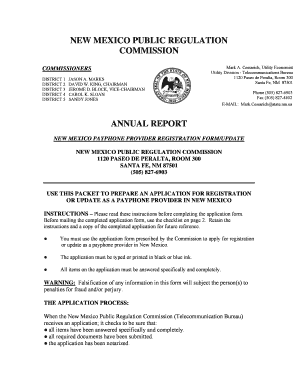
NEW MEXICO PUBLIC REGULATION COMMISSION COMMISSIONERS DISTRICT 1 DISTRICT 2 DISTRICT 3 DISTRICT 4 DISTRICT 5 JASON A. MARKS DAVID W. KING, CHAIRMAN JEROME D. BLOCK, VICE-CHAIRMAN CAROL K. SLOAN SANDY.

How it works

  1. Open form

    Open form follow the instructions

  2. Easily sign form

    Easily sign the form with your finger

  3. Share form

    Send filled & signed form or save

How to fill out the NMPRC online

Filling out the New Mexico Public Regulation Commission (NMPRC) payphone provider registration form online can seem daunting, but with the right guidance, you can navigate the process smoothly. This comprehensive guide will walk you through each step of the form, ensuring you understand the requirements and complete it accurately.

Follow the steps to successfully fill out and submit the NMPRC form online.

  1. Press the ‘Get Form’ button to access the NMPRC registration form and open it in your preferred editor.
  2. Begin by filling out the Payphone Provider/Applicant’s Identification section, providing your name, any Doing Business As (D/B/A) name, and the corresponding address. Ensure accuracy and completeness in this section.
  3. Complete the N.M. Taxpayer ID and the Applicant Telephone Number fields. If your mailing address differs from the main address, include that as well.
  4. Identify a contact person for inquiries. Fill in their name, address, and telephone number in the designated fields.
  5. Select the appropriate form of business from the options provided—Corporation, Partnership, Sole Proprietorship, or Other—and provide a brief description if you select 'Other'.
  6. Proceed to the Payphone Equipment Information Update Form. For each payphone you are registering, list details such as the payphone number, any new installations or upgrades, and equipment make and model.
  7. Complete the details regarding the premises where the payphone is located, including the premise fee structure. Be sure to indicate if the payphone is lighted, enclosed, and accessible.
  8. Submit a summary of any complaints received, ensuring to include specifics for each complaint, such as the type and actions taken.
  9. Fill out the Oath of Applicant/Provider section. Here, you will affirm that the information provided is true and complete. Include your signature and the date.
  10. If necessary, provide notarization for your application by including the notary section with the date and the notary's information.
  11. Review all your entries carefully. Once you are satisfied that everything is correct, you can save changes, download, print, or share the completed form.

Get started on filing your NMPRC registration form online today.

Get form

Experience a faster way to fill out and sign forms on the web. Access the most extensive library of templates available.
Get form

Related content

Northwest Missouri Psychiatric Rehabilitation...
NMPRC is a 108-bed psychiatric hospital that provides long-term inpatient care for adults...
Learn more
Lunch & Learn with Cynthia Hall and Cydney...
Lunch & Learn with Cynthia Hall and Cydney Beadles, NMPRC. October 23, 2018. "PRC 101: The...
Learn more
SANDI.A PElAK SERVICES, INC. - New Mexico Public...
May 13, 2013 — Nl:WMEXIGO. PUBLIC REGULATION COMMISSION. FOR THE. YEAR ENDED DECEMl3ER...
Learn more

Related links form

Task Agreement Template Temp To Hire Agreement Template Student Laptop Loan Agreement Template Water Supply Agreement Template

Questions & Answers

Get answers to your most pressing questions about US Legal Forms API.

Contact support

The New Mexico Public Regulation Commission (NMPRC) is responsible for regulating PNM, or Public Service Company of New Mexico. This commission ensures that PNM provides fair rates and reliable services to its customers. Through oversight of PNM's operations, the NMPRC supports consumer protection and enhances accountability within the energy sector. For assistance in understanding your rights and options as a PNM customer, our platform can be a valuable resource.

The NMPRC, or New Mexico Public Regulation Commission, oversees various public services within the state, including energy, telecommunications, and transportation. Its role is to ensure that these services are provided fairly and efficiently to all residents of New Mexico. By regulating these industries, the NMPRC helps protect consumers while promoting a reliable infrastructure. If you need more information on how the NMPRC affects your services, consider our platform for helpful resources.

Your Npmrc file can usually be found in either your user directory or your project's root folder. The typical location varies based on operating systems and personal configurations. To quickly find it, execute 'npm config get userconfig' in your terminal. If you encounter difficulties, explore useful options with UsLegalForms for guidance.

Finding your NPMRC is straightforward. You can check common locations such as your project root or home directory. Running the terminal command 'npm config get userconfig' can also lead you directly to your Npmrc file. If you're looking for tailored assistance, platforms like UsLegalForms provide useful resources to navigate configuration files.

To obtain an npmrc token, you first need to log in to your npm account using the command 'npm login'. After successfully logging in, npm will generate an authentication token, which will be stored in your Npmrc file. This token allows for secure access to your npm registry without needing to log in each time. Consider consulting UsLegalForms for tips on managing your tokens effectively.

To find out where your npm is located, you can open your terminal and run the command 'which npm' on Unix-based systems or 'where npm' on Windows. This command will give you the path where npm is installed. Knowing the location can be beneficial when configuring projects or troubleshooting issues. Using UsLegalForms can help provide clarity on related configuration questions.

Setting up an npmrc file involves creating a new text file named '.npmrc' in your project directory or home directory. You can manually add configurations by specifying lines like 'registry' or 'authToken.' Saving the file will apply these settings to npm commands within the scope of your project. For detailed guidance, consider exploring UsLegalForms to simplify the setup.

A Npmrc file serves as a crucial tool for defining the behavior of npm in your working environment. It allows you to set project-specific settings or global configurations. Without this file, npm may use default settings that might not align with your project's requirements. Thus, configuring your Npmrc file is essential for smooth operations.

An Npmrc file is a configuration file used by npm to manage settings for your Node.js projects. It contains various configurations such as proxy settings, registry URLs, and authentication tokens. Having a properly set up Npmrc file can significantly streamline your development process. Using platforms like UsLegalForms can help you create and manage your Npmrc file with ease.

The Pnpm Npmrc file is typically located in your project's root directory. You might also find it in your home directory, depending on how you configured your npm settings. To locate it quickly, just open your terminal and type 'pnpm config get userconfig'. This command will show you the exact path to your Npmrc file.

Get This Form Now!

Use professional pre-built templates to fill in and sign documents online faster. Get access to thousands of forms.
Get form
If you believe that this page should be taken down, please follow our DMCA take down processhere.

Industry-leading security and compliance

US Legal Forms protects your data by complying with industry-specific security standards.
  • In businnes since 1997
    25+ years providing professional legal documents.
  • Accredited business
    Guarantees that a business meets BBB accreditation standards in the US and Canada.
  • Secured by Braintree
    Validated Level 1 PCI DSS compliant payment gateway that accepts most major credit and debit card brands from across the globe.
Get Nmprc
Get form
Form Packages
Adoption
Bankruptcy
Contractors
Divorce
Home Sales
Employment
Identity Theft
Incorporation
Landlord Tenant
Living Trust
Name Change
Personal Planning
Small Business
Wills & Estates
Packages A-Z
Form Categories
Affidavits
Bankruptcy
Bill of Sale
Corporate - LLC
Divorce
Employment
Identity Theft
Internet Technology
Landlord Tenant
Living Wills
Name Change
Power of Attorney
Real Estate
Small Estates
Wills
All Forms
Forms A-Z
Form Library
Customer Service
Terms of Service
Privacy Notice
Legal Hub
Content Takedown Policy
Bug Bounty Program
About Us
Help Portal
Legal Resources
Blog
Affiliates
Contact Us
Delete My Account
Site Map
Industries
Forms in Spanish
Localized Forms
State-specific Forms
Forms Kit
Legal Guides
Real Estate Handbook
All Guides
Prepared for You
Notarize
Incorporation services
Our Customers
For Consumers
For Small Business
For Attorneys
Our Sites
US Legal Forms
USLegal
FormsPass
pdfFiller
signNow
airSlate WorkFlow
DocHub
Instapage
Social Media
Call us now toll free:
+1 833 426 79 33
As seen in:
  • USA Today logo picture
  • CBC News logo picture
  • LA Times logo picture
  • The Washington Post logo picture
  • AP logo picture
  • Forbes logo picture
© Copyright 1997-2025
airSlate Legal Forms, Inc.
3720 Flowood Dr, Flowood, Mississippi 39232
Form Packages
Adoption
Bankruptcy
Contractors
Divorce
Home Sales
Employment
Identity Theft
Incorporation
Landlord Tenant
Living Trust
Name Change
Personal Planning
Small Business
Wills & Estates
Packages A-Z
Form Categories
Affidavits
Bankruptcy
Bill of Sale
Corporate - LLC
Divorce
Employment
Identity Theft
Internet Technology
Landlord Tenant
Living Wills
Name Change
Power of Attorney
Real Estate
Small Estates
Wills
All Forms
Forms A-Z
Form Library
Customer Service
Terms of Service
Privacy Notice
Legal Hub
Content Takedown Policy
Bug Bounty Program
About Us
Help Portal
Legal Resources
Blog
Affiliates
Contact Us
Delete My Account
Site Map
Industries
Forms in Spanish
Localized Forms
State-specific Forms
Forms Kit
Legal Guides
Real Estate Handbook
All Guides
Prepared for You
Notarize
Incorporation services
Our Customers
For Consumers
For Small Business
For Attorneys
Our Sites
US Legal Forms
USLegal
FormsPass
pdfFiller
signNow
airSlate WorkFlow
DocHub
Instapage
Social Media
Call us now toll free:
+1 833 426 79 33
As seen in:
  • USA Today logo picture
  • CBC News logo picture
  • LA Times logo picture
  • The Washington Post logo picture
  • AP logo picture
  • Forbes logo picture
© Copyright 1997-2025
airSlate Legal Forms, Inc.
3720 Flowood Dr, Flowood, Mississippi 39232