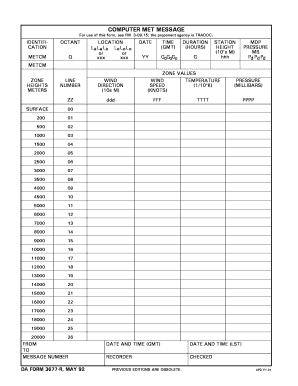
COMPUTER MET MESSAGE For use of this form see FM 3-09. 15 the proponent agency is TRADOC. IDENTIFICATION OCTANT METCM Q LOCATION LaLaLa L oL oL o or xxx DATE TIME GMT DURATION HOURS YY GoGo o G STATION HEIGHT 10 s M hhh MDP PRESSURE MB Pd PdP d SURFACE LINE NUMBER WIND DIRECTION ZZ ZONE METERS ddd ZONE VALUES TEMPERATURE SPEED 1/10 oK KNOTS FFF MILLIBARS TTTT PPPP 10000 11000 12000 13000 14000 15000 16000 17000 18000 19000 20000 FROM TO MESSAGE N.
Open form follow the instructions
Easily sign the form with your finger
Send filled & signed form or save
How to fill out the DA FORM 3677, MAY 92 online
The DA FORM 3677, MAY 92 is essential for transmitting computer meteorological messages. This guide provides clear, step-by-step instructions on how to fill out the form online, ensuring accuracy and compliance with regulations.
Follow the steps to successfully complete the form
- Press the ‘Get Form’ button to access the DA FORM 3677, MAY 92. This will open the form in an editable format for your convenience.
- Begin filling out the identification section. Enter the octant code, METCM, location details, date, time (in GMT), and duration of the report in hours. Ensure all entries are accurate.
- In the next section, provide details about the weather at your location. Include the height of the meteorological station in meters, the pressure in millibars, and any additional necessary meteorological information.
- Complete the wind information fields. Specify the wind direction in tens of meters and the wind speed in knots.
- Fill in the zone values for temperature and pressure at various elevations. Ensure all numerical values correspond to the specified ranges and limits outlined in the instructions.
- Once all sections are filled out correctly, review each entry for accuracy. Make any necessary adjustments before finalizing your form.
- After ensuring all information is correct, save your changes. You may choose to download, print, or share the completed DA FORM 3677, MAY 92 as needed.
Complete your DA FORM 3677, MAY 92 online today for efficient processing.
Experience a faster way to fill out and sign forms on the web. Access the most extensive library of templates available.
Related content
Sep 28, 2017 — (These forms shall be used by a person filing for divorce.) Introduction...
92. Figure 6-11 Sample TAMIS (DA Form 581) Request for Issue of Ammunition...
damage that may have occurred during shipment. ... 25 base station computers on port 4200...
Get answers to your most pressing questions about US Legal Forms API.
How do I register a logo officially?
You can also register a trademark for your logo with the Secretary of State in the state where you will be using the logo. Doing so protects your rights only within that state, so the logo can be used by others in other states. The third and most expensive option is to file a trademark application with the USPTO.
How do you certify a logo?
Registering a logo You can register a logo with the USPTO by using the Trademark Electronic Application System (TEAS) or other online trademark service. If your logo includes design elements, you will need to upload an image, using a . jpg file, of the logo as part of your trademark application.
Who approves logo?
Once the logo is registered with the USPTO, a trademark owner will have exclusive rights to use the logo within the approved goods or services class anywhere in the U.S. The owner may sue for any unlawful use of the logo, and may file to stop foreign goods with your logo from being imported into the U.S.
Do I need to register or trademark my logo?
You almost never “must” register a trademark. It is good business practice to protect yourself (from claims of infringement by others and infringement of your rights by others) by obtaining registration of your brand, and it helps to build value in your business. Often your trademark becomes your most valuable asset.
How do I register my logo in Canada?
Registering a trademark A trademark application may be filed electronically with the Canadian Intellectual Property Office (CIPO) on its website. The application sets out, among other things, the applicant's name and address, the trademark, and the goods and services with which the mark will be used in Canada.
How much does it cost to trademark a logo in Canada?
There is a trademark application filing fee of $347.35 CAD (in 2023) for the first class of goods and services in your Canadian trademark application. For each class of goods and services beyond the first, there is a further cost of $105.26 CAD (in 2023) per class payable when filing your application.
How do I create a registered logo?
Press and hold Alt while typing 0174 for the registered trademark (®) symbol. This code gives you the registered trademark symbol, which is the "R" in a circle. Remember, do not lift your finger from the Alt key until you've typed the series of numbers 0174 in order.
Do I need to register my logo?
In the U.S., you don't need to register a trademark or copyright your company's logo. Once you put down the original work on paper or digital media and use it to market your business, you automatically own the rights. However, registering a trademark affords you an extra layer of protection.
Use professional pre-built templates to fill in and sign documents online faster. Get access to thousands of forms.
If you believe that this page should be taken down, please follow our DMCA take down process here.