Loading
Get Mv2941
How it works
-

Open form follow the instructions
-

Easily sign the form with your finger
-

Send filled & signed form or save
How to fill out the Mv2941 online
This guide provides a clear and comprehensive approach to filling out the Mv2941 form online. By following these instructions, users can successfully navigate each section of the application, ensuring a smooth submission process.
Follow the steps to complete your Mv2941 application online.
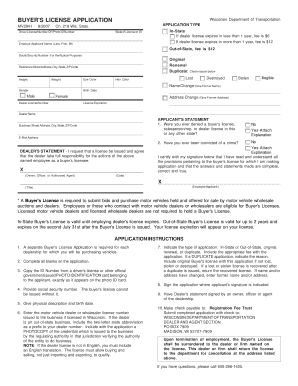
- Press the ‘Get Form’ button to obtain the Mv2941 form and open it in your preferred online tool.
- Select the application type indicating whether it is an original, renewal, or duplicate. Specify if it is for in-state or out-of-state applications and include the applicable fee.
- Fill in your driver license number or photo ID number, ensuring that it matches the ID exactly as it appears.
- Provide your first, middle initial, and last names in the designated fields. Follow this with your social security number for verification purposes.
- Enter your residence street address along with the city, state, and ZIP code.
- Provide your physical description including height, weight, hair color, and eye color. Additionally, include your birth date.
- Check the appropriate reason for the application if applicable, such as lost, destroyed, stolen, or name change.
- Complete the dealer license number field if applicable. Include any necessary documentation if the dealer license is from another state.
- Read the applicant's statement carefully. Indicate if you have been denied a buyer's license or convicted of a crime, attaching explanations as needed.
- Ensure the dealer's statement is signed by an owner, officer, or authorized agent of the dealership.
- Sign the application in the designated area, confirming that all provided information is complete and true.
- Make a payment check out to 'Registration Fee Trust' and submit the completed application along with the check to the Wisconsin Department of Transportation.
- Review all information before saving, downloading, printing, or sharing the completed form.
Complete your Mv2941 application online today and submit it with confidence.
To fill out a vehicle registration application in Arkansas, begin with the Mv2941 form. Fill in personal details, such as your name and address, followed by specifics about your vehicle. Review all sections for accuracy, and consider using resources like USLegalForms for guidance. Once complete, submit the application to your local revenue office.