Loading
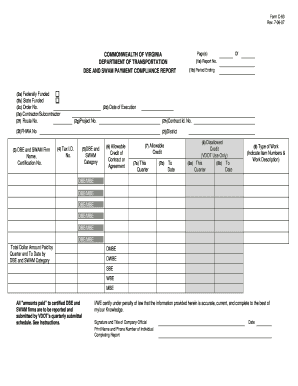
Get Va Form C 63 Rev 7 25 17
How it works
-

Open form follow the instructions
-

Easily sign the form with your finger
-

Send filled & signed form or save
How to fill out the Va Form C 63 Rev 7 25 17 online
Filling out the Va Form C 63 Rev 7 25 17 online is a straightforward process. This guide will walk you through each section of the form, ensuring that you provide the necessary information accurately and efficiently.
Follow the steps to complete the Va Form C 63 Rev 7 25 17 online.
- Click ‘Get Form’ button to obtain the form and open it in the editor.
- Begin by indicating the report number in section 1a, showing the sequence of your submissions. For instance, if this is your second report, enter '2'.
- In section 1b, specify the reporting period ending date according to the provided reporting schedule.
- Select whether the contract is federally funded by marking 'yes' in section 2a, and do the same for state funding in section 2b, if applicable.
- Enter the order number assigned to your project in section 2c. This number is essential for tracking your submission.
- Fill in the date of execution in section 2d, noting when the contract was officially executed by VDOT.
- In section 2e, input your company's name as the contractor or subcontractor.
- Provide the highway route number in section 2f, as detailed in your contract.
- Enter the project number assigned by VDOT in section 2g, ensuring it matches your contract.
- Input your contract identification number in section 2h, as provided by VDOT.
- Enter the FHWA number assigned to your project in section 2i for federal tracking.
- For section 2j, specify the district where the project is located.
- List all DBE and SWAM firms utilized in section 3, along with their respective certification numbers.
- Indicate your Federal Employer Identification Number in section 4.
- In section 5, categorize the DBE and SWAM firm as certified by the Virginia Department of Minority Business Enterprise.
- In section 6, provide the dollar value of the contract or agreement for which the DBE and SWAM can receive participation credit.
- Enter the allowable credits for the reporting quarter in section 7a and to date in section 7b.
- Fill out section 8a for disallowed credits during the quarter and section 8b for disallowed credits to date.
- Indicate the type of work performed and its description in section 9.
- Finally, ensure that the certification statement is completed with the signature and title of a company official, and include their printed name and phone number.
- Once all information is filled in, you can save changes, download, print, or share the form as needed.
Complete your Va Form C 63 Rev 7 25 17 online today for efficient processing.
As outlined in Section 10-193 of the C.G.S., the purpose of the Certificate of Age Form ED-301 is to ensure that individuals under the age of eighteen have proper documentation of their age and are employed in occupations that are acceptable under the law.