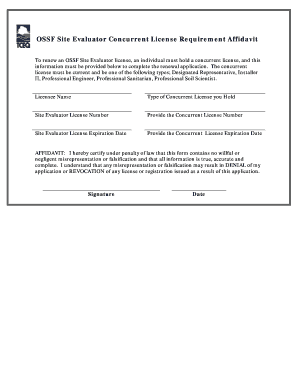
Get Ossf Site Evaluator Concurrent License Requirement Affidavit - Tceq Texas
How it works
-

Open form follow the instructions
-

Easily sign the form with your finger
-

Send filled & signed form or save
How to fill out the OSSF Site Evaluator Concurrent License Requirement Affidavit - Tceq Texas online
Filling out the OSSF Site Evaluator Concurrent License Requirement Affidavit is essential for individuals looking to renew their OSSF Site Evaluator license in Texas. This guide will provide step-by-step instructions on how to complete the affidavit accurately and efficiently online.
Follow the steps to complete the affidavit accurately online.
- Click ‘Get Form’ button to obtain the form and open it in the editor.
- Enter your licensee name in the designated field. This should reflect the name associated with your current OSSF Site Evaluator license.
- Select the type of concurrent license you hold from the available options. Ensure you choose from the recognized categories, such as Designated Representative, Installer II, Professional Engineer, Professional Sanitarian, or Professional Soil Scientist.
- Input your Site Evaluator license number in the corresponding field. Double-check this number for accuracy to avoid potential issues with your application.
- Provide your concurrent license number. This is the unique identifier assigned to your concurrent license.
- Enter the expiration date of your Site Evaluator license. Make sure to use the correct format and verify that the information is up to date.
- Input the expiration date of your concurrent license in the specified field. Again, ensure to verify the accuracy of this date.
- Read the affidavit statement carefully. By signing this affidavit, you certify that the information provided is accurate and complete, acknowledging the consequence of misrepresentation.
- Sign the document in the provided signature field. This step is crucial as it authenticates the form.
- Enter the date of signature in the designated field. This should reflect the date when you completed the form.
- Once all fields are complete, review the entire document for any errors or omissions. Make any necessary adjustments.
- After confirming the details, proceed to save your changes. You may also choose to download, print, or share the affidavit as needed.
Complete your documents online today and ensure a smooth renewal process for your OSSF Site Evaluator license.
Becoming a certified septic installer in Texas involves completing a state-approved training program and passing a certification exam. You must also apply for your certification with the Texas Commission on Environmental Quality (TCEQ). Relevant regulations, including the OSSF Site Evaluator Concurrent License Requirement Affidavit - Tceq Texas, must be understood and adhered to during this process. Platforms like UsLegalForms can provide guidance and the necessary documents to streamline your certification journey.