Loading
Get Trucking Company Documentaries
How it works
-

Open form follow the instructions
-

Easily sign the form with your finger
-

Send filled & signed form or save
How to fill out the Trucking Company Documentaries online
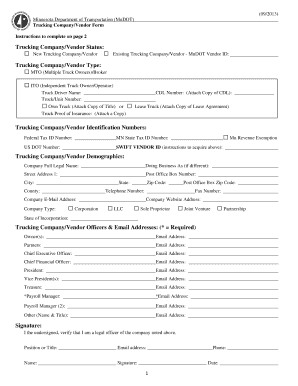
Completing the Trucking Company Documentaries is an essential step for vendors working with MnDOT. This guide provides clear instructions on how to accurately fill out the form online, ensuring you have the necessary information ready for submission.
Follow the steps to complete the Trucking Company Documentaries form online.
- Click ‘Get Form’ button to obtain the Trucking Company Documentaries and open it in your preferred document editor.
- Select your Trucking Company/Vendor Status by checking either 'New Trucking Company/Vendor' or 'Existing Trucking Company/Vendor' and provide your MnDOT Vendor ID if applicable.
- Indicate your Trucking Company/Vendor Type by selecting either 'MTO (Multiple Truck Owners)/Broker' or 'ITO (Independent Truck Owner/Operator)'.
- Enter the Truck Driver Name and Truck/Unit Number in the designated fields.
- Provide your CDL Number and attach a copy as required.
- Specify whether you Own or Lease the Truck by checking the appropriate box and attaching the necessary documentation.
- Attach a copy of your Truck Proof of Insurance.
- Fill out the Trucking Company/Vendor Identification Numbers section, including Federal Tax ID Number, MN State Tax ID Number, US DOT Number, and SWIFT VENDOR ID.
- Complete the Trucking Company/Vendor Demographics section by providing your Company Full Legal Name, Doing Business As (if different), Street Address, City, State, and other contact information.
- List the Trucking Company/Vendor Officers and their email addresses. Ensure each entry is complete and accurate.
- Sign and date the form, confirming that you are a legal officer of the company.
- Finally, save changes to the document, and choose to download, print, or share the completed form according to your needs.
Start completing your Trucking Company Documentaries online today!
Get form
Experience a faster way to fill out and sign forms on the web. Access the most extensive library of templates available.
The 70 hour rule works by allowing truck drivers to accumulate a maximum of 70 hours of on-duty time over a rolling eight-day period. Once a driver hits this limit, they must take a break of at least 34 consecutive hours to reset their hours. Understanding this rule helps trucking companies manage their operations effectively, an important aspect frequently discussed in documentaries related to trucking.
Get This Form Now!
Use professional pre-built templates to fill in and sign documents online faster. Get access to thousands of forms.