Loading
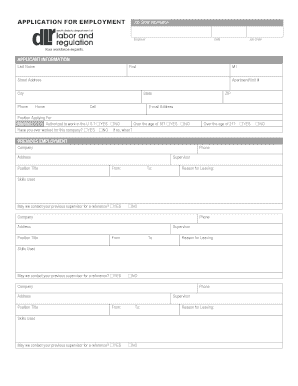
Get 510 Employment Application - Dlr Sd
How it works
-

Open form follow the instructions
-

Easily sign the form with your finger
-

Send filled & signed form or save
How to fill out the 510 Employment Application - Dlr Sd online
Completing the 510 Employment Application - Dlr Sd online is an important step in your job application process. This guide provides clear, step-by-step instructions to ensure you fill out the application accurately and effectively.
Follow the steps to complete the form with ease.
- Press the ‘Get Form’ button to access the application form and open it in your preferred digital document editor.
- Fill in your job order information at the top of the form, including employer name, date, and job order number.
- In the Applicant Information section, provide your last name, first name, middle initial, street address, apartment or unit number (if applicable), city, state, and ZIP code.
- Enter your contact information, including home and cell phone numbers, and email address.
- Specify the position you are applying for and indicate whether you are authorized to work in the U.S., if you have previously worked for this company, and your age status.
- In the Previous Employment section, list your previous employers by including the company name, phone number, address, position title, supervisor's name, employment dates, reason for leaving, skills used, and permission to contact the supervisor.
- If applicable, repeat step 6 for additional previous employment positions.
- Proceed to the Education section by indicating whether you possess a high school diploma or GED. Provide the name, address, city, and state of your school, and specify if you graduated and the degree earned.
- List any relevant licenses, certifications, or registrations, along with any other educational experiences that pertain to the job.
- In the Additional Skills or Qualifications section, provide any extra skills relevant to the position.
- Complete the Military Service section by stating your branch, active duty status, service dates, and type of discharge.
- In the References section, provide three professional references, including their full names, mailing addresses, relationships to you, and phone numbers.
- Carefully review all the information you have entered for accuracy.
- At the end of the form, read the disclaimer carefully. Sign and date the application to certify the information provided is accurate.
- Lastly, you can save your changes, download, print, or share the completed application as needed.
Complete your 510 Employment Application - Dlr Sd online today!
To apply for unemployment benefits in South Dakota, you need to provide several key documents. These typically include your Social Security number, a valid driver's license or state ID, and details about your previous employment. Additionally, you should gather the W-2 forms from your past employers. The 510 Employment Application - Dlr Sd is essential for ensuring your application is processed smoothly.