Loading
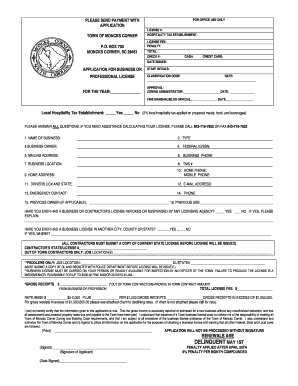
Get Moncks Corner Business License
How it works
-

Open form follow the instructions
-

Easily sign the form with your finger
-

Send filled & signed form or save
How to fill out the Moncks Corner Business License online
Filling out the Moncks Corner Business License online can be a straightforward process when guided effectively. This comprehensive guide will walk you through each section of the application form, ensuring that you can complete it accurately and efficiently.
Follow the steps to complete your business license application.
- Click the ‘Get Form’ button to access the business license application form and open it for editing.
- Begin by entering the current year in the 'FOR THE YEAR' field to specify the licensing period.
- Fill in the name of your business in the 'NAME OF BUSINESS' field.
- Select the type of your business from the available options in the 'TYPE' section.
- Provide the name of the business owner in the 'BUSINESS OWNER' field.
- Input your Federal ID number or Social Security Number in the respective field.
- Enter the mailing address for the business accurately in the 'MAILING ADDRESS' section.
- List the business phone number in the 'BUSINESS PHONE' field.
- Provide the location of the business in the 'BUSINESS LOCATION' section.
- If applicable, enter the TMS (Tax Map Number) in the designated field.
- Fill out the home address of the business owner in the 'HOME ADDRESS' section.
- List your home phone and mobile phone numbers in their respective fields.
- Include your driver's license number and the state of issue in the 'DRIVERS LIC# AND STATE' field.
- Provide a valid email address in the 'E-MAIL ADDRESS' section for communication purposes.
- Enter an emergency contact person's name and their phone number.
- If applicable, provide the name of the previous owner in the 'PREVIOUS OWNER' field.
- Describe the previous use of the business space in the 'PREVIOUS USE' section.
- Answer the questions regarding previous licenses and any revocations or suspensions honestly.
- For contractors, submit a copy of the current state license in the specified section.
- Estimate your gross receipts from the business, ensuring to provide the amount as accurately as possible.
- Review the completed form thoroughly to ensure all required fields are filled out correctly.
- Once all necessary information has been entered, save your changes, and download or print the completed application form.
- Submit the application along with the payment to the specified address, ensuring that all documentation is attached.
Begin filling out your Moncks Corner Business License application online today.
No, your Moncks Corner Business License number is not the same as your EIN number. Your business license number is assigned by the local government when you obtain your business license, whereas your EIN, or Employer Identification Number, is issued by the IRS for tax purposes. It's important to keep these numbers separate as they serve different functions.